


Imagine crafting a polished, animated news broadcast with just a few clicks—no expensive software, no design expertise, and no video editing skills required. The Visual Paradigm Animation Maker, also known as AniFuzion, makes this a reality. This powerful online tool allows you to create dynamic 2D and 3D animations, including lifelike characters in professional settings like a news studio. The image above showcases a realistic 3D character standing in a virtual newsroom, complete with studio lighting, a large screen, and a modern set design—demonstrating the high-quality, professional results achievable with AniFuzion. Whether you’re an educator creating an engaging lesson, a marketer launching a campaign, or a business professional delivering a presentation, this AI-powered animation tool simplifies the process of bringing your ideas to life with stunning visuals.
Quick summary
-
Visual Paradigm Animation Maker (AniFuzion) enables easy creation of professional 2D and 3D animations.
-
Users can build realistic scenes, like a news studio, using drag-and-drop tools and pre-built assets.
-
Features include customizable 3D characters, AI-powered text-to-speech, and automatic lip-sync for realistic dialogue.
-
The tool is browser-based, requiring no software installation, and is ideal for non-designers.
-
Animations can be exported as videos or interactive flipbooks for sharing across platforms.
What is AniFuzion and How Does It Work?
At its core, AniFuzion is a user-friendly online animation platform integrated into Visual Paradigm Online. It’s designed to democratize animation by removing the technical barriers typically associated with video production. Instead of requiring complex software or coding skills, AniFuzion provides a simple, intuitive interface where you can drag and drop elements to build your scenes. The platform offers a vast library of 3D characters, props, backgrounds, and motion actions, allowing you to construct detailed environments like the news studio shown in the image. Once your scene is set, you can add voiceovers using AI text-to-speech, which automatically synchronizes the character’s mouth movements with the audio—ensuring a natural, professional look.
For instance, the character in the screenshot appears to be delivering a news report, complete with expressive hand gestures and a professional demeanor. This level of realism is achieved through AniFuzion’s extensive motion library, which includes over 2,000 pre-built actions like speaking, gesturing, and walking. You can easily apply these actions to your characters, and the tool handles the timing and animation seamlessly. The drag-and-drop interface makes it feel like assembling a digital puzzle, where each element—whether it’s a character, a background, or a prop—can be positioned and adjusted with precision. This hands-on approach ensures that even beginners can produce high-quality animations without feeling overwhelmed.
Key Features That Make AniFuzion Stand Out
One of the standout features of AniFuzion is its AI-powered text-to-speech (TTS) functionality. Instead of hiring a voice actor or recording audio yourself, you can simply type your script into the TTS panel and choose from a range of voices, accents, and emotional tones. The tool then generates the audio, which is automatically synchronized with the character’s lip movements—a process known as automatic lipsync. This ensures that your animated characters appear to be speaking naturally, enhancing the realism of your content.
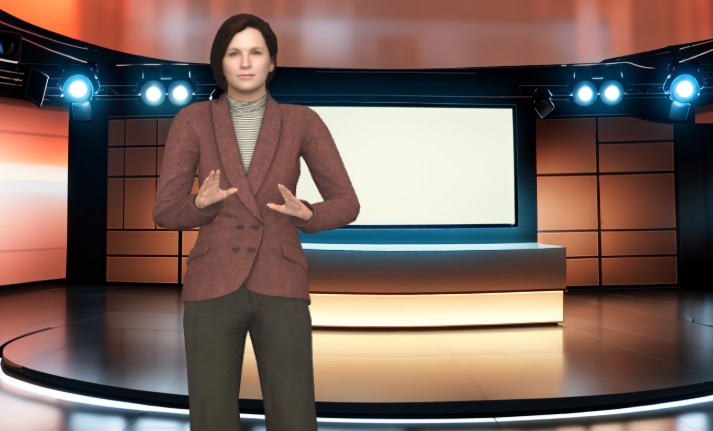
Another powerful feature is the extensive 3D character library. The character in the image is a prime example of how customizable these figures can be. You can modify their appearance by changing colors, textures, and even body parts, allowing you to create a unique character that fits your brand or message. The platform also supports motion retargeting, which means you can apply the same animation to different characters, ensuring consistency across your projects. This is particularly useful when creating multiple characters for a series or campaign.
For those looking to enhance their animations further, AniFuzion offers a variety of shape effects and animation presets. You can apply dynamic effects like fades, bounces, and transitions to text and objects, adding visual interest and helping to emphasize key points. These features are especially useful in educational or marketing content, where engaging visuals can significantly improve audience retention. Additionally, the tool allows you to create interactive flipbooks, which can be shared via hyperlinks or embedded in websites, making it easy to distribute your content across different platforms.
How to Create Your First Animation in AniFuzion
Getting started with AniFuzion is straightforward and requires no prior experience. Begin by signing up for a Visual Paradigm Online account, then navigate to the Animation Maker. From there, you can start a new project by selecting a template or creating a blank canvas. The first step is to add a character to your scene—simply drag a 3D figure from the library onto the canvas and customize its appearance. Next, choose a motion action from the library, such as walking or gesturing, to bring the character to life.
Once your character is animated, you can add audio by inputting your script into the TTS panel. The tool will generate the voiceover, and the character’s mouth will automatically sync with the words. You can also enhance your scene by adding backgrounds, props, and text animations. For example, you might include a news ticker at the bottom of the screen or a headline graphic to reinforce your message. After fine-tuning the timing and flow of your animation, you can preview it to see how it looks. Finally, export your creation as an MP4 video or generate a shareable flipbook link.
Who Can Benefit from AniFuzion?
While the image shows a professional news anchor, AniFuzion is versatile enough to serve a wide range of users. Educators can use it to create interactive lessons or classroom presentations, making complex topics more engaging and memorable. Marketers can produce promotional videos, product demos, or social media clips to capture audience attention and drive engagement. Business professionals can develop onboarding materials, training modules, or internal communications to improve clarity and retention. Content creators can experiment with animated storytelling, YouTube videos, or explainer animations to share their ideas in a visually compelling way.
Even beginners or hobbyists can benefit from AniFuzion’s intuitive interface and ready-to-use assets. The tool empowers users to iterate quickly, refine their skills, and produce polished work without the need for extensive design experience. Whether you’re creating a simple animated video or a complex interactive story, AniFuzion provides the tools you need to bring your vision to life.
Conclusion
Creating professional-quality animations doesn’t have to be complicated or expensive. With the Visual Paradigm Animation Maker (AniFuzion), you can produce stunning 2D and 3D animations, like the news anchor scene shown in the image, using a simple, intuitive interface. The platform’s AI-powered features, extensive asset library, and drag-and-drop functionality make it accessible to users of all skill levels. Whether you’re an educator, marketer, business professional, or content creator, AniFuzion allows you to communicate your ideas effectively and engage your audience in new and exciting ways. Don’t wait—start creating your first animation today.
Ready to get started? Try AniFuzion now and discover how easy it is to bring your ideas to life.
Related Links
-
How to Create PowerPoint Like Animation Slides on the… – AniFuzion: Creating animated PowerPoint presentations has never been easier, thanks to tools like Visual Paradigm Online’s AniFuzion. This online 2D animation maker allows you to bring your…
-
Bring Your Ideas to Life with Visual Paradigm Anifuzion 3D Video Maker: Anifuzion is a web-based 3D animation tool that enables users to create immersive 3D videos and animations without requiring advanced technical skills.
-
AniFuzion: The Online Ultimate Animation Maker – Content Posts: Visual Paradigm Online’s AniFuzion stands out as a leading animation video tool due to its comprehensive feature set, which caters to a wide range of users, from beginners to experienced animators.
-
Introducing Visual Paradigm’s AniFuzion: The Ultimate Animated Video Maker – Cybermedian: Part of the Visual Paradigm Online Platform, AniFuzion offers a unique blend of 2D and 3D animation techniques , making it an all-in-one solution for creating dynamic and engaging content1.
-
AniFuzion: Online Animation Maker: Visual Paradigm Online. Start creating stunning 2D and 3D animations. Explore customizable character families and intuitive tools to bring … Character Families · Storytelling Video Maker · Restaurant Owners · Tutorials
-
Comprehensive Guide to Creating Animated Content for Flipbooks with Visual Paradigm Online’s Flipbook Maker: This guide details the process of generating animated flipbook content using the flipbook maker feature in Visual Paradigm Online.
-
3D Video Maker – Visual Paradigm: Create eye-catching 3D videos that stand out for visual storytelling, presentations, or creative projects, Without needing of advanced software, you can customize scenes with 3D characters, 3D props, motions in a dynamic and engaging way.
-
Online 3D video maker – Visual Paradigm: Create stunning 3D videos effortlessly with Visual Paradigm ‘s intuitive and powerful animation tools.
-
2D Animation Maker – Create Expressive 2D Character – Visual Paradigm: Bring stories to life with vibrant 2D animations using VP Online. This tool offers easy-to-use features for animating 2D characters, scenes, and effects, …
-
2D Animation Maker – Create Animated Videos Online: An easy-to-use online tool for creating 2D animations without coding, perfect for educators, marketers, and content creators.
 vpadmin
- Uncategorized
- January 14, 2026
