


Unlocking Clarity in Complex Decision Making
In the realms of business analysis and software development, ambiguity is the enemy. Complex business rules, when left as unstructured paragraphs or verbal agreements, often lead to implementation errors, conflicting logic, and costly bugs. The Visual Paradigm Decision Table Generator emerges as a sophisticated solution to this perennial problem. By combining a structured three-step wizard with advanced AI capabilities, this tool transforms vague requirements into precise, testable decision logic.
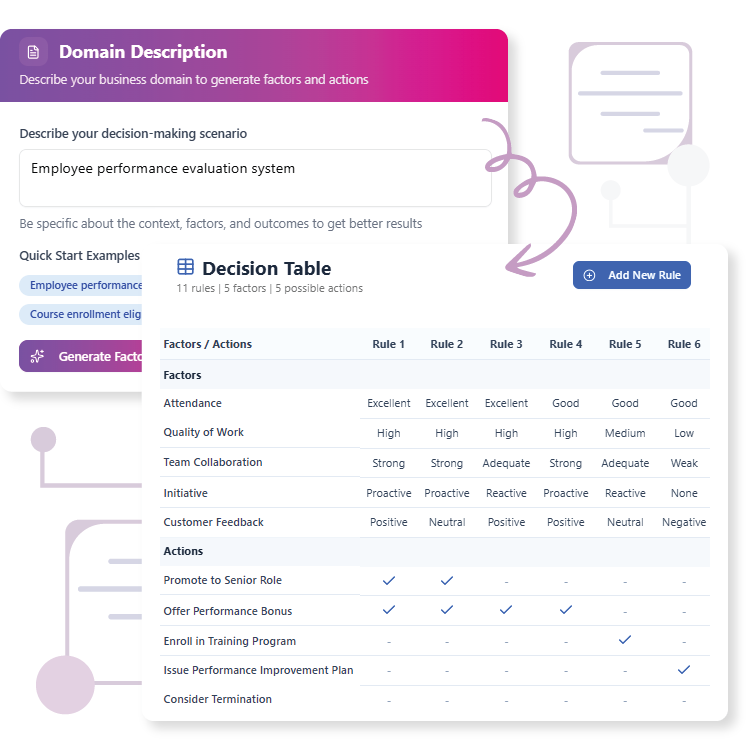
This review explores the functionality, workflow, and benefits of the Decision Table Generator, examining how it bridges the gap between human language and machine-executable logic.
What is the Decision Table Generator?
The Decision Table Generator is an intelligent web application designed to create clear, concise, and comprehensive decision tables. A decision table is a tabular representation used to specify which actions should be performed based on various combinations of conditions (factors). While effective, creating these tables manually is often tedious and prone to human error.
This tool automates the heavy lifting. It allows users to input a natural language description of a problem—such as shipping logic or discount eligibility—and uses Artificial Intelligence to extract the necessary factors and actions. It then structures these elements into a grid, ensuring that every possible combination of conditions is accounted for.
Key Features and Capabilities
1. AI-Powered Extraction
The standout feature of this tool is its ability to process natural language. In the initial phase, users can describe their domain in plain English. For example, a user might type: “A customer gets a discount if they have a Gold membership and spend over $500.” The AI analyzes this text and identifies “Membership Level” and “Purchase Amount” as factors, and “Apply Discount” as an action. This feature drastically accelerates the initial setup phase, turning a narrative into structured data in seconds.
2. The 3-Step Guided Wizard
To ensure consistency, the tool enforces a logical workflow:
- Step 1: Domain Description: Define the problem space manually or utilize pre-set examples to get started.
- Step 2: Configure Factors & Actions: An interactive editor allows users to refine the AI’s suggestions. Users can add, edit, or remove factors (conditions) and actions (outcomes) to ensure the logic perfectly matches business requirements.
- Step 3: Table Generation: With a single click, the tool generates the complete matrix, creating rules for every possible combination of the defined factors.
3. Cloud and Local Flexibility
Modern workflows require flexibility. The Decision Table Generator supports cloud saving, allowing teams to access their logic models from anywhere. Conversely, for projects requiring strict data privacy or offline access, the tool offers local Import/Export functionality via JSON files. This ensures that critical business logic remains secure and version-controlled.
Who Benefits Most?
While useful for anyone dealing with logic, this tool is particularly optimized for specific professional roles:
| Role | Primary Benefit |
|---|---|
| Business Analysts | Documents complex rules unambiguously to ensure stakeholders and developers are aligned. |
| Software Developers | Translates requirements into executable code by exposing edge cases and missing logic. |
| Project Managers | Reduces project ambiguity and improves team efficiency by clarifying decision-making processes. |
| QA Engineers | Enhances test coverage by using the decision table to generate comprehensive test cases. |
How to Use the Tool: A Practical Workflow
Using the Decision Table Generator is designed to be intuitive. Here is a walkthrough of a typical session:
Phase 1: Description and Extraction
Upon launching the generator, you are greeted with the “Domain Description” screen. Here, you articulate the rule set. If you are systematizing a loan approval process, you might describe the credit score thresholds and income requirements. Clicking “Generate Factors & Actions” triggers the AI to parse this text and populate the next stage.
Phase 2: Refinement
In the configuration stage, you review the AI’s output. You might notice the AI suggested “Credit Score” as a factor but you need to define specific ranges (e.g., High, Medium, Low). The interactive editor allows you to specify these values as comma-separated lists. This is also where you define the specific actions, such as “Approve Loan” or “Request Co-signer.”
Phase 3: Generation and Logic Definition
Once factors are set, the tool generates the decision table structure. This grid displays every mathematical combination of your factors. At this stage, your task is to review each row (rule) and mark the appropriate action. This process often reveals scenarios you hadn’t considered—such as what happens when a user has a “High” income but a “Low” credit score—forcing a decision on edge cases that might otherwise cause bugs in production.
Limitations and Considerations
While the Decision Table Generator is a powerful asset, users should be aware of certain constraints to maximize its utility:
- Internet Dependency: The AI generation features and cloud saving require an active internet connection.
- Manual Logic Entry: The AI generates the structure (factors and actions) and the table layout. It does not automatically determine which action applies to which rule; the human expert must fill in the logic to ensure accuracy.
- Complexity Limits: To keep tables readable and manageable, there is a suggested limit of roughly 10 factors and 10 actions. Extremely complex systems should likely be broken down into smaller, modular decision tables.
Conclusion
The Decision Table Generator represents a significant step forward in requirements engineering and logic modeling. By leveraging AI to jumpstart the process, it removes the “blank page syndrome” often associated with documenting business rules. It encourages a focus on logic rather than formatting, ensuring that the final output is a clear, error-free map of decision-making processes.
For teams looking to improve communication, reduce implementation errors, and accelerate the transition from requirements to code, this tool is an essential addition to the software development lifecycle.
To explore the tool and start generating your own decision tables, visit the official landing page at Visual Paradigm Decision Table Generator.
 vpadmin
- Uncategorized
- December 27, 2025
