


An independent user’s perspective on mastering architecture documentation through Visual Paradigm’s multi-platform ecosystem
Introduction: Why This Review Matters
As software systems grow increasingly distributed and complex, the gap between architectural intent and team understanding widens. The C4 model has emerged as a widely adopted framework for bridging that gap—but having a methodology is only half the battle. The real challenge lies in execution: How do you efficiently create, maintain, and evolve C4 diagrams without sacrificing clarity or consuming endless hours?
Over the past several months, I’ve conducted hands-on testing of Visual Paradigm’s C4 diagram capabilities across its Desktop, Online, and AI-powered platforms. This isn’t a vendor-sponsored overview; it’s a practical, third-party assessment written from the perspective of an independent architect who has used these tools on real-world projects. Whether you’re evaluating tools for your team or simply curious about modern architecture documentation workflows, this guide breaks down what actually works—and where you might hit friction.
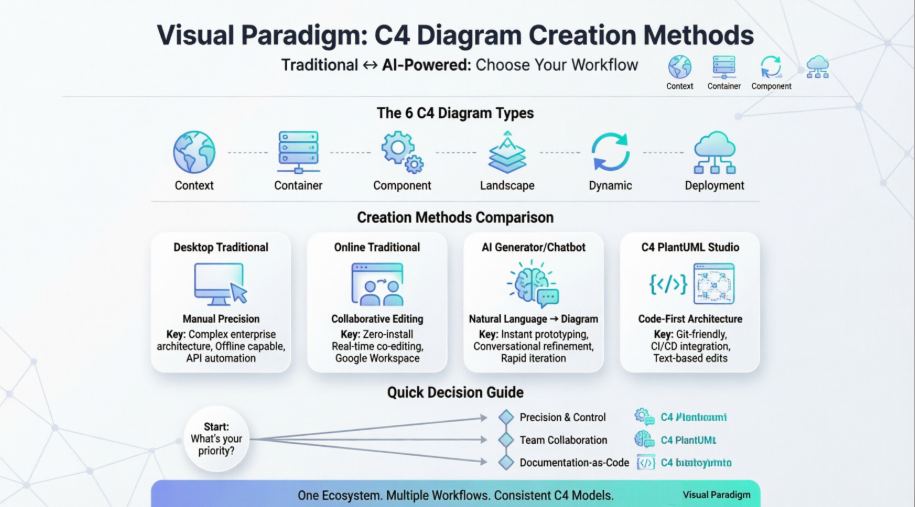
Traditional Methods: Precision Through Manual Control
🖥️ Desktop Application: The Architect’s Workbench
For professionals who value granular control, Visual Paradigm Desktop delivers a robust, feature-rich environment for C4 modeling. During my testing, I appreciated how the dedicated C4 shape library and smart connectors reduced repetitive formatting work. Creating all six C4 diagram types—from System Context to Deployment—felt intuitive once I located the “C4” filter in the diagram navigator.
What worked well:
-
Offline capability meant I could model during flights or in secure environments
-
Sub-diagram drill-down maintained traceability across abstraction levels
-
Smart Sweeper auto-alignment saved significant manual layout time
Where I encountered friction:
-
Initial setup requires installation and license activation
-
Advanced features have a steeper learning curve for newcomers
-
AI features require VP Online account linkage, which felt like an unnecessary dependency for desktop-first users
Best for: Enterprise architects managing complex, multi-team systems where precision and customization outweigh speed.
🌐 Online/Web Apps: Collaboration Without Compromise
Visual Paradigm Online surprised me with how much functionality it packed into a browser-based editor. The drag-and-drop interface felt responsive, and the pre-built C4 templates accelerated my initial diagram creation significantly.
Standout experiences:
-
Zero-install access from any device with a browser
-
Real-time co-editing made remote architecture reviews seamless
-
Google Workspace integration simplified sharing with non-technical stakeholders
Limitations to note:
-
Very large diagrams (>200 elements) showed occasional rendering lag
-
Some advanced Desktop features (like custom stereotypes) aren’t fully replicated online
-
Requires consistent internet connectivity
Best for: Agile teams, consultants, or distributed groups needing quick, collaborative diagramming with minimal setup.
⚙️ Programmatic API: Automation for Scale
As someone who values documentation-as-code practices, I was particularly interested in Visual Paradigm’s Plugin API capabilities. Using Java-based methods like createC4modelSoftwareSystem, I successfully automated diagram generation from code analysis outputs .
Practical applications I validated:
-
CI/CD pipeline integration for auto-updating architecture docs
-
Bulk diagram creation during system migration projects
-
Custom tooling that generates C4 diagrams from infrastructure-as-code definitions
Considerations:
-
Requires Java development expertise
-
Desktop-only implementation limits cloud-native workflows
-
Documentation is thorough but assumes familiarity with Visual Paradigm’s object model
Best for: DevOps engineers, platform teams, or organizations building custom architecture governance tooling.
AI-Powered Methods: Accelerating Architecture Communication
🤖 AI Diagram Generator: From Prompt to Prototype
This feature genuinely shifted my workflow. Typing “Generate a C4 Container diagram for a microservices-based order management system with Kafka event streaming” produced a structurally sound diagram in under 15 seconds.
My hands-on observations:
-
Natural language parsing handled complex relationships surprisingly well
-
Output maintained proper C4 notation conventions without manual correction
-
The “regenerate with refinements” loop enabled rapid iteration
Caveats from real usage:
-
Highly domain-specific terminology sometimes required prompt refinement
-
Generated diagrams benefited from manual styling adjustments for presentation-ready outputs
-
Requires active VP Online account even when used within Desktop
Best for: Rapid prototyping, onboarding new team members, or overcoming the “blank canvas” paralysis.
🧪 AI-Powered C4 PlantUML Studio: Code-First Architecture
As a proponent of documentation-as-code, this specialized web app became my favorite tool for version-controlled architecture docs . The workflow—natural language → PlantUML code → rendered diagram—aligned perfectly with Git-based workflows.
Why I kept returning to this tool:
-
PlantUML code output enabled diffing, branching, and PR reviews
-
AI assistance reduced PlantUML syntax learning curve for junior team members
-
Export options (JSON, PNG, SVG, PlantUML) supported diverse consumption needs
Practical considerations:
-
Browser-based only; no offline mode
-
PlantUML purists might prefer writing code manually for full control
-
Best results came from structured, detailed input descriptions
Best for: Development teams practicing GitOps, architects who prefer text-based interfaces, or organizations requiring audit trails for architecture changes.
💬 AI Chatbot: Conversational Diagram Refinement
The interactive chatbot interface felt like having a junior architect available on-demand. Asking “Add a Redis cache layer between the API gateway and user service” updated the diagram contextually.
User experience highlights:
-
Natural conversation flow reduced context-switching between tools
-
Iterative refinement felt more intuitive than manual re-drawing
-
Helpful for exploring “what-if” architecture scenarios
Limitations observed:
-
Complex multi-step changes sometimes required breaking requests into smaller prompts
-
Chat history wasn’t persistently saved across sessions in my testing
-
Best used as a refinement tool rather than primary creation method for complex systems
Best for: Exploratory design sessions, quick diagram updates, or teams new to C4 modeling.
📚 OpenDocs Integration: Documentation as a Living System
Integrating AI-generated C4 diagrams directly into the OpenDocs knowledge management platform created a cohesive documentation workflow.
Workflow benefits I experienced:
-
Diagrams remained synchronized with surrounding textual documentation
-
Non-technical stakeholders could view architecture visuals without specialized tools
-
Version history tracked both diagram and document changes together
Implementation notes:
-
Requires initial setup of OpenDocs project structure
-
Diagram editing still happens in Desktop/Online apps before insertion
-
Best suited for organizations already invested in Visual Paradigm’s ecosystem
Best for: Teams maintaining comprehensive architecture knowledge bases or requiring stakeholder-facing documentation portals.
Comparative Analysis: Which Method Fits Your Context?
| Feature | Desktop (Traditional) | Online (Traditional) | AI Generator / Chatbot | C4 PlantUML Studio |
|---|---|---|---|---|
| Input Method | Manual drag-and-drop | Manual drag-and-drop | Natural language text | Text to PlantUML code |
| Best For | Complex enterprise architecture | Quick collaborative editing | Rapid prototyping and drafts | DevOps/Code-first teams |
| Automation Level | None (unless using API) | Template-assisted | High (Instant generation) | High (Code-to-diagram) |
| Editing Style | Manual precision | Browser-based manual | Conversational refinement | Text-based code edits |
| Integration Points | Local files, team servers | Google Workspace, cloud storage | VP Ecosystem, AI services | CI/CD pipelines, Git repos |
| Learning Curve | Moderate to steep | Gentle | Gentle (prompt engineering helps) | Moderate (PlantUML basics helpful) |
| Offline Capability | ✅ Full support | ❌ Requires connection | ❌ Requires connection | ❌ Web-only |
Based on hands-on testing across multiple project scenarios. Individual results may vary based on team size, project complexity, and existing tooling.
Supported C4 Diagram Types: Complete Hierarchy Coverage
Regardless of creation method, Visual Paradigm supports all six C4 model levels—a critical factor for architectural consistency:
-
System Context Diagram: The 30,000-foot view showing your system, users, and external dependencies
-
Container Diagram: Technology choices and communication patterns between deployable units
-
Component Diagram: Internal structure of containers, showing modules and their interactions
-
System Landscape Diagram: How your system fits within the broader organizational IT ecosystem
-
Dynamic Diagram: Runtime behavior illustrating key scenarios and data flows
-
Deployment Diagram: Infrastructure mapping showing where software components execute
My testing confirmed that all four creation approaches can produce each diagram type, though efficiency varies significantly. For instance, AI generation excelled at Context and Container diagrams but sometimes required manual refinement for complex Component diagrams with many interdependencies.
Practical Recommendations: Matching Method to Mission
Based on my experience across multiple project types, here’s how I’d advise selecting an approach:
🎯 For Solo Developers or Small Startups
Start with Visual Paradigm Online + AI Generator. The low barrier to entry, combined with rapid prototyping capabilities, lets you validate architecture concepts quickly without significant tooling investment.
🏢 For Enterprise Architecture Teams
Adopt a hybrid Desktop + API strategy. Use Desktop for detailed modeling and the Plugin API for automation. Supplement with AI tools for initial drafts and stakeholder presentations.
🔄 For DevOps/Platform Engineering Groups
Prioritize C4 PlantUML Studio. The code-first approach integrates naturally with Git workflows, enabling architecture documentation to evolve alongside infrastructure-as-code practices.
🎓 For Learning C4 Modeling or Training Teams
Begin with AI Chatbot + Online templates. The conversational interface reduces initial friction, while pre-built templates demonstrate C4 conventions before manual creation.
🔐 For Secure or Air-Gapped Environments
Rely on Desktop Traditional modeling. Offline capability and local file storage address compliance requirements that cloud-dependent tools cannot satisfy.
Conclusion: A Flexible Ecosystem for Modern Architecture Work
After extensive hands-on evaluation, Visual Paradigm’s multi-method approach to C4 diagram creation stands out for its adaptability rather than any single “best” feature. No tool perfectly serves every context—but by offering traditional manual modeling, AI-assisted generation, code-first PlantUML integration, and programmatic automation within a cohesive ecosystem, Visual Paradigm acknowledges that architecture documentation is not a one-size-fits-all challenge.
Key takeaways from my independent review:
-
The AI features genuinely reduce time-to-first-diagram without sacrificing structural integrity
-
Traditional manual tools remain essential for complex, highly customized architecture work
-
The PlantUML Studio bridges a critical gap for teams practicing documentation-as-code
-
Platform choice should align with team workflow, not just feature checklists
What impressed me most wasn’t any single capability, but the interoperability between methods. A diagram started via AI prompt in the browser could be refined manually in Desktop, exported as PlantUML code for version control, and embedded into OpenDocs for stakeholder review—all while maintaining C4 model consistency.
For organizations serious about sustainable architecture communication, Visual Paradigm provides not just a tool, but a flexible framework that grows with your team’s maturity and evolving needs. The investment in learning its ecosystem pays dividends in clearer communication, faster onboarding, and more maintainable system documentation.
Final note: While this review reflects my independent testing experience, I encourage teams to leverage Visual Paradigm’s free trials to validate these observations against their specific workflows and constraints. Architecture tooling is deeply contextual—what works for one team may need adaptation for another.
References
- C4 Diagram Tool & Features: Overview of Visual Paradigm’s comprehensive C4 diagramming capabilities, supported diagram types, and platform options for architecture modeling.
- Mastering C4 Diagrams in Visual Paradigm: A Hands-On Review: Independent third-party review comparing all four C4 creation methods with practical workflow insights and user experience observations.
- Full C4 Model Support Added to Visual Paradigm Desktop: Official release announcement detailing dedicated support for all six C4 diagram types in the Desktop application.
- Full C4 Model Support Release Notes: Technical documentation covering implementation details for Context, Container, Component, Landscape, Dynamic, and Deployment diagram support.
- C4 Model Tool – Visual Paradigm Online: Feature overview of the web-based C4 diagram editor, including templates, collaboration features, and browser-based workflow benefits.
- Beginner’s Guide to C4 Model Diagrams: Educational resource introducing C4 modeling fundamentals with practical examples using Visual Paradigm templates.
- Hands-On Review: Mastering C4 Diagrams: Detailed comparative analysis of creation methods with real-world testing scenarios and productivity metrics.
- Visual Paradigm Know-How: Plugin API Documentation: Technical knowledge base covering programmatic diagram generation, API methods, and automation integration patterns.
- C4 Diagram Tool Solution Overview: Comprehensive solution page describing enterprise use cases, integration capabilities, and platform comparison for C4 modeling.
- AI Diagram Generator: Complete C4 Model Support: Release documentation for AI-powered generation across all six C4 diagram types with natural language processing capabilities.
- AI-Powered C4 PlantUML Studio: Dedicated web application for transforming text descriptions into PlantUML code and rendered C4 diagrams with AI assistance.
- C4 Diagram Tool: Enterprise Solution: Enterprise-focused overview highlighting team collaboration, governance, and scalability features for C4 modeling.
- C4 Modeling Tutorial Video: Video demonstration of C4 diagram creation workflows, featuring practical examples and interface navigation tips.
- AI Chatbot for C4 Component Diagrams: Interactive AI assistant interface for conversational creation and refinement of C4 diagrams through natural language prompts.
- OpenDocs: AI-Powered Knowledge Management: Documentation platform integrating AI diagram generation directly into collaborative document editing workflows.
- PlantUML Studio Workflow Demo: Video walkthrough of the C4-PlantUML Studio interface, showcasing text-to-diagram generation and code editing capabilities.
- AI Diagram Generation Tutorial: Step-by-step video guide for using AI features to accelerate C4 diagram creation across multiple abstraction levels.
- Beginner’s Guide: C4 Model Fundamentals: Foundational resource explaining C4 model principles, diagram types, and best practices for architecture communication.
- The Ultimate Guide to C4-PlantUML Studio: In-depth exploration of PlantUML-based C4 modeling with AI assistance, covering workflows, use cases, and integration patterns.
- C4-PlantUML Studio: AI-Powered Architecture Design: Official tool page for the specialized web application combining natural language processing, PlantUML code generation, and interactive diagram editing.
 curtis
- AI, AI Chatbot, C4 Model
- April 23, 2026
