


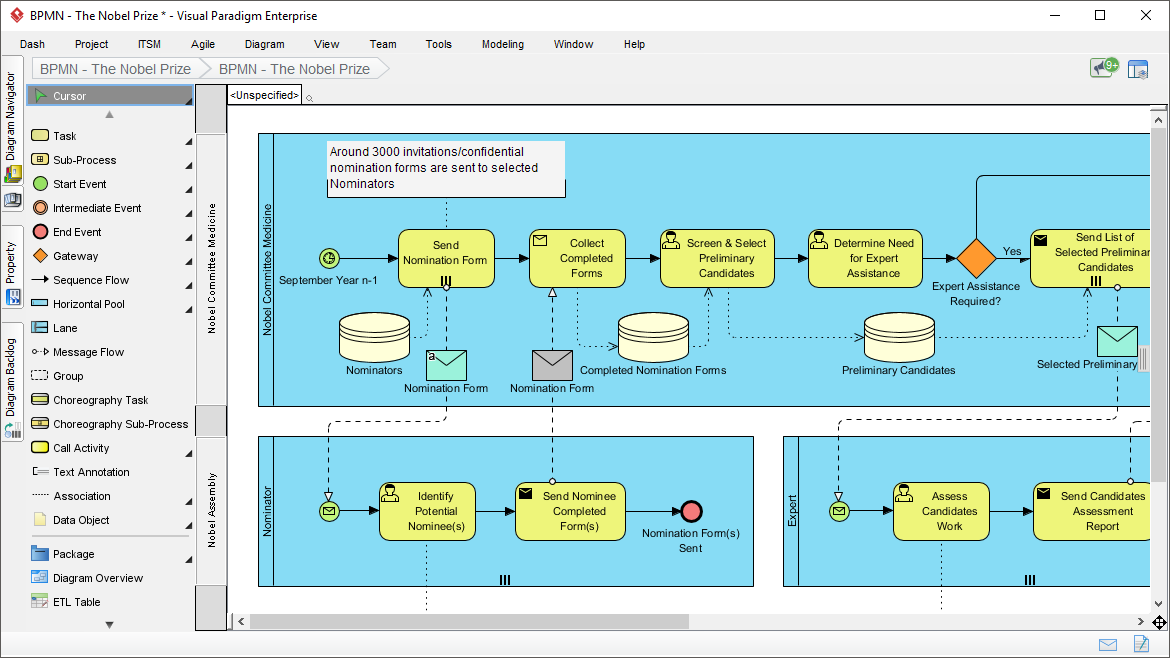
In the realm of Business Process Model and Notation (BPMN), complexity often arises when multiple distinct actors must collaborate to achieve a single business goal. The diagram presented here illustrates a sophisticated workflow for managing the nomination process for a prestigious award. This architecture is not merely a linear sequence; it is a dynamic system involving three distinct participants: the Nobel Committee, the Nominator, and the Expert.
This tutorial breaks down the system architecture shown in the diagram, explaining how Visual Paradigm allows us to visualize these interactions, manage data flows, and orchestrate the simulation of the process.
1. The Architecture of Collaboration: Swimlanes and Pools
The foundation of this BPMN model is the use of Swimlanes. In Visual Paradigm, these are represented as horizontal containers that partition the process based on responsibility. This visual structure is critical for defining the “Who” and “What” of the process.
- The Nobel Committee of Medicine: This is the primary pool, responsible for the high-level orchestration of the nomination timeline, data management, and decision-making regarding expert assistance.
- The Nominator: A separate lane representing the external individual initiating the process. Their role is strictly limited to identifying a candidate and submitting the necessary forms.
- The Expert: A specialized lane introduced for specific scenarios. This actor is brought in only when the Committee requires further validation of a candidate’s work.
By separating these lanes, the model clearly defines the boundaries of authority and the hand-off points between different organizational roles.
2. The Core Workflow: From Invitation to Selection
The upper swimlane, Nobel Committee of Medicine, drives the main logic of the system. Let’s walk through the sequence of events depicted:
- Initiation (Start Event): The process begins with a Timer Start Event, indicated by the clock icon. The annotation notes this occurs in “September Year n-1,” establishing a recurring, time-bound schedule for the nomination cycle.
- Communication (Message Flow): A dashed arrow connects the Committee to the Nominator’s lane. This represents a Message Flow, specifically the sending of “confidential nomination forms.” Unlike sequence flows, which happen within a single pool, message flows cross boundaries, simulating communication between different entities.
- Data Collection (Tasks & Data Stores): The Committee performs a task to “Collect Completed Forms.” This action is supported by a Data Store (the cylinder icon), labeled “Completed Nomination Forms.” In Visual Paradigm, this symbolizes a persistent repository where data is archived and retrieved, ensuring data integrity throughout the process.
- Screening (Gateways): The process reaches a decision point represented by a Gateway (the diamond shape). The label “Determine Need for Expert Assistance?” indicates a conditional path. The model branches based on whether the committee determines the candidate’s profile requires external validation.
3. Advanced Modeling: Choreography and Expert Intervention
The power of this diagram lies in its handling of the “Expert” lane. This is not a standard linear step but a conditional intervention.
If the decision gateway evaluates to Yes, the process triggers a flow to the Expert lane. The expert performs the task “Assess Candidates Work” and produces a “Send Candidates Assessment Report.” This report is then returned to the Committee’s lane, feeding into the final decision to “Send List of Selected Preliminary Candidates.”
This structure demonstrates Choreography modeling—a method of defining the interaction between multiple participants. By visualizing the dashed lines connecting the Committee’s decision to the Expert’s assessment, the model ensures that all stakeholders understand their specific trigger points and deliverables.
4. Data Integrity and Visual Feedback
Visual Paradigm enhances the standard BPMN specification with several features visible in this model:
- Data Objects: Notice the envelope icons (Message Events) and the document icons. These act as data objects, visualizing the physical or digital artifacts (e.g., “Nomination Form”) being passed between actors.
- Annotations: The text box at the top left (“Around 3000 invitations…”) serves as a model annotation. This allows technical architects to embed business context directly into the diagram without cluttering the flow logic.
- Simulation Ready: The presence of specific Start and End events, along with clear gateways, makes this model ready for simulation. Visual Paradigm can execute this process to check for deadlocks or bottlenecks, such as a scenario where too many experts are requested.
By utilizing Visual Paradigm, the gap between the theoretical “As-Is” process and the optimized “To-Be” architecture is bridged through precise, executable modeling.
 vpadmin
- October 9, 2026
