


Introduction
When I first started working with Business Process Model and Notation (BPMN) 2.0, I made what turned out to be a very common mistake: I treated gateways as if they were the decision-makers in a process. After all, those diamond-shaped symbols seem to be asking “Which path should we take?” — so it’s natural to assume they’re doing the thinking.
But after spending time modeling real-world processes and reviewing how experienced practitioners structure their diagrams, I realized that this mental model was fundamentally flawed. The truth is far more elegant: a gateway is not responsible for making the decision at all. It’s simply a router. The actual decision happens elsewhere — specifically, in the activity or task that comes immediately before the gateway.
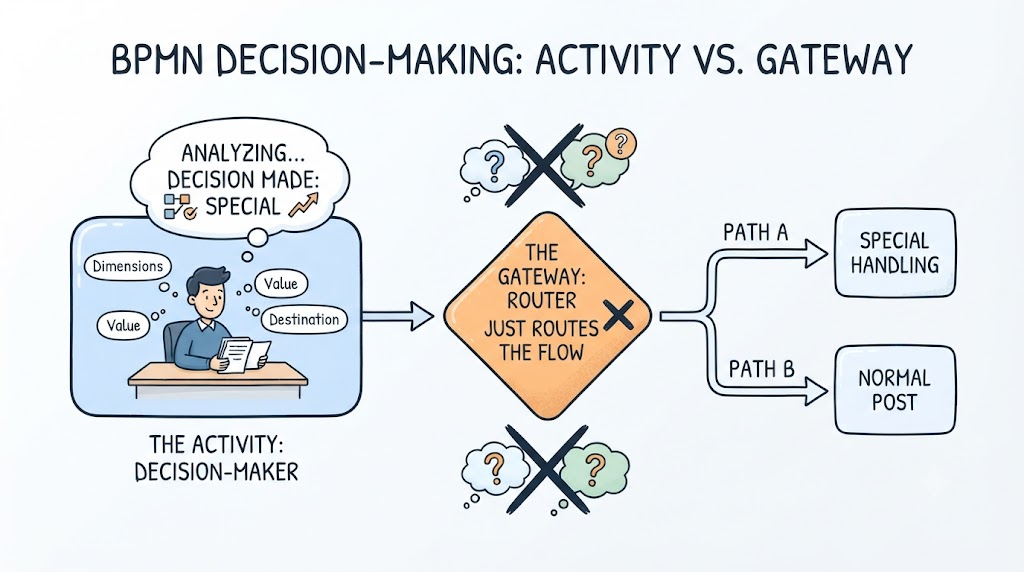
This guide walks through what I learned about this crucial distinction, why it matters for clean process modeling, and how separating the “thinking” from the “routing” leads to diagrams that are both more accurate and easier to communicate to stakeholders.
The Core Insight: Gateways Are Routers, Not Thinkers
The single most important thing to internalize about BPMN 2.0 gateways is their functional role. A gateway does not evaluate conditions, weigh options, or reach conclusions. It does exactly one thing: it directs the sequence flow along alternative paths based on information that has already been determined.
Think of it like a traffic signal at an intersection. The signal doesn’t decide whether you need to turn left or go straight — you (the driver) made that decision before you even reached the intersection. The signal simply enforces the routing based on your pre-determined direction. In BPMN, the gateway plays the same mechanical role.
This realization completely changed how I approach process modeling. Instead of asking “What should this gateway decide?”, I now ask “What task or activity produced the outcome that this gateway needs to route on?”
Where the Decision Actually Happens
Once you accept that gateways are just routers, the next question becomes: where does the actual decision-making occur?
The answer is almost always in the activity or task immediately preceding the gateway. This is where the intellectual work, evaluation, or system-driven logic takes place. The gateway merely reflects the result of that work in the flow of the diagram.
A Practical Example: The Shipment Process
Consider a shipment process I modeled for a logistics client. The initial version of the diagram had a gateway labeled “Is this a special shipment?” — which made it sound like the gateway was asking the question.
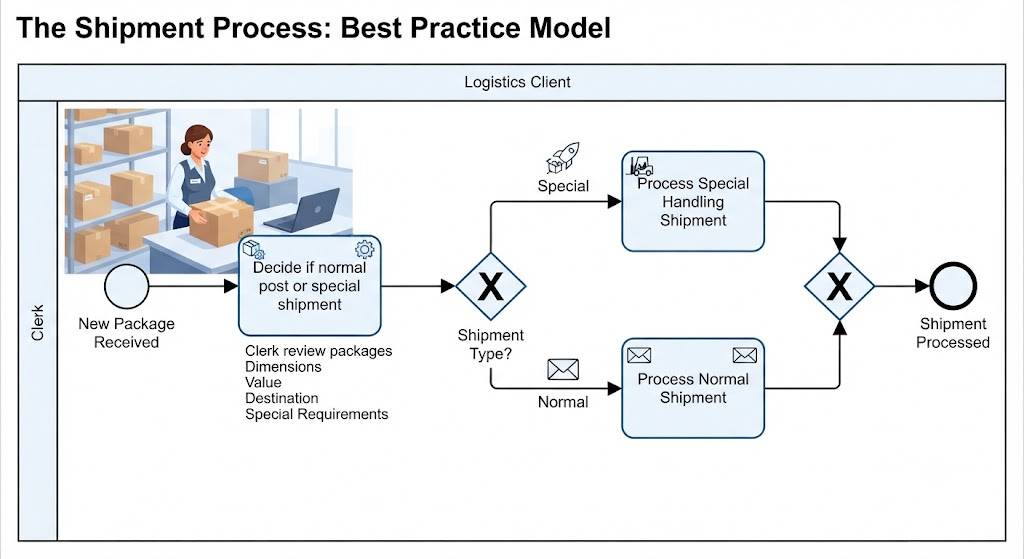
After restructuring, the diagram looked like this:
-
A clerk performs a task explicitly labeled “Decide if normal post or special shipment”
-
The outcome of that task (normal vs. special) is then passed to an exclusive gateway
-
The gateway routes the flow down one of two paths based on that pre-determined outcome
The difference is subtle but significant. The task is where the evaluation happens — the clerk reviews package dimensions, value, destination, and any special handling requirements. The gateway simply says “if the result was ‘special,’ go this way; otherwise, go that way.”
Functional Roles: Tasks vs. Gateways
Understanding the distinction between tasks and gateways requires being clear about what each element represents:
Tasks represent actual units of work. They are where things get done — where someone evaluates information, makes a choice, runs a calculation, or performs an action. A task can be as simple as “Verify customer address” or as complex as “Review nomination eligibility against committee criteria.”
Gateways represent routing logic. They don’t perform work; they control flow. They take the output of a preceding task and direct the process token down the appropriate branch. The gateway itself has no intelligence — it’s a mechanical construct.
This separation of concerns is one of the things that makes BPMN such a powerful modeling language. By keeping work and routing distinct, the diagram clearly communicates both what needs to be done and how the process branches based on the results.
Mechanisms of Routing: How Gateways Work
Once the decision has been made in a preceding task, the gateway enforces that decision through specific routing mechanisms. The most commonly used is the exclusive gateway, which ensures that only one of the available branches is traversed.
Here’s how the mechanism works in practice:
-
The preceding task produces a single, determinate outcome
-
The exclusive gateway evaluates that outcome against its conditional labels
-
Exactly one outgoing sequence flow is activated
-
The process token continues along that single path
Other gateway types handle different routing scenarios — parallel gateways for concurrent paths, inclusive gateways for one-or-more branches — but the principle remains the same: the gateway routes based on information determined elsewhere.
Complex Evaluations: Real-World Scenarios
The gateway-as-router concept becomes even more important when dealing with complex processes that involve multiple stakeholders and sophisticated decision criteria.
The Nobel Prize Nomination Process
In modeling a Nobel Prize nomination workflow, I encountered a scenario where the Issue List Manager needed to review nominations and determine whether they met specific readiness criteria before the process could continue. The critical insight was that the “review and determine” work happened in a dedicated task assigned to the Issue List Manager. The subsequent gateway simply routed the process — either continuing to the next stage if the nomination was ready, or ending the process if it wasn’t.
The gateway didn’t judge the quality of the nomination. The Issue List Manager did. The gateway just reflected that judgment in the process flow.
Email Voting Processes
Similarly, in email-based voting workflows, the actor responsible for collecting and tallying votes performs the actual determination of whether a quorum has been reached or whether a motion has passed. A gateway downstream then routes accordingly. The separation is clean: the human does the thinking, the gateway does the routing.
Why This Distinction Matters
You might be wondering whether this level of precision really matters in practice. After all, the diagram “works” either way — the process flows correctly regardless of whether you attribute the decision to the gateway or the preceding task.
But in my experience, there are several concrete benefits to getting this right:
1. Clearer accountability. When the decision is explicitly captured in a task, it’s obvious who or what is responsible for making that decision. You can assign the task to a specific role, estimate how long it will take, and track whether it was completed correctly.
2. Better communication with stakeholders. Non-technical stakeholders understand tasks — they represent work that people do. When you show them a task labeled “Review and approve budget request,” they immediately understand what happens at that step. A gateway labeled “Approved?” is vaguer and invites questions about who’s doing the approving.
3. Easier process improvement. When you need to optimize a process, you need to know where decisions are being made. If decisions are buried inside gateways, it’s harder to identify bottlenecks, redundant evaluations, or opportunities to delegate or automate.
4. More accurate automation. When implementing a BPMN diagram in a workflow engine, the distinction matters technically. Tasks map to work items; gateways map to routing rules. Conflating the two leads to implementation confusion.
Common Pitfalls to Avoid
Through my own trial and error, and by reviewing diagrams created by others, I’ve identified a few recurring mistakes related to this gateway-decision distinction:
Labeling gateways as questions. A gateway labeled “Is the payment valid?” implies the gateway is performing validation. Instead, create a task called “Validate payment” and let the gateway route based on the result.
Skipping the decision task. Sometimes modelers jump straight from an information-gathering task to a gateway, implicitly assuming the gateway will figure out what to do. But if no task explicitly performs the evaluation, the diagram is incomplete — it’s unclear who or what makes the determination.
Overloading gateways with logic. A single gateway with complex conditional expressions on multiple outgoing flows often indicates that the decision logic should be broken down into a proper task with a clear output, followed by simpler routing.
Conclusion
The distinction between gateways and decisions in BPMN 2.0 is one of those foundational concepts that seems minor at first but has outsized impact on the quality of your process models. Once I internalized that gateways are routers — not decision-makers — my diagrams became cleaner, more communicative, and easier to implement.
The key takeaway is simple but powerful: the decision happens in the task, and the gateway just routes based on the outcome. By maintaining this separation, you create diagrams that accurately reflect how work actually gets done, who is responsible for what, and how the process branches based on real-world evaluations.
Whether you’re modeling a straightforward shipment workflow or a complex multi-stakeholder process like Nobel Prize nominations, applying this principle will help you produce BPMN diagrams that are both technically correct and genuinely useful for the people who need to understand and execute the process.
References
- From Narrative to Diagram: How Visual Paradigm’s AI BPMN Generator Transforms Process Modeling Workflows: How AI converts text narratives into BPMN diagrams.
- Mastering Business Process Modeling (BPMN 2.0) with Visual Paradigm’s AI-Powered Tools: Guide to mastering BPMN 2.0 using AI tools.
- Visual Paradigm BPMN Review: Bridging the Gap Between Business Logic and Technical Execution: In-depth review of Visual Paradigm’s BPMN capabilities.
- AI BPMN Business Process Diagram Generator Update: Release notes for the AI BPMN generator update.
- Understanding the BPMN Notation: A Key to Effective Business Process Modeling: Foundational guide to understanding BPMN notation.
- Visual Paradigm BPMN Tutorial: Video tutorial demonstrating BPMN features.
- Beyond Code and AI: Why Visual Paradigm Remains Essential for Professional Software Architecture: Enduring value of Visual Paradigm in software architecture.
- BPMN Activity Types Explained: Detailed explanation of different BPMN activity types.
- How AI-Powered NLP is Revolutionizing Text-to-BPMN Generation for Enterprise Process Modeling: NLP technology behind text-to-BPMN generation.
- Visual Paradigm Features: Overview of core features of Visual Paradigm.
- BPMN Diagram and Tools: Look at BPMN diagramming tools and features.
- Visual Paradigm Official Website: Official homepage for Visual Paradigm.
- Click Start AI – Technical Support: Technical support for getting started with AI features.
- Testing Visual Paradigm’s AI-Powered BPMN Diagram Generator for Real-World Process Mapping: Practical test of the AI generator for real-world mapping.
