


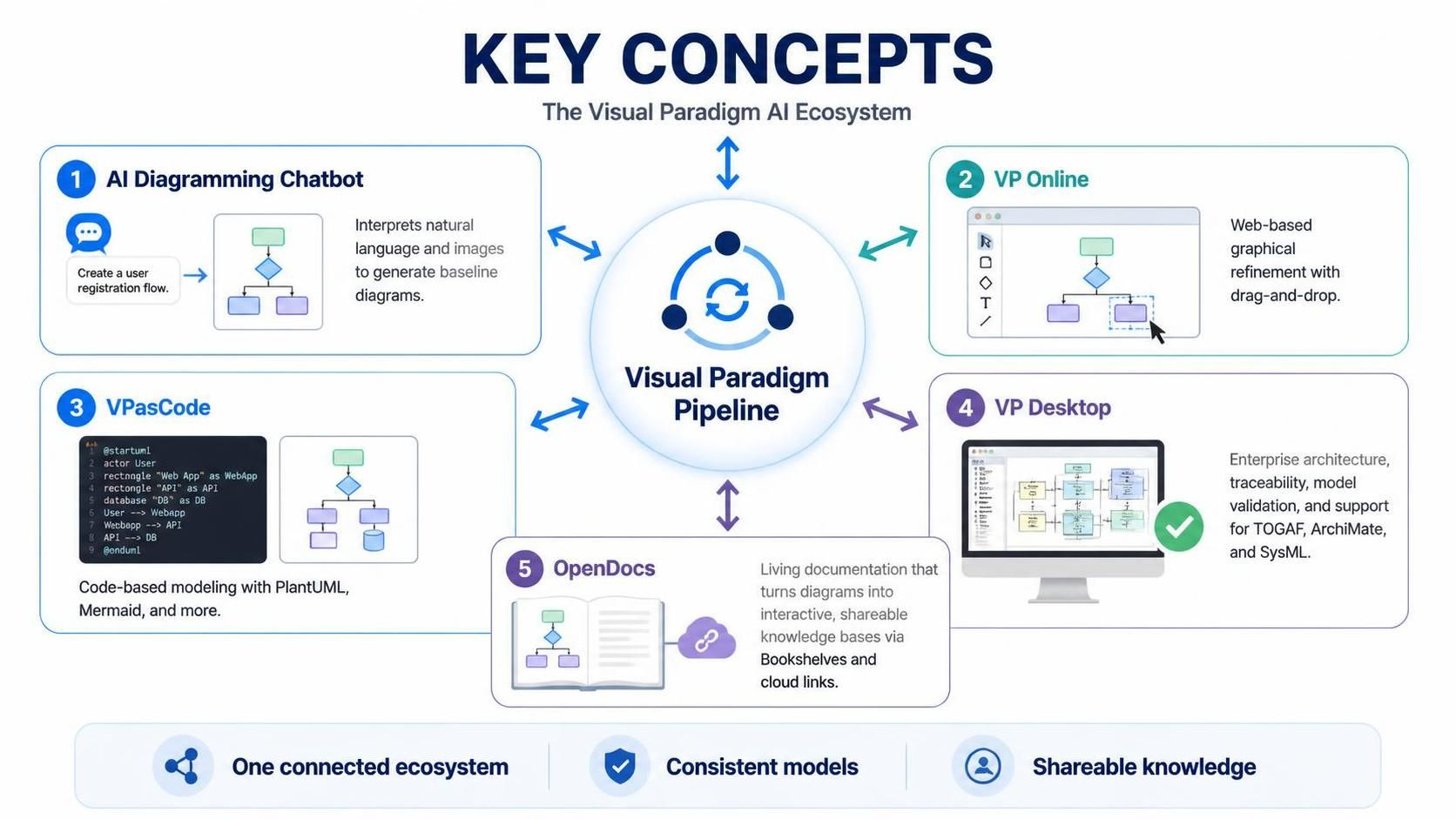
In the rapidly evolving landscape of software architecture, the barrier between “thinking” about a system and “building” it is disappearing. The Visual Paradigm AI Ecosystem represents a paradigm shift—a unified infrastructure designed to synchronize data across five distinct environments. This tutorial explores how the Visual Paradigm Pipeline acts as the central nervous system, connecting conversational AI, graphical editors, code-based modeling, and enterprise architecture into a single, cohesive workflow.
Understanding this ecosystem is not just about learning five different tools; it is about mastering the flow of information from a simple idea to a validated, documented enterprise solution.
1. The Central Nervous System: Visual Paradigm Pipeline
At the heart of this architecture lies the Visual Paradigm Pipeline. Think of this not merely as a file repository, but as a synchronization engine. In traditional modeling, you might save a file on your desktop, email it to a colleague, and lose track of versions. The Pipeline eliminates this fragmentation.
It ensures that changes made in one tool—whether it’s a quick sketch in the AI Chatbot or a complex validation in VP Desktop—are reflected everywhere else in real-time. This “One Connected Ecosystem” ensures Consistent Models across the board, preventing the “version hell” that often plagues collaborative projects.
2. The Entry Point: AI Diagramming Chatbot
The workflow often begins with ideation. The AI Diagramming Chatbot serves as the conversational interface for this ecosystem. It democratizes modeling by allowing users to bypass complex menus and syntax rules initially.
- Natural Language Processing: You can simply type a prompt like “Create a user registration flow,” and the AI interprets the intent.
- Image Recognition: The tool can even interpret uploaded images or sketches to generate baseline diagrams.
This component is designed for speed. It generates a baseline model that serves as the starting point for refinement, allowing architects to focus on logic rather than drawing shapes.
3. The Refinement Layer: VP Online & VPasCode
Once a baseline exists, the ecosystem branches into two distinct but connected refinement paths: graphical and code-based.
VP Online: The Visual Editor
VP Online acts as the web-based graphical refinement tool. It is the ideal environment for drag-and-drop editing. If you prefer visual manipulation over typing, this is where you polish the diagram generated by the AI, adjusting connectors, colors, and layout directly in the browser.
VPasCode: The Code-Based Approach
For those who prefer precision and version control, VPasCode offers a code-based modeling experience. This environment supports industry-standard languages like PlantUML and Mermaid. It is particularly powerful for developers who want to manage their architecture diagrams as text files, allowing for Git-based collaboration and diffing.
4. The Powerhouse: VP Desktop
While the web tools handle the “what” and “how” of diagrams, VP Desktop handles the “why” and “deep dive.” It is the powerhouse for Enterprise Architecture.
VP Desktop brings heavy-duty features to the ecosystem, including:
- Traceability: Linking models to requirements and code.
- Model Validation: Ensuring your architecture adheres to strict standards.
- Complex Framework Support: Deep integration with TOGAF, ArchiMate, and SysML.
This is where the lightweight diagrams from the chatbot evolve into rigorous, validated enterprise blueprints.
5. The Output: OpenDocs
The final stage of the workflow is not just saving the diagram, but sharing the knowledge. OpenDocs transforms static diagrams into interactive, shareable knowledge bases.
By utilizing Bookshelves and Cloud Links, OpenDocs allows stakeholders to interact with the architecture without needing the modeling software installed. It turns the architecture model into a living documentation platform, ensuring that the “Shareable Knowledge” remains up-to-date with the source of truth.
Summary of the Workflow
- Initiate: Use the AI Chatbot to generate a baseline diagram from natural language.
- Refine: Edit the diagram visually in VP Online or via code in VPasCode.
- Validate: Perform deep analysis and framework validation in VP Desktop.
- Document: Publish the final result as interactive content in OpenDocs.
By leveraging the Visual Paradigm Pipeline to connect these steps, organizations can achieve a seamless flow from idea to implementation.
 vpadmin
- October 12, 2026
