


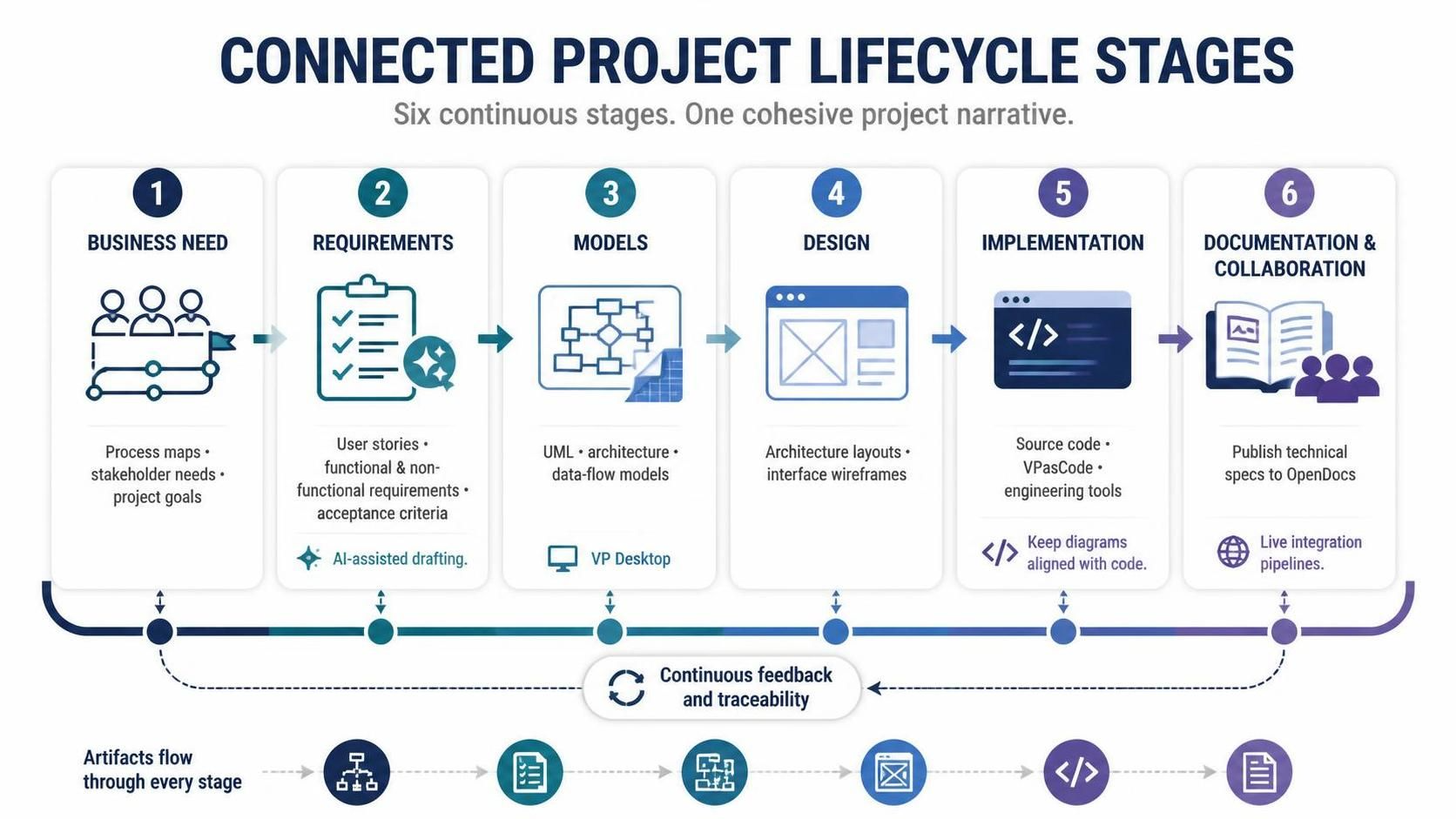
In modern systems engineering and software development, the gap between business strategy and technical implementation is often where projects fail. Teams struggle with fragmented tools, disconnected documentation, and the constant risk of “drift”—where the code no longer matches the design. The solution lies in a unified approach to the project lifecycle. This tutorial explores the six continuous stages of the Connected Project Lifecycle, demonstrating how a platform like Visual Paradigm bridges the gap between high-level business goals and low-level source code.
The Philosophy of Connected Development
Traditional development methodologies often treat diagrams, code, and documentation as isolated artifacts. A business analyst creates a process map in one tool, a developer writes code in an IDE, and a writer updates a Word document elsewhere. This siloed approach creates friction and errors.
The Connected Project Lifecycle reimagines this flow. By connecting these artifacts through six continuous stages, every diagram, piece of code, and specification contributes to a cohesive project narrative. This approach ensures traceability and alignment, allowing teams to move from concept to deployment seamlessly.
Stage 1: Business Need
The journey begins at the source: the business need. This stage is about defining the “Why” and the “What” before diving into the “How.” It involves capturing high-level process maps, stakeholder descriptions, and project goals.
Using structured tools, teams can define requirements in a format that ensures alignment among all parties. This initial phase sets the context for the entire project, ensuring that technical efforts are always tied back to business value.
Stage 2: Requirements
Once the business need is defined, it must be translated into actionable requirements. This stage involves generating user stories, functional and non-functional requirements, and acceptance criteria.
AI-Driven Efficiency: A significant advantage in this stage is the integration of AI capabilities. The platform can assist in drafting these elements based on the initial business needs. For example, if a business goal is defined as “Automate invoice processing,” the AI can help generate a list of functional requirements and user stories to support that goal, speeding up the requirements gathering process.
Stage 3: Models
With requirements in hand, the focus shifts to deep visual representation. This is the modeling stage, where abstract requirements are transformed into concrete models.
- UML & Architecture: Creating standard Unified Modeling Language diagrams to define system structure.
- Data-Flow Models: Visualizing how data moves through the system.
- VP Desktop: This stage often leverages the robust modeling capabilities of VP Desktop, which is essential for constructing complex systems and deep visual representations.
The goal here is to create a blueprint that is precise enough to guide the design and implementation phases.
Stage 4: Design
Following the technical models, the Design stage refines the architecture layouts and interface wireframes. This is where the system begins to take a more tangible form.
The power of a unified platform is most evident here. The seamless integration between modeling and design tools allows for iterative refinement. If an architectural model changes, the design team is immediately aware, ensuring that the visual design aligns perfectly with the underlying architectural models. This prevents the common scenario where a UI is designed for a system that doesn’t exist.
Stage 5: Implementation
The transition from design to code is often the most dangerous part of the lifecycle, as manual re-typing can lead to errors. The Implementation stage mitigates this risk by transitioning to source code, text-driven diagramming via VPasCode, and other engineering tools.
Code Synchronization: The platform supports developers by keeping diagrams synchronized with code changes. This means that if a developer modifies a class in the code, the corresponding UML diagram updates automatically. This reduces the risk of “drift” between design and implementation, ensuring the documentation remains accurate.
Stage 6: Documentation & Collaboration
The final stage is not merely an afterthought; it is the culmination of the workflow. Technical specifications are published to OpenDocs via live integration pipelines.
This ensures that documentation is always up-to-date and accessible to all stakeholders. Instead of generating a static PDF from a snapshot in time, the platform generates live documentation that reflects the current state of the project. This facilitates better collaboration and knowledge sharing, ensuring that everyone is working from the same source of truth.
Key Concepts for Mastery
1. Hybrid Workflow
A Hybrid Workflow integrates local desktop tools with cloud-based applications. Imagine a scenario where a software architect uses VP Desktop to create a detailed SysML model of a complex embedded system. Once the model is complete, it is automatically synced to the Unified Drive. The architect can then share the model with a remote team member who uses VP Online to add comments and suggestions. The changes are synced back to the desktop, ensuring that both parties are working with the most up-to-date version.
2. Live Sync Pipeline
This is the mechanism that ensures real-time synchronization of data across different components. For example, if a developer updates a class diagram in VPasCode by modifying the underlying text description, the change is immediately reflected in the corresponding UML diagram in VP Desktop and the documentation in OpenDocs. This live sync guarantees that all artifacts remain aligned.
3. Prompt-Driven Modeling
Leveraging Generative AI, this concept allows users to describe a process in natural language, which the system then converts into a visual model. For instance, a business analyst can describe a “new customer onboarding process,” and the AI Chatbot can generate a BPMN diagram representing that process, which can then be refined manually.
Conclusion
The Connected Project Lifecycle represents a significant leap forward in the realm of visual modeling and project lifecycle management. By bridging the gap between desktop and cloud environments, unifying over 100 applications, and integrating powerful generative AI capabilities, it offers a cohesive and efficient workflow for teams of all sizes.
As organizations continue to navigate the complexities of modern software development, platforms that support this unified approach will play a crucial role in enhancing productivity. By embracing these connected stages, teams can overcome tool fatigue, reduce fragmentation, and achieve greater success in their projects.
 vpadmin
- October 16, 2026
