


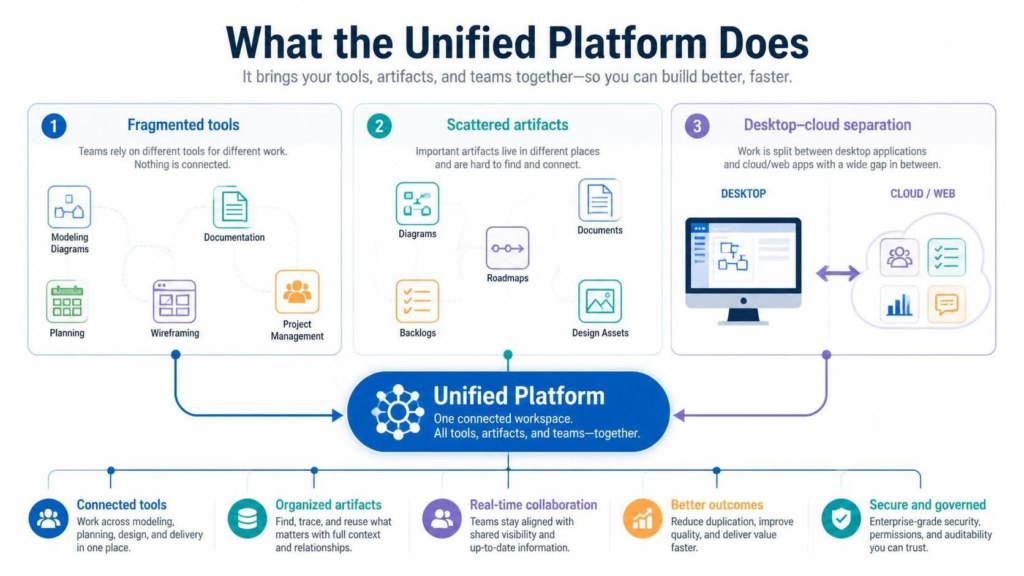
In the modern landscape of software engineering and business analysis, teams frequently face a triad of challenges: Fragmented Tools, Scattered Artifacts, and Desktop-Cloud Separation. The Visual Paradigm Unified Platform is not merely a new interface; it is a fundamental architectural shift designed to resolve these disconnects. This tutorial explores how the platform functions as a centralized integration layer, merging the robust capabilities of the Desktop application with the accessibility of Browser-based (VP Online) tools.
The Problem: Disconnected Workflows
Before diving into the solution, we must understand the architectural debt accumulated by modern teams. As visualized in the platform’s design philosophy, three specific gaps often hinder productivity:
- Fragmented Tools: Teams often rely on disparate applications for different tasks. One tool might be used for Modeling Diagrams, another for Documentation, while a third handles Planning and Project Management. Nothing in this ecosystem is inherently connected.
- Scattered Artifacts: Crucial data lives in silos. Diagrams are stored in one repository, roadmaps in another, and backlogs in a third. Linking these assets is difficult, leading to a loss of context.
- Desktop-Cloud Separation: There is a historic gap between “power” and “access.” The Desktop application offers deep, offline modeling capabilities, while Cloud/Web apps offer convenience. Historically, these two worlds were split by a wide gap, requiring manual data synchronization.
The Solution: The Unified Workspace
The Unified Platform acts as the “Central Nervous System” for your development lifecycle. It replaces the siloed approach with a Centralized Workspace that functions as an integration and access layer.
1. The Drive-Like View
One of the most significant architectural changes is the introduction of a drive-like view of projects and artifacts. Instead of opening isolated files, the user interacts with a unified file system. This allows for:
- Centralized Discovery: Users can find tools, create assets, and organize work in a single location.
- Unified Navigation: A unified “Create” menu allows users to spawn new diagrams, documents, or planning artifacts without leaving the context of their current project.
2. Bridging the Gap: Desktop + Cloud
The platform effectively bridges the “Desktop–Cloud Separation” problem. It creates a seamless connection where:
- Desktop Projects: You retain access to your powerful Visual Paradigm Desktop projects for detailed, offline modeling.
- Browser Launcher: A browser-based application launcher provides immediate access to web tools without needing to install new software.
- Real-Time Context: The platform connects diagrams, documents, and project-planning artifacts. This ensures that if you update a backlog item in the web view, the linked diagram is aware of that change.
Architectural Benefits
By unifying these components, the platform delivers five core benefits that improve the system’s overall health:
- Connected Tools: Work across modeling, planning, design, and delivery happens in one place. The separation between “business analysis” and “software engineering” is reduced.
- Organized Artifacts: The system allows you to find, trace, and reuse assets with full context and relationships, solving the issue of scattered data.
- Real-time Collaboration: Teams stay aligned through shared visibility and up-to-date information, regardless of whether they are working locally or remotely.
- Better Outcomes: By reducing duplication, teams can improve quality and deliver value faster.
- Secure and Governed: Enterprise-grade security and permissions are applied to this unified layer, ensuring auditability and trust.
Technical Implementation
From a technical standpoint, the Unified Platform utilizes a hybrid architecture. It does not replace the Desktop or VP Online; rather, it provides an Access Layer.
Key Integration Points:
- AI-Powered Analysis: The platform integrates AI tools that can analyze diagrams and generate content, available across both desktop and cloud environments.
- Documentation & Collaboration: Online documentation tools are now first-class citizens, linked directly to the artifacts they describe.
- Visual Paradigm Ecosystem: The platform serves as the hub for the entire VP ecosystem, ensuring that tools like wireframing, database design, and Agile planning are not just “installed” but are “connected.”
Conclusion
The Visual Paradigm Unified Platform transforms the development environment from a collection of disjointed tools into a cohesive ecosystem. By addressing fragmentation and separation, it allows teams to focus on the actual work—building better, faster systems—rather than managing the tools themselves.
 vpadmin
- October 16, 2026
