


In the modern era of software development, documentation is often the first casualty of speed. Engineers focus on coding, and documentation falls behind, becoming a static, outdated liability. However, the emergence of OpenDocs by Visual Paradigm represents a paradigm shift. It introduces the concept of “living documentation,” where technical diagrams and explanatory text coexist seamlessly within the same document.
This tutorial explores the architectural philosophy behind OpenDocs and demonstrates how to build dynamic, editable system models using AI-driven diagramming. We will walk through the creation of a Customer Order Process architecture, illustrating how to maintain the integrity of your system design without the friction of exporting and re-importing images.
Understanding the Core Architecture
OpenDocs is built on a flexible architecture that treats diagrams not as static raster images (like JPEGs or PNGs), but as editable, vector-based objects embedded directly into the text flow. This structure allows for a bidirectional relationship between your code, your documentation, and your visual models.
The system relies on an AI Block system. Instead of manually drawing nodes and lines in a separate tool, you describe the diagram you need using natural language prompts. The system interprets these prompts and generates the underlying model definition.
The “Edit” Workflow
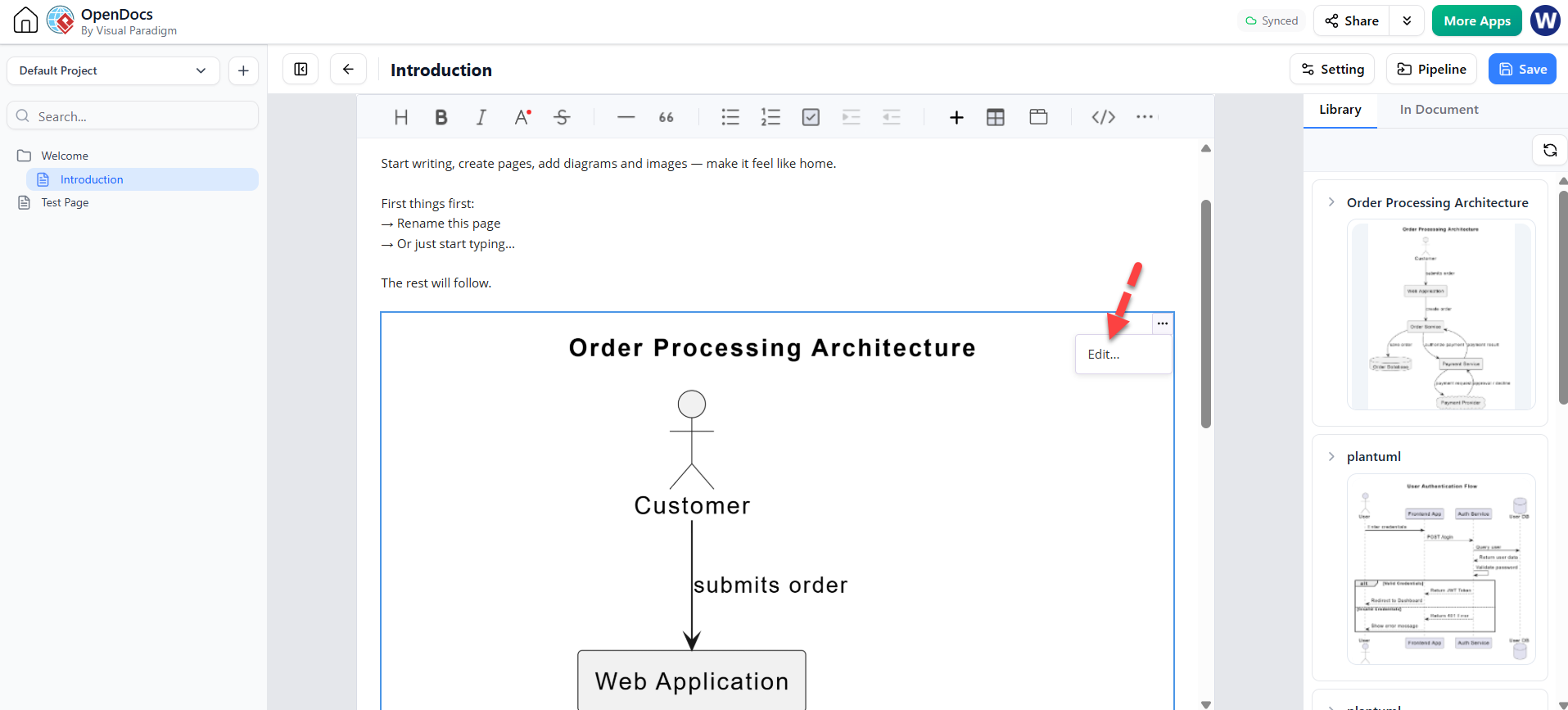
The screenshot provided in the context highlights a crucial feature: the Edit… button on the diagram block. This signifies that the diagram is not a “frozen” snapshot. It remains a live object within the editor.
- Inline Rendering: The diagram renders directly in the document body.
- Dynamic Updates: If you change the text prompt associated with the block, the diagram regenerates automatically.
- Manual Fine-Tuning: Clicking “Edit…” opens the full modeling environment (likely Visual Paradigm’s engine), allowing you to tweak specific relationships or attributes that the AI might have missed.
Step-by-Step: Creating a System Architecture Diagram
Let’s reconstruct the “Order Processing Architecture” shown in the image. This is a classic Use Case or Sequence style diagram, often used in Level 0 Data Flow Diagrams (DFD) to show the interaction between an external actor and the core system.
Step 1: The AI Prompt
The process begins with a descriptive prompt. In the OpenDocs interface, you would insert an AI block and type a command similar to:
"Create a system architecture diagram showing a Customer interacting with a Web Application. The customer should submit an order to the application."Step 2: Generating the Model
Visual Paradigm’s engine interprets this request and creates a graph structure. The resulting diagram consists of two primary components:
- The Actor (Customer): Represented by the standard stick figure, symbolizing an external entity that initiates a process.
- The System Boundary (Web Application): A box representing the software system being analyzed.
- The Interaction (Submit Order): A directed arrow connecting the Actor to the System, labeled with the action.
Step 3: The Code Representation
While the user sees a visual graphic, the system stores this as code (likely using a standard modeling language like UML or a proprietary syntax). Understanding the underlying code helps in debugging and advanced editing.
If this were rendered in PlantUML (a common standard for text-to-diagram tools), the code generating the image in the screenshot would look like this:
@startuml
left to right direction
actor "Customer" as C
rectangle "Web Application" as WA {
}
C --> "submits order" : WA
@enduml
In the context of OpenDocs, you might not see this code immediately, but the “Edit” functionality implies that this structural definition is always accessible in the background.
Why This Matters: The Benefits of Living Documentation
The transition from static images to dynamic blocks solves several critical problems in software architecture:
1. Elimination of “Export Hell”
Traditionally, an architect would draw a diagram in Visio, Rational Rose, or Enterprise Architect, export it as a PNG, and then paste it into a Word document or Confluence page. If the requirements changed, the architect had to redraw the diagram, export it again, and replace the old image. OpenDocs removes this friction.
2. Consistency Between Text and Visuals
When text and diagrams are separate, they often diverge. A developer might update the code, but forget to update the diagram. By keeping them in the same document, the diagram is naturally tied to the documentation’s lifecycle.
3. Accessibility and Collaboration
Non-technical stakeholders (like Product Managers) can view the documentation in the browser without needing specialized modeling software. If they request a change, the technical team can update the prompt or edit the block, and the diagram updates instantly for everyone.
Conclusion
The architecture of OpenDocs represents the future of technical documentation. By integrating AI-driven diagram generation with editable, inline visual blocks, it bridges the gap between high-level conceptual design and detailed system specifications. Whether you are documenting a simple “Order Processing” flow or a complex microservices architecture, keeping your diagrams alive within your text is the most effective way to maintain system integrity over time.
 vpadmin
- October 22, 2026
