


In modern software architecture, bridging the gap between abstract business requirements and concrete technical implementation is crucial. The C4 Model provides a powerful hierarchy of diagrams to achieve this, and the Container Diagram is arguably the most vital step for understanding how a system is built.
This tutorial guides you through the anatomy of a Container Diagram for a “Task Management App,” using PlantUML and the C4-PlantUML standard library. We will deconstruct the provided diagram code to understand how to define systems, containers, and external relationships effectively.
1. The Philosophy: What is a Container?
Before writing a single line of code, it is essential to understand the level of abstraction. In the C4 Model hierarchy:
- Level 1 (Context): Shows the system as a single box in the universe.
- Level 2 (Container): This is our focus. It breaks the system down into runtime constructs (e.g., a Web App, a Mobile App, a Microservice, a Database).
- Level 3 (Component): Breaks containers into classes or functions.
A Container represents a distinct, deployable unit of software. It usually has its own process ID and potentially its own technology stack (like a Node.js server separate from a React frontend). This diagram helps developers visualize the boundaries and communication protocols between these units.
2. Setting the Stage: Boilerplate and Libraries
To create a professional-grade diagram, we do not reinvent the wheel. The C4-PlantUML library provides predefined shapes and styling. Notice the very first line of our PlantUML code:
@startuml
!include https://raw.githubusercontent.com/plantuml-stdlib/C4-PlantUML/master/C4_Container.puml
The !include directive imports the necessary definitions for Person, Container, SystemBoundary, and Rel (relationships). Without this, PlantUML would not recognize these specific C4 keywords.
3. Defining the Actors and Boundaries
The diagram begins by defining the human element and the system boundary.
title Container Diagram - Task Management App

Person(user, "User", "A user of the task management system")

System_Boundary(taskApp, "Task Management App") {
    // Containers go here
}
The Person
We define the Person actor. The syntax Person(id, "Label", "Description") creates a standard human icon. The id is a unique reference used later to draw arrows (e.g., user).
The System Boundary
The SystemBoundary(taskApp, "Task Management App") block is critical. It acts as a dashed box that encapsulates the internal architecture of our application. Anything inside this block is considered part of the “Task Management App,” while anything outside is external.
4. Inside the System: Containers and Databases
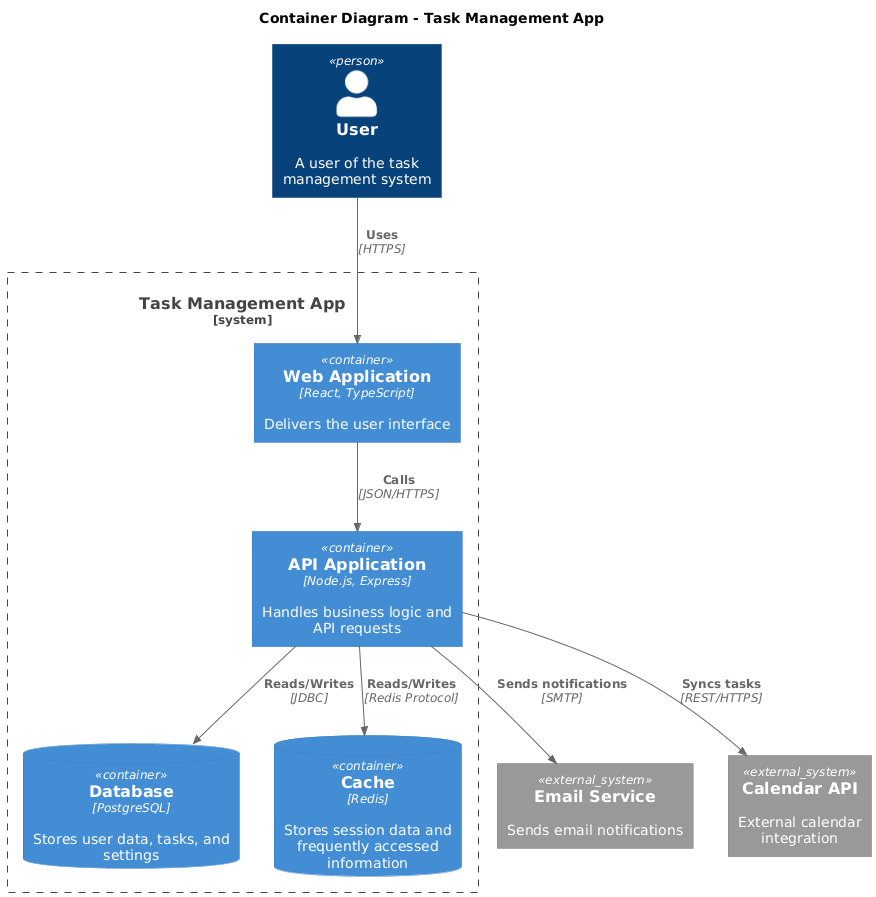
Now, we populate our boundary with the actual technology components. The diagram identifies four distinct containers:
- Web Application: The frontend (React, TypeScript).
- API Application: The backend (Node.js, Express).
- Database: The persistent storage (PostgreSQL).
- Cache: The high-speed memory store (Redis).
In the code, we use Container for the app parts and ContainerDb for the databases:
Container(webApp, "Web Application", "React, TypeScript", "Delivers the user interface")
Container(apiApp, "API Application", "Node.js, Express", "Handles business logic and API requests")
ContainerDb(database, "Database", "PostgreSQL", "Stores user data, tasks, and settings")
ContainerDb(cache, "Cache", "Redis", "Stores session data and frequently accessed information")
Key Insight: Notice the distinction between Container and ContainerDb. While both are containers, the latter automatically renders the shape as a cylinder (a database icon), making the diagram instantly readable without manual styling.
5. External Systems and Relationships
Software rarely exists in a vacuum. Our Task Management App needs to send emails and sync with calendars. These are External Systems.
System_Ext(emailService, "Email Service", "Sends email notifications")
System_Ext(calendarApi, "Calendar API", "External calendar integration")
Mapping the Data Flow
The most important part of an architecture diagram is the flow. We use the Rel (Relationship) command to draw arrows. The syntax is Rel(Source, Target, "Label", "Protocol").
Rel(user, webApp, "Uses", "HTTPS")
Rel(webApp, apiApp, "Calls", "JSON/HTTPS")
Rel(apiApp, database, "Reads/Writes", "JDBC")
Rel(apiApp, cache, "Reads/Writes", "Redis Protocol")
Rel(apiApp, emailService, "Sends notifications", "SMTP")
Rel(apiApp, calendarApi, "Syncs tasks", "REST/HTTPS")
By specifying the protocol (HTTPS, JDBC, SMTP), we provide immediate context on how these systems communicate, which is vital for security reviews and network configuration.
6. Visualizing the Result
When this code is rendered, it produces a clean, professional diagram where:
- The User interacts with the Web App via a browser (HTTPS).
- The Web App (React) does not handle logic directly but calls the API App (Node.js) for data.
- The API App acts as the central hub, talking to the PostgreSQL database for persistence and Redis for speed.
- Finally, the API connects to external services like SMTP for emails.
Conclusion
The Container Diagram is the “blueprint” for developers. It abstracts away the complex code inside a container but highlights the architecture boundaries. By mastering the C4-PlantUML syntax, you can create living documentation that evolves with your code, ensuring that your team always understands the “Big Picture” of the system.
 vpadmin
- October 29, 2026
