


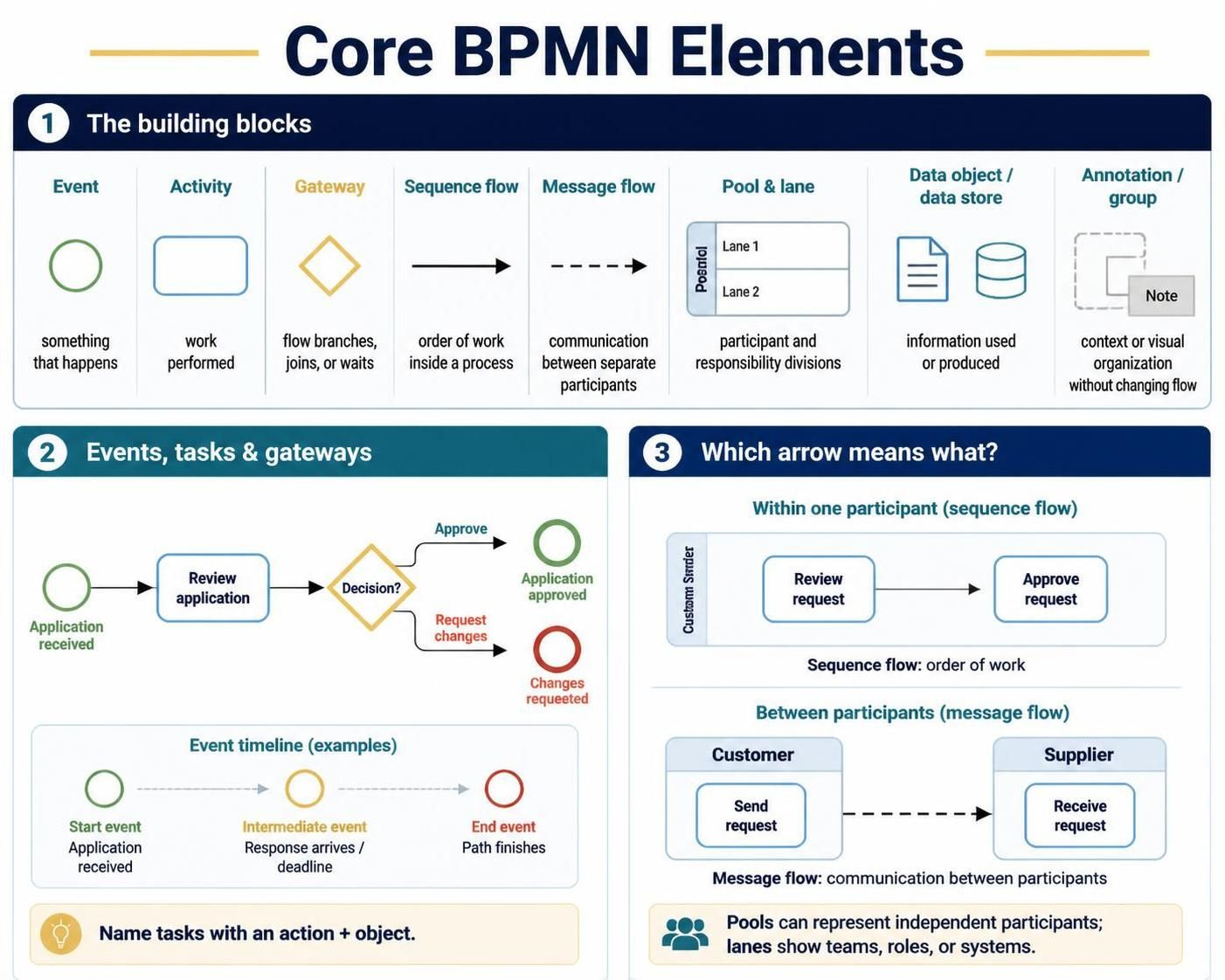
Business Process Model and Notation (BPMN) is the global standard for visualizing business processes. While it can become incredibly complex, the foundation of any diagram relies on a small, intuitive set of building blocks. This tutorial breaks down the core elements shown in our reference material, guiding you from basic shapes to the logic that drives them.
1. The Building Blocks of BPMN
Before diving into complex workflows, you must understand the vocabulary of BPMN. Think of these as the letters of the alphabet; you cannot write a sentence without them. The diagram categorizes these into shapes that represent time, work, logic, and communication.
- Event (Circle): Events are things that happen. They have no duration but mark specific points in time.
- Start: The trigger (e.g., “Application Received”).
- Intermediate: Something occurring in the middle (e.g., “Timer Expires”).
- End: The outcome (e.g., “Payment Processed”).
- Activity (Rounded Rectangle): This represents the actual work being performed. It is a container for tasks.
- Task: A single unit of work, like “Review Application.”
- Sub-process: A complex activity broken down into smaller steps.
- Gateway (Diamond): This is the logic of your process. It is where the flow branches (decides), joins, or waits.
- Exclusive Gateway (X): Choose one path (e.g., “Approve” OR “Reject”).
- Parallel Gateway (+): Do everything at once (e.g., Send email AND send invoice).
- Sequence Flow (Solid Arrow): This defines the order of steps inside a single process. It connects events, activities, and gateways to show the chronological flow.
- Message Flow (Dashed Arrow): This shows communication between participants. It crosses the boundaries of Pools to show information passing from one organization to another.
2. Understanding Participants: Pools and Lanes
Processes rarely happen in a vacuum. They involve different organizations, departments, or systems. BPMN uses Pools and Lanes to visualize responsibility.
Pools: The Container
A Pool represents a distinct participant or organization. For example, in a supply chain, one pool represents the Customer and another represents the Supplier. Pools are isolated; they cannot talk to each other using standard arrows. They must use Message Flows.
Lanes: The Responsibility
Inside a Pool, you can draw Lanes. Lanes divide the process to show who is doing the work.
- Role-based: Different lanes for “Manager” and “Clerk”.
- System-based: Different lanes for “ERP System” and “Human User”.
3. Routing Logic and Data
Once you have your participants and flows, you need to define the rules and the information moving through them.
Gateways (The Decision Maker)
Gateways control the flow. A common scenario is the “Decision” diamond.
graph TD
    Start((Start)) --> Review[Review Application]
    Review --> Gateway{Decision?}
    Gateway -->|Approve| EndApproved((Approved))
    Gateway -->|Reject| EndRejected((Rejected))
Data Objects and Stores
Processes consume and produce data.
- Data Object: A piece of information used in a task (e.g., an Application Form).
- Data Store: A place where data is saved for later (e.g., a Database or Filing Cabinet).
4. Sequence Flow vs. Message Flow
This is the most common point of confusion for beginners. The type of arrow you use depends entirely on where the connection is going.
| Feature | Sequence Flow (Solid Arrow) | Message Flow (Dashed Arrow) |
|---|---|---|
| Scope | Within the same Pool/Participant | Between different Pools/Participants |
| Meaning | The next step in the work order. | Communication (sending a request). |
| Example | Customer submits form → System processes it. | Customer sends order → Supplier receives order. |
 vpadmin
- October 29, 2026
