


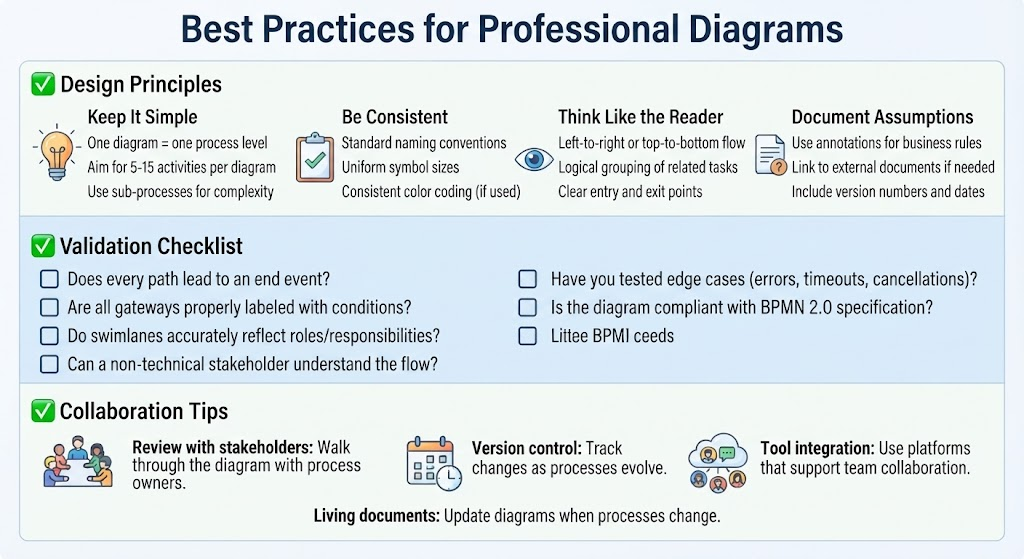
Creating a Business Process Model and Notation (BPMN) diagram is an exercise in communication. It is the bridge between technical execution and business strategy. While the BPMN 2.0 specification provides the grammar for the language, the Design Principles outlined below act as the style guide for writing a compelling story.
This tutorial explores how to structure your diagrams for maximum clarity, validate them for accuracy, and maintain them as living documents within a professional environment.
1. Design Principles: The Foundation of Clarity
The most common mistake in process modeling is trying to do too much in a single view. To avoid cognitive overload for your audience, adhere to the following core principles.
Keep It Simple
Complexity is the enemy of understanding. A single diagram should not attempt to explain an entire enterprise workflow. Instead, focus on one specific process level.
- The Golden Rule: One diagram equals one process level.
- Activity Count: Aim for 5 to 15 activities per diagram. If you exceed this, the diagram becomes unreadable.
- Handling Complexity: If a process is too complex, do not clutter the main diagram. Use sub-processes to hide detail and drill down into a separate, more detailed diagram.
Be Consistent
Consistency reduces the cognitive load required to interpret your diagram. If a stakeholder has to guess what a symbol means because it is colored differently or sized strangely, the diagram has failed.
- Naming Conventions: Use standard naming conventions for all tasks and pools.
- Visual Uniformity: Maintain uniform symbol sizes and consistent color coding (if used) to denote status or category.
Think Like the Reader
Process flows are read like a book. You must structure the diagram to align with natural reading patterns.
- Flow Direction: Use a Left-to-right or Top-to-bottom flow.
- Logical Grouping: Group related tasks together visually.
- Entry and Exit: Ensure there are clear entry points (Start Events) and exit points (End Events) to guide the reader.
Document Assumptions
Process models are rarely 100% self-explanatory. They require context.
- Annotations: Use annotations to explain business rules (e.g., “Credit check required for orders over $500”).
- External Links: Link to external documents if the rules are too complex for a diagram.
- Metadata: Always include version numbers and dates to ensure you are working from the latest source of truth.
2. The Validation Checklist
Before finalizing your BPMN diagram, you must rigorously test it. A diagram that looks good but fails logically is worse than no diagram at all. Use the following checklist to validate your work.
- Path Completeness: Does every path lead to an end event? (Ensure no “dead ends” exist where a process could hang).
- Gateway Logic: Are all gateways (decision points) properly labeled with conditions? (e.g., “Yes”, “No”, “Approved”, “Rejected”).
- Swimlane Accuracy: Do swimlanes accurately reflect roles and responsibilities? (Ensure the right department owns the right tasks).
- Stakeholder Readability: Can a non-technical stakeholder understand the flow? (If they can’t, simplify).
- Edge Cases: Have you tested edge cases? (What happens on errors, timeouts, or cancellations?).
- Compliance: Is the diagram compliant with the BPMN 2.0 specification?
3. Collaboration and Maintenance
A diagram is a snapshot of a process at a specific moment. To be effective, it must be a living document.
Review with Stakeholders
Do not just email a diagram. Walk through it with process owners. This “walkthrough” phase is critical for uncovering gaps in logic that the modeler missed.
Version Control
Processes evolve. Use version control to track changes. If a process changes, the diagram must be updated immediately to reflect reality.
Tool Integration
Use platforms that support team collaboration (such as Visual Paradigm) to allow multiple users to review and comment on the model simultaneously.
4. Final Thoughts and Next Steps
Mastering BPMN 2.0 isn’t about memorizing every symbol—it’s about understanding when and why to use each element to communicate processes clearly. Start simple, validate with stakeholders, and iterate.
As you practice, you will notice a shift in your workplace. Meetings will become shorter because everyone is looking at the same visual reference. Handoffs between departments will become smoother because responsibilities are clearly defined. You will gain a deeper understanding of how your organization truly operates.
Recommended Next Steps
- Pick a simple process from your daily work.
- Sketch it using the four core building blocks (Start, Task, Gateway, End).
- Validate the flow with a colleague.
- Refine based on their feedback.
- Gradually add complexity as you gain confidence.
Happy modeling!
 vpadmin
- October 29, 2026
