


In the realm of software engineering and system architecture, managing complexity is the single most critical challenge. As systems grow from simple scripts into enterprise-grade applications, the “spaghetti code” problem often arises. One of the most effective methodologies to combat this complexity is the use of Package Diagrams. In this tutorial, we will explore how to model a high-level system architecture using the General System diagram, utilizing the powerful capabilities of the Visual Paradigm tool.
Understanding the General System Diagram
A General System diagram (often referred to as a Package Diagram in UML) is designed to visualize the high-level structure of a system. Unlike detailed class diagrams that focus on methods and attributes, this diagram focuses on the organization of elements into groups—known as packages.
By grouping related classes or components together, architects can create a mental map of how the system functions. It allows stakeholders to see the boundaries between subsystems and understand the dependencies without getting lost in the implementation details.
Deconstructing the Architecture
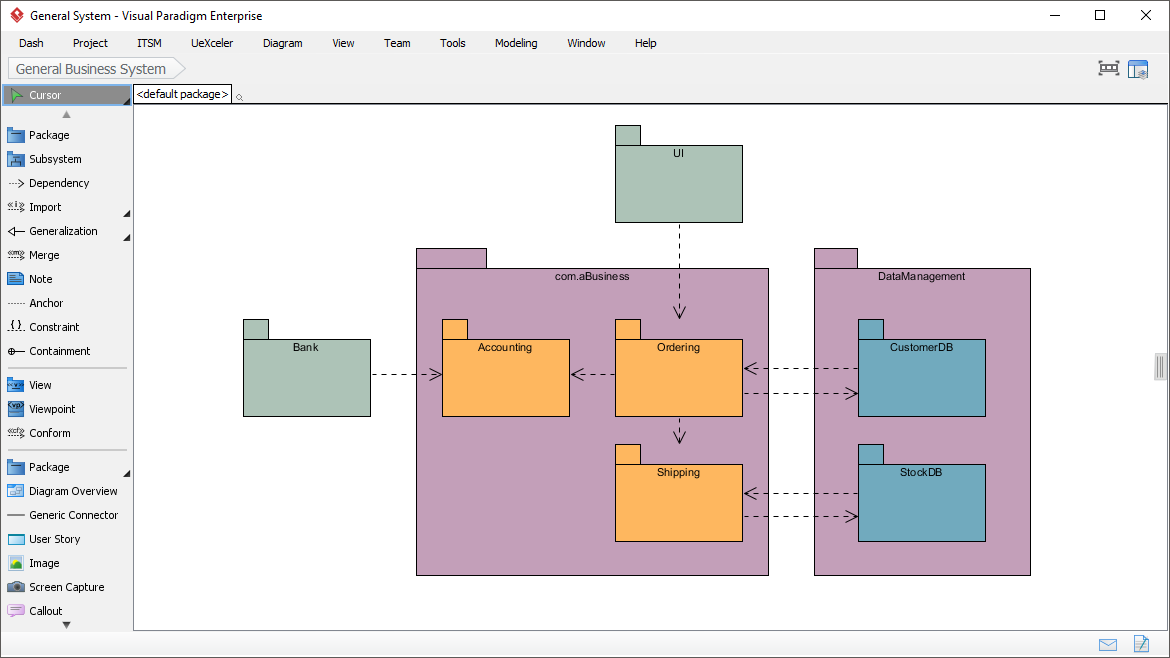
Let us analyze the architecture presented in the screenshot. This model represents a “General Business System” that orchestrates business logic, data management, and external interactions. The diagram is divided into logical layers and distinct functional areas.
1. The Business Logic Layer
The central part of the diagram is dominated by the package named com.aBusiness. This acts as the “brain” of the application, containing the core operational logic. Inside this package, we see three distinct sub-components:
- Accounting: Handles financial calculations and transaction records.
- Ordering: Manages the creation and processing of customer orders.
- Shipping: Deals with logistics, tracking, and delivery management.
Notice the internal flow: The Ordering package has a dependency pointing to Accounting (likely to charge a customer) and Shipping (to dispatch goods). This illustrates the sequential nature of a business transaction.
2. The Data Management Layer
To the right, we find the DataManagement package. In modern architecture, separating data persistence from business logic is a best practice. This package contains two specific resources:
- CustomerDB: Likely stores user profiles, addresses, and history.
- StockDB: Stores inventory levels and product catalogs.
The dashed arrows pointing from Ordering and Shipping to these databases indicate that the business processes rely on this data to function.
3. External Systems and Interfaces
On the far left, we see the Bank package. This represents an external dependency or an external service. The dashed line connecting Bank to Accounting implies that the system triggers financial transactions or validates payments through an external banking API.
At the top, the UI package represents the user interface. The dashed line pointing downwards into the Ordering package signifies that the user interface initiates the business processes (e.g., when a user clicks “Place Order”).
Implementing with Visual Paradigm
Visual Paradigm Enterprise provides a robust environment for creating these diagrams. The toolbar on the left of the screenshot reveals the “General System” palette, which includes specific tools for:
- Package: Used to create the main containers like
com.aBusiness. - Subsystem: Useful for creating larger, self-contained modules.
- Dependency: The tool used to draw the dashed arrows with open arrowheads.
- Containment: Used to nest elements inside packages.
When modeling, Visual Paradigm allows you to define the visibility (public, private, protected) of the packages and their contents, ensuring that your architectural constraints are strictly enforced.
Best Practices for Package Modeling
When designing your own system architecture, keep the following principles in mind:
- High Cohesion: Ensure that elements within a package (like
Ordering) are strongly related. If a package contains unrelated classes, it is too broad. - Low Coupling: Try to minimize dependencies between packages. For example, the
UIshould ideally only talk to theOrderingpackage, not directly to theCustomerDB. - Clear Naming: Use standard naming conventions (like Java packages
com.aBusiness) to make the diagram self-explanatory.
Conclusion
By utilizing the General System diagram in Visual Paradigm, you can transform a complex set of requirements into a clear, visual blueprint. This diagram serves as a vital communication tool between developers, stakeholders, and architects, ensuring everyone understands the flow of data and control across the system.
 vpadmin
- October 12, 2026
