


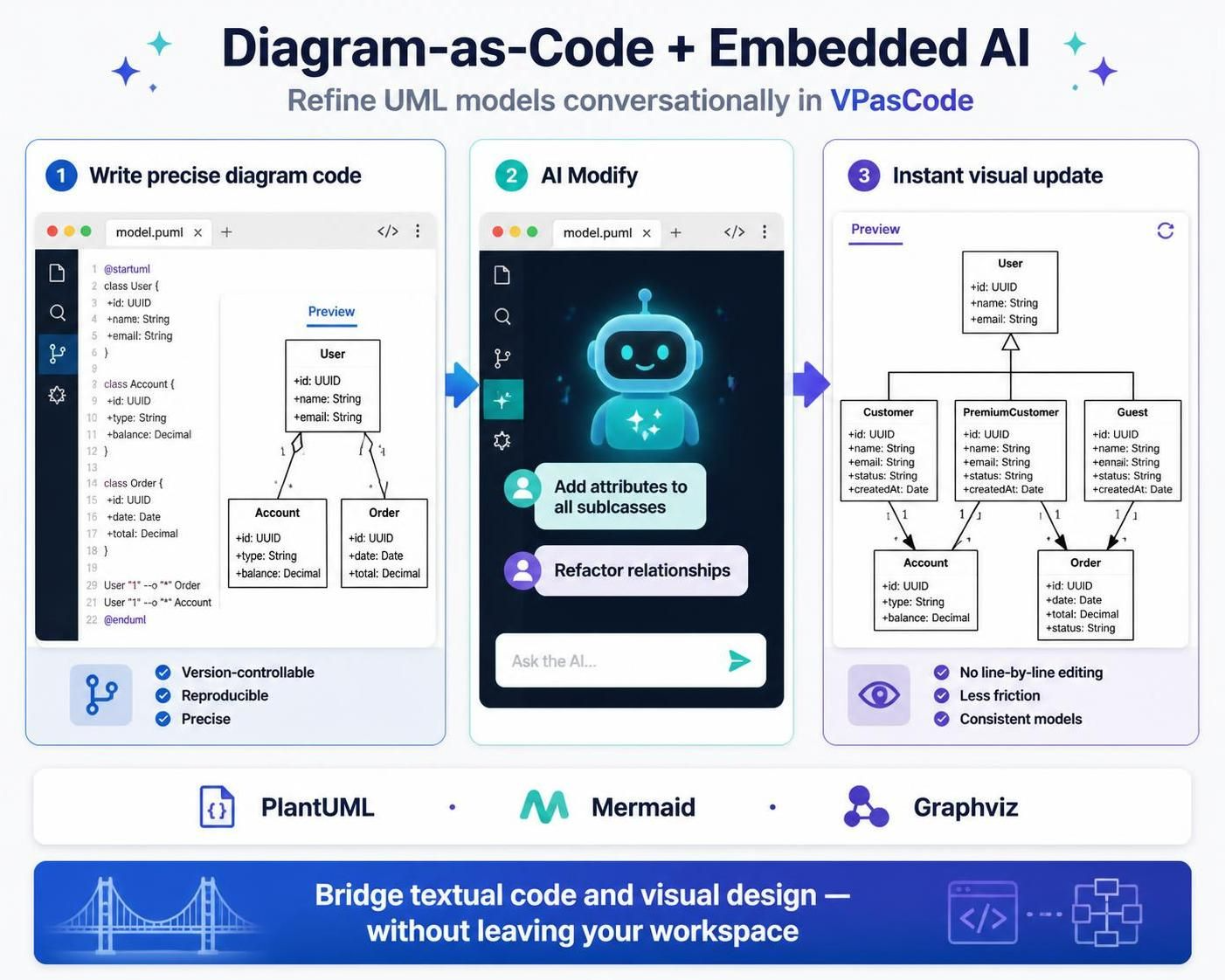
In the modern software engineering landscape, the gap between design and implementation has traditionally been bridged by manual diagramming tools. However, a paradigm shift is occurring with the advent of Diagram-as-Code (DaC). This methodology treats visual models not as static images, but as executable, version-controlled text files. When combined with Embedded AI—specifically within environments like VPasCode (Visual Paradigm as Code)—developers can achieve a workflow where they write code, refine models conversationally, and visualize changes instantly.
This tutorial explores the architecture of this hybrid workflow, breaking down how to transition from static text definitions to dynamic, AI-enhanced visual models.
The Architecture of Diagram-as-Code
Diagram-as-Code relies on Domain Specific Languages (DSL) to describe visual structures. Instead of dragging and dropping shapes on a canvas, you define relationships and attributes using syntax. This approach brings several critical advantages to the software development lifecycle:
- Version Controllability: Since the diagram is a text file (often
.pumlfor PlantUML or.mmdfor Mermaid), it can be committed to Git repositories, allowing for diff tracking and history. - Reproducibility: The model is generated deterministically from the code, eliminating the “drift” that often occurs when diagrams are manually edited in GUI tools.
- Automation: Diagrams can be generated automatically from source code analysis or documentation.
The image provided illustrates a three-step workflow that leverages these principles to maximize developer productivity.
Step 1: Write Precise Diagram Code
The foundation of this workflow is the definition of the system model. In the image, we see a model.puml file. This is a PlantUML file, a popular open-source DSL for creating UML diagrams.
At this stage, the developer acts as the architect, defining the core entities. For example, the code defines a User class and its relationship to Account and Order entities. This “precise code” serves as the single source of truth.
@startuml
class User {
  +id: UUID
  +name: String
  +email: String
}

class Account {
  +id: UUID
  +type: String
  +balance: Decimal
}

class Order {
  +id: UUID
  +date: Date
  +total: Decimal
}

User "1" --o "*" Order
User "1" --o "*" Account
@enduml
Step 2: AI Modify (The Conversational Interface)
Once the initial code is written, the “AI Modify” phase transforms the workflow. Instead of manually editing the text syntax to add complexity—such as handling different user types—the developer interacts with the AI as a collaborative partner.
As shown in the central panel of the image, the developer inputs a natural language prompt: “Add attributes to all subclasses” or “Refactor relationships”. The AI parses the context of the existing model and generates the necessary code changes.
This conversational refinement allows for rapid iteration. For instance, if a business requirement changes to distinguish between a “Guest” and a “PremiumCustomer,” the AI can instantly refactor the code to introduce inheritance hierarchies without the developer needing to recall specific PlantUML syntax for inheritance.
Step 3: Instant Visual Update
The final step is the rendering engine. The modified code is compiled into a visual representation. The image demonstrates the power of this step: the AI successfully identified that the base User class needed to be refactored to support Customer, PremiumCustomer, and Guest.
The resulting diagram shows a clean, consistent Class Diagram with proper inheritance markers (the hollow triangle arrow) and accurate cardinality (the “1” and “*” symbols). The benefits listed in the third panel—No line-by-line editing, Less friction, and Consistent models—are the direct result of this automated rendering loop.
Technical Implementation & Syntax
To implement this workflow, one typically utilizes the PlantUML syntax. The AI’s ability to “refactor relationships” implies a deep understanding of the underlying grammar.
Consider the inheritance structure generated in the image. The AI would have rewritten the code to look something like this:
class User {
  +id: UUID
  +name: String
  +email: String
}

class Customer extends User {
  +status: String
  +createdAt: Date
}

class PremiumCustomer extends Customer {
  +status: String
  +createdAt: Date
}

class Guest extends User {
  +status: String
  +createdAt: Date
}

' Relationships
Customer "1" --o "1" Account
Customer "1" --o "1" Order
Guest "1" --o "1" Account
Guest "1" --o "1" Order
This demonstrates how the AI bridges the gap between high-level intent (“I need sub-classes”) and low-level implementation (extending classes and defining attributes).
Supporting Ecosystems
While the example uses PlantUML, the concept of Diagram-as-Code extends to other tools. The bottom banner of the image highlights three major engines supported in this workflow:
- PlantUML: The industry standard for UML diagrams, offering rich syntax for Class, Sequence, and State diagrams.
- Mermaid: A JavaScript-based diagramming and charting tool that renders markdown-like syntax, popular in documentation sites like GitHub and GitLab.
- Graphviz: A powerful open-source tool for graph visualization, often used for network topology or complex dependency graphs.
Conclusion
The integration of Diagram-as-Code with conversational AI represents a significant leap in system architecture modeling. By treating diagrams as code, developers maintain rigorous control over their designs. By adding AI, they remove the friction of syntax memorization, allowing them to focus on the logic and structure of their systems. This workflow—Write, Modify, Update—ensures that your visual documentation remains in perfect sync with your software.
 vpadmin
- October 12, 2026
