


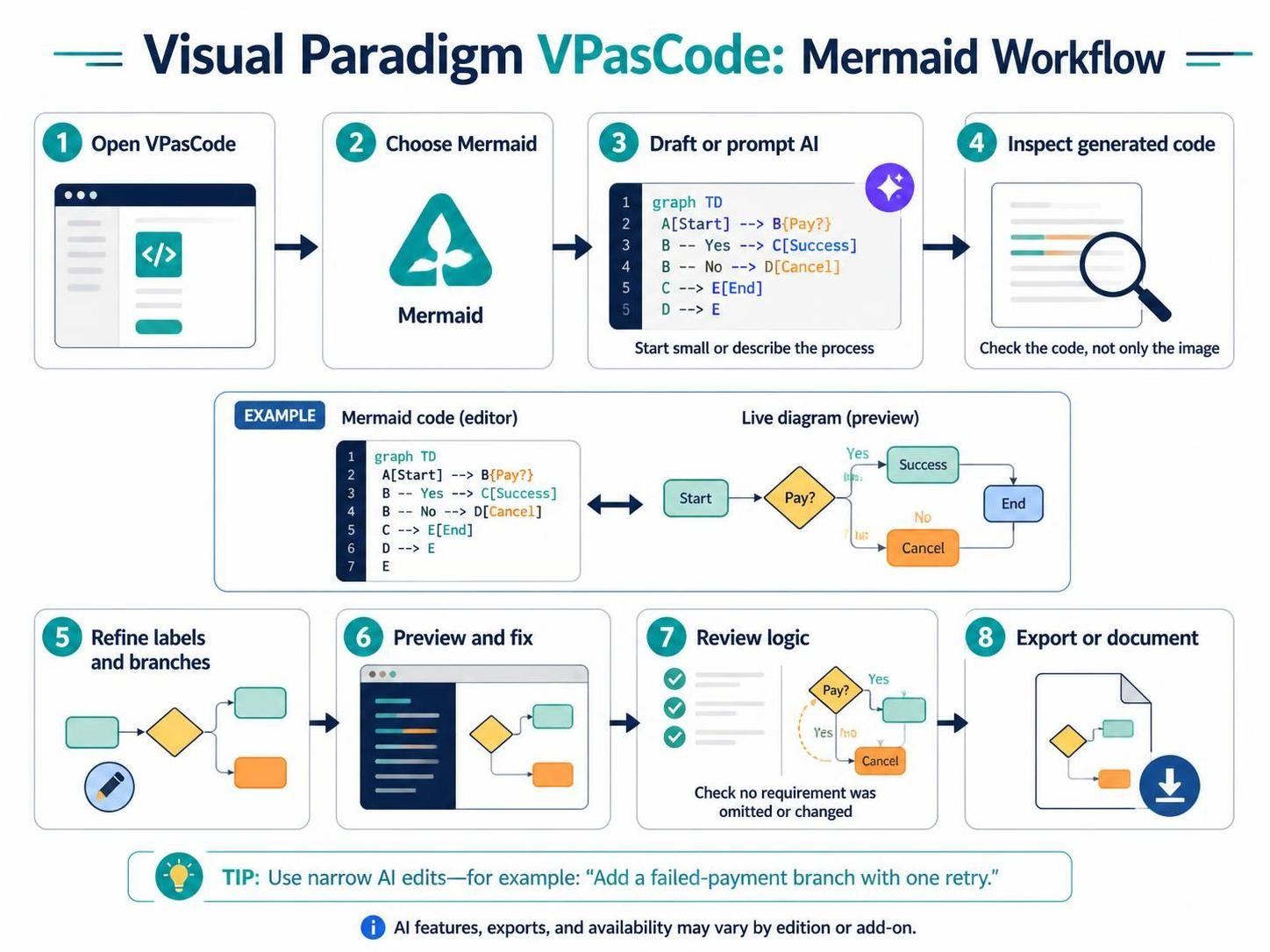
Visual Paradigm’s VPasCode represents a modern shift in system modeling: the transition from drag-and-drop interfaces to a text-centric, “code-first” environment. By leveraging the power of Mermaid syntax, VPasCode allows developers and architects to generate, edit, and maintain complex diagrams through code editing and AI-assisted prompts. This tutorial breaks down the specific workflow required to maximize efficiency, ensuring that your diagrams remain accurate, maintainable, and logically sound.
Step 1: Initialization and Environment Setup
The workflow begins by accessing the browser-based VPasCode workspace. Unlike traditional diagramming tools that rely heavily on mouse gestures, VPasCode prioritizes keyboard input and code structure. The first critical decision is selecting the diagram language. For flowcharts and process logic, Mermaid is the standard choice due to its readability and widespread adoption in technical documentation.
Key Actions in Step 1 & 2:
- Open VPasCode: Launch the editor environment.
- Select Language: Choose “Mermaid” to ensure the renderer interprets your text as a flowchart.
Step 3: Drafting with AI or Manual Syntax
Once the environment is ready, you have two primary paths to create the initial model:
- AI-Driven Generation: You can describe the process naturally to the built-in AI diagram generator. This is ideal for rapid prototyping or starting a complex flow from a high-level description.
- Manual Drafting: Start with a small flowchart structure. For example, defining a simple decision node.
Example: Basic Mermaid Syntax
Below is the foundational code structure for a payment processing flow, which serves as the basis for the workflow:
graph TD
    A[Start] --> B{Pay?}
    B -- Yes --> C[Success]
    B -- No --> D[Cancel]
    C --> E[End]
    D --> E
Step 4: The Critical Inspection Phase
VPasCode distinguishes itself by forcing the user to look beyond the visual representation. In Step 4, the workflow mandates inspecting the generated code, not just the rendered picture. While the visual diagram shows you the “what,” the Mermaid code reveals the “how.” This step is crucial for catching logical errors, such as missing connections or redundant nodes, that might be obscured by the visual layout engine.
Step 5 & 6: Refinement and Live Preview
The core of the VPasCode workflow is the “Live Preview” loop. As you refine node labels, branch conditions (like “Yes/No” paths), or connections in the editor, the preview updates instantly.
Iterative Refinement Strategy
- Refine Labels: Ensure text is concise and semantically clear.
- Fix Layout: Use the live preview to identify confusing overlaps or alignment issues.
- AI Modification: If the editor supports AI modification, use narrow, specific instructions. Avoid vague commands. For instance, instead of “fix this,” try: “Add a failed-payment branch that allows one retry.”
Step 7: Logic Verification
After applying changes, particularly those generated by AI, you must rigorously review the logic. AI models can sometimes hallucinate requirements or alter the intended process flow. You must verify that:
- No requirements were omitted.
- The process logic remains consistent with your business rules.
- All decision diamonds (diamonds in the diagram) have corresponding exit paths.
Step 8: Export and Documentation
The workflow concludes with exporting the finished diagram. VPasCode supports exporting to standard image or vector formats for inclusion in project documentation. Alternatively, because the source is code, you can simply copy the Mermaid syntax directly into Markdown files, READMEs, or internal wikis, ensuring your documentation stays in sync with your diagrams.
Conclusion
By adhering to this structured workflow, you leverage the best of both worlds: the speed of AI-assisted generation and the precision of code-level control. Whether you are designing a system architecture or documenting a business process, the VPasCode workflow ensures your diagrams are robust, editable, and logically verified.
 vpadmin
- October 13, 2026
