


In the realm of software architecture, accurately depicting how systems interact over time is crucial. One of the most common patterns in enterprise software is the processing of batches of data—such as processing a list of pending payments. While a standard sequence diagram shows a linear flow, it often fails to capture the repetitive nature of these tasks efficiently. This is where the loop fragment becomes an essential tool in UML modeling.
This tutorial explores how to model a “Batch Job” processing “Pending Payments” using VPasCode, a text-based diagramming tool powered by Visual Paradigm. We will walk through the syntax, the logic, and the best practices for creating clear, scalable sequence diagrams.
Understanding the Scenario: Batch Payment Processing
Before writing a single line of code, we must define the system components. In this scenario, we have two primary actors:
- Batch Job: An internal system process responsible for handling tasks that do not require real-time user intervention. It acts as the initiator.
- Payment API: An external or internal service that handles the actual financial transactions. It acts as the executor.
The business logic is straightforward: The Batch Job must iterate through a collection of pending payments and submit each one to the API. Without a loop construct, a diagram would need to show an infinite number of interaction lines, making it unreadable. The loop fragment allows us to encapsulate this repetition.
Step-by-Step: Constructing the Diagram
VPasCode allows you to describe diagrams using natural language syntax. Here is how we translate the architecture into code.
1. Defining Participants
First, we declare the participants. In VPasCode (which uses PlantUML syntax), we use the participant keyword. We assign aliases (like Job and API) to make the interaction lines more concise.
@startuml
participant "Batch Job" as Job
participant "Payment API" as API
@enduml
2. Implementing the Loop Fragment
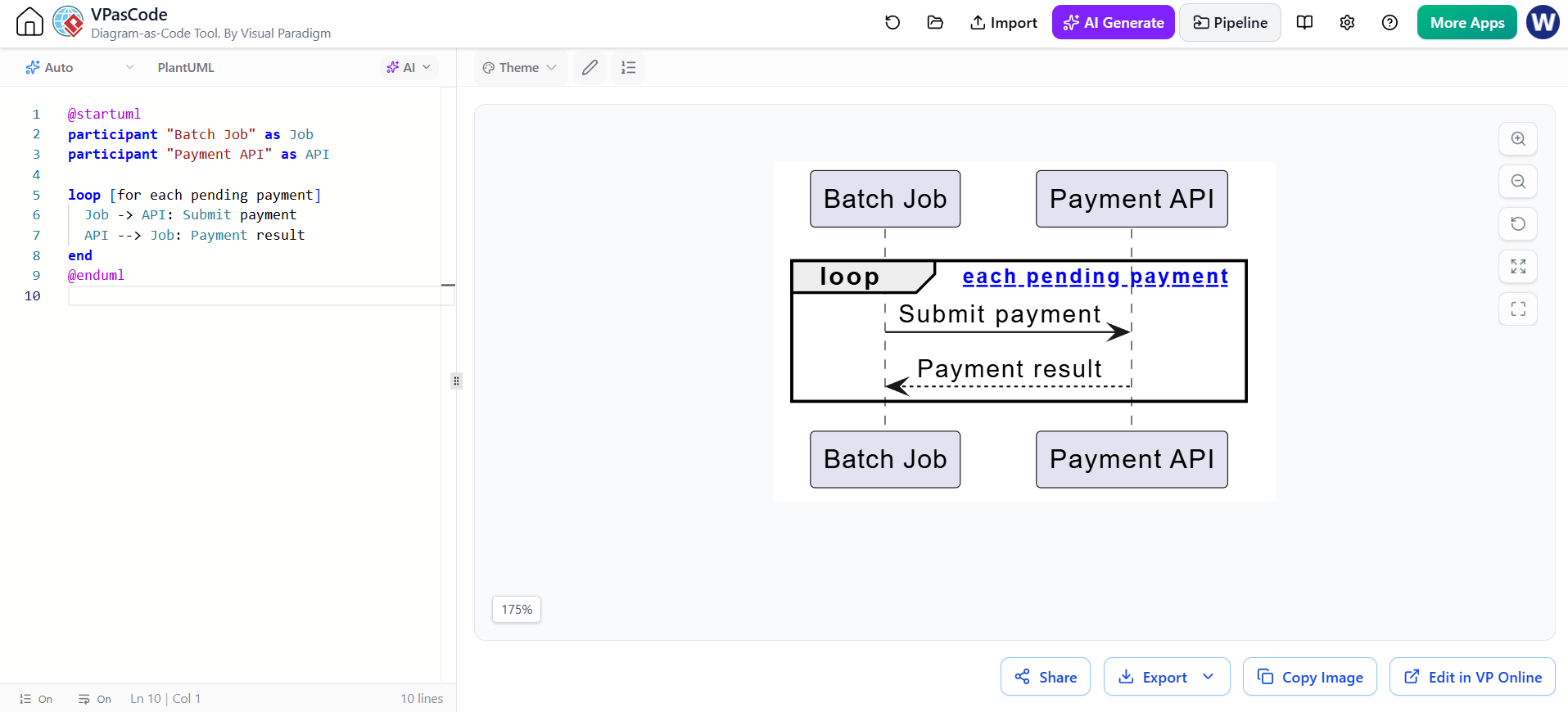
The core of our diagram is the loop. In PlantUML/VPasCode, we use the loop keyword followed by the scope condition. The condition [for each pending payment] clearly defines the iteration context.
Inside the loop, we define the interaction:
Job-> API: A solid arrow represents a synchronous call (sending the request).API–> Job: A dashed arrow represents a return message (sending the result).
Here is the complete code structure:
loop [for each pending payment]
  Job -> API: Submit payment
  API --> Job: Payment result
end
Notice how the indentation helps visualize the scope of the loop, although the parser relies on the loop and end keywords to define the boundaries.
Why Use Loop Fragments?
Using the loop fragment is not just about saving space; it is about improving readability and abstraction. When stakeholders view a sequence diagram, they are looking for the “happy path” or the critical logic flow. If you were to manually draw out 100 payments, the diagram would be cluttered and confusing.
By using the loop, you abstract the “n” iterations into a single, manageable block. This allows the reader to focus on the fact that a submission occurs and a result is returned, without getting lost in the repetition.
Advanced: Handling Errors and Alternatives
Real-world systems are rarely perfect. In a batch job, a payment might fail. While the basic loop handles success, you can expand this using nested fragments. For instance, you could wrap the API --> Job interaction in an alt fragment to handle cases where the API returns an error code, triggering a retry logic within the batch job.
VPasCode makes these complex structures easy to manage because you are editing text. You can simply move lines around or add new conditional blocks without redrawing the entire chart.
Conclusion
The combination of VPasCode and UML Sequence Diagrams provides a robust way to document system behavior. By mastering the loop fragment, you can effectively communicate complex, repetitive backend processes like batch payment processing in a clean, professional manner.
 vpadmin
- October 13, 2026
