


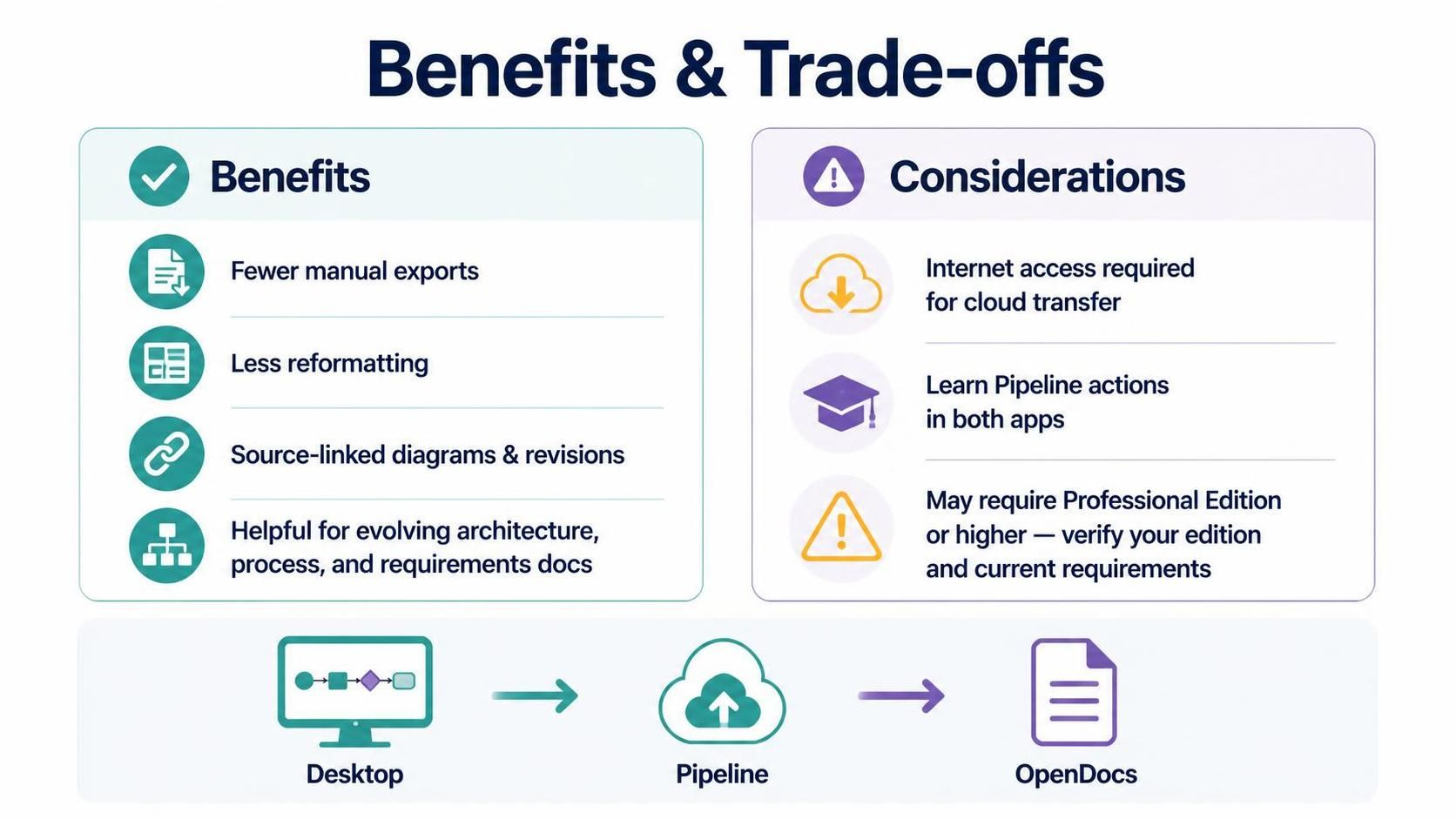
In the modern software development lifecycle, documentation often becomes a bottleneck. It is frequently treated as a secondary activity, leading to “document rot” where the diagrams no longer match the actual system logic. The integration between Visual Paradigm Desktop and OpenDocs via the Pipeline service offers a robust solution to this challenge. This tutorial explores the architecture of this workflow, analyzing the benefits of direct model-to-document synchronization and the practical considerations required to implement it successfully.
The Architecture of Integration
The core concept behind this integration is the separation of concerns: modeling happens locally on the engineer’s machine, while documentation is managed and published in the cloud. The flow is linear and automated, ensuring that the source of truth remains the model file.
The process follows a distinct three-stage pipeline:
- Source (Desktop): The process begins in Visual Paradigm Desktop. Here, architects and developers create and maintain their diagrams, whether they are Class Diagrams, Sequence Diagrams, or BPMN models. The model is the single source of truth.
- Transport (Pipeline): The Desktop application acts as the sender. It does not simply email files; it utilizes a secure cloud pipeline to send artifacts. This step requires an active internet connection, as the data must traverse the network to reach the documentation server.
- Destination (OpenDocs): The final destination is OpenDocs. Upon receiving the artifact, the system ingests the data, making it immediately available as a web-based document. This creates a direct link between the model and the published documentation.
Why This Flow Matters
By establishing this direct route from modeling to documentation, teams eliminate the traditional “export-then-edit” cycle. In legacy workflows, a team member would export a diagram to PDF or Word, open a separate document editor, and manually reformat the image to fit a template. This integration removes the need for manual exports and reformatting entirely.
Furthermore, this architecture supports version control for documentation. Because the diagrams are associated with their source and revisions in the model, any update to the design in the Desktop application is propagated through the Pipeline. This is particularly useful for teams maintaining architecture, process, or requirements documentation that changes over time.
Practical Considerations for Implementation
While the benefits are clear, successful implementation requires understanding the trade-offs and prerequisites involved in the workflow.
1. Connectivity Requirements
The most immediate technical requirement is Internet Access. The Pipeline service functions as a bridge to the cloud. If your organization operates in a strictly air-gapped environment without outbound internet access, this specific workflow cannot be utilized without significant architectural changes to your internal infrastructure.
2. The Learning Curve: Pipeline Actions
Users must learn where the Pipeline actions are located within the software. Unlike standard export menus, these actions are specific to the integration and require familiarity with both the Desktop application and the OpenDocs interface. Teams should allocate time for training to ensure that engineers know how to trigger the transfer and where to find the configuration settings in both applications.
3. Edition Limitations
It is critical to verify your software license before planning a rollout. The image summary notes that this feature may require Professional Edition or higher. Using this workflow with a Standard or lower edition may result in functionality errors. Always check your installed edition and current product requirements to ensure compliance.
Summary of Benefits vs. Trade-offs
To visualize the decision-making process for adopting this workflow, consider the following comparison table:
| Benefits | Trade-offs / Considerations |
|---|---|
| Direct Modeling Route Eliminates the gap between design and documentation. |
Internet Dependency Requires reliable connectivity for cloud transfer. |
| Reduced Manual Work Fewer manual exports and less reformatting required. |
Training Required Users must learn specific Pipeline actions. |
| Source-Linked Revisions Diagrams stay associated with their source and version history. |
Licensing Constraints May require Professional Edition or higher. |
| Evolution Support Ideal for evolving architecture and process docs. |
Workflow Shift Requires a shift from local file management to cloud-centric workflows. |
Conclusion
The integration between Visual Paradigm Desktop, Pipeline, and OpenDocs represents a mature approach to technical documentation. By leveraging the cloud to bridge the gap between design and publishing, organizations can ensure their documentation remains accurate and up-to-date. However, success depends on proper planning regarding internet connectivity, user training, and license verification. When these factors are addressed, the result is a streamlined, professional documentation process that scales with the team’s needs.
 vpadmin
- October 15, 2026
