


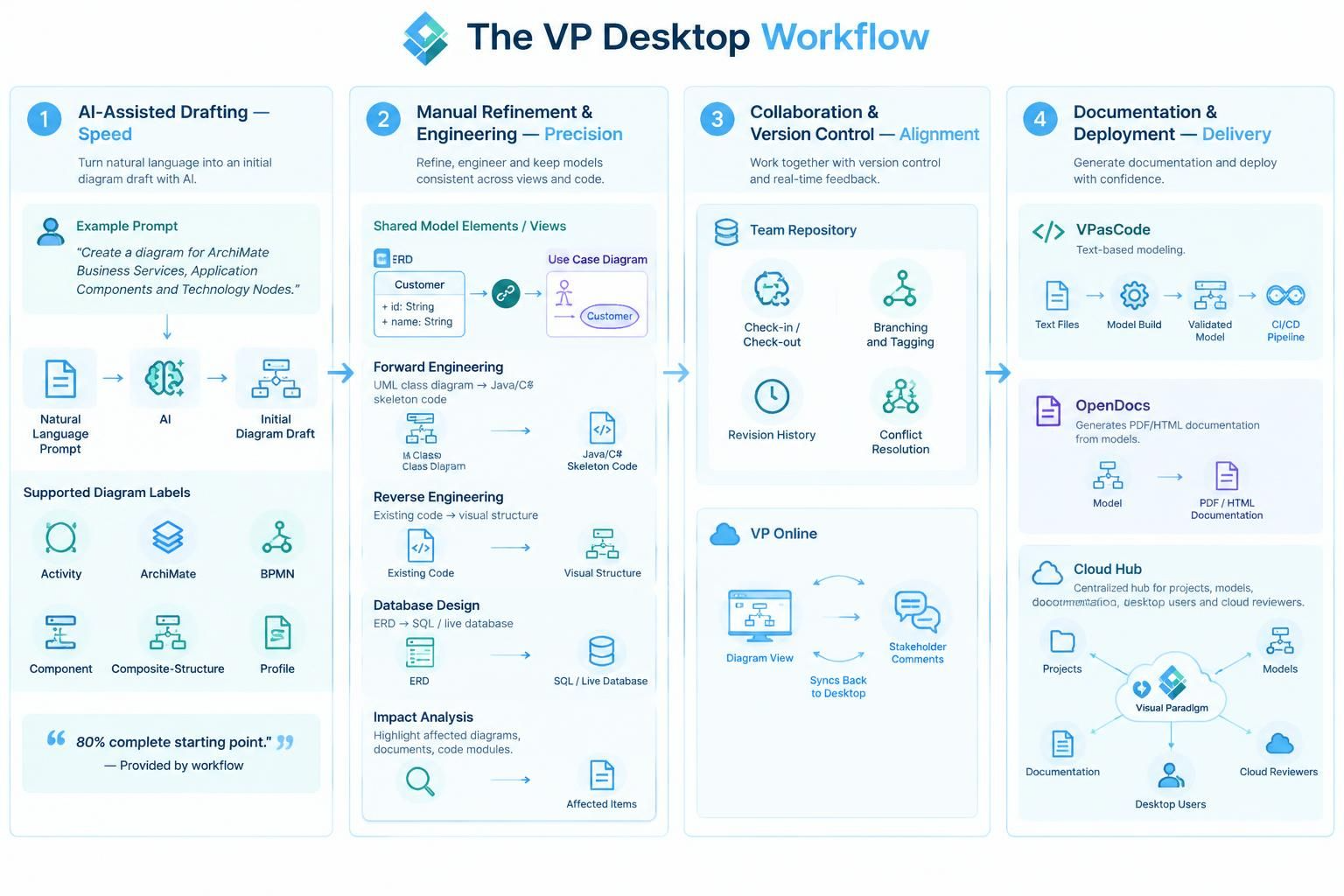
Modern enterprise architecture demands speed without sacrificing precision. Visual Paradigm (VP) Desktop has evolved from a static drawing tool into a dynamic, model-driven engineering environment. By integrating embedded AI, robust version control, and a unified cloud ecosystem, the VP Desktop workflow transforms how we design, engineer, and deliver complex systems.
This tutorial breaks down the four-phase workflow: AI-Assisted Drafting, Manual Refinement, Collaboration, and Deployment. We will explore how these phases work together to create a seamless engineering lifecycle.
Phase 1: AI-Assisted Drafting (Speed)
The era of staring at a blank canvas is over. The first phase of the VP workflow focuses on acceleration using embedded AI. Instead of manually placing shapes and connecting lines, you can now define the system’s structure through natural language.
The Prompt-to-Draft Mechanism
VP Desktop interprets high-level descriptions to generate complex diagrams. This is not merely a text-to-image generator; it creates a structured model. When you input a prompt, the AI understands the semantic relationships between entities.
Example Workflow:
- Natural Language Input: You type a description such as: “Create an ArchiMate diagram showing the relationship between Business Services, Application Components, and Technology Nodes.”
- AI Processing: The embedded AI engine parses the keywords (Business Services, Application Components) and maps them to the correct ArchiMate stereotypes and relationships.
- Initial Draft Generation: The system renders a diagram that is approximately 80% complete, providing a standard-compliant structure immediately.
Supported Diagram Types
Recent updates have expanded the AI’s capabilities to cover a wide range of enterprise modeling standards. You can now instantly generate drafts for:
- Activity Diagrams: For process flow visualization.
- ArchiMate: For enterprise architecture alignment.
- BPMN: For business process modeling.
- Component & Composite-Structure: For software architecture.
- Profile Diagrams: For domain-specific extensions.
Phase 2: Manual Refinement & Engineering (Precision)
Once the AI provides the “80% complete” starting point, the workflow shifts to Phase 2: Manual Refinement. This phase leverages the power of model-driven engineering to ensure that the visual diagram and the underlying code are perfectly synchronized.
Shared Model Elements & Views
A common pitfall in traditional diagramming tools is data duplication—drawing a “Customer” box in one diagram and manually typing it in another. VP Desktop avoids this by using a centralized model database.
If you define a Customer entity in an Entity Relationship Diagram (ERD), that same object exists in the database. You can then reference it in a Use Case Diagram. If you update the Customer table in the ERD, the Change is reflected across all views automatically.
Code & Database Engineering
The true power of the desktop workflow is bidirectional engineering. You are not just drawing diagrams; you are writing code and building databases.
Forward Engineering (Model to Code):
Define your software structure using UML Class Diagrams. Once the design is finalized, VP Desktop can generate the skeleton code for your target language (e.g., Java, C#). This ensures your implementation starts with a correct structure.
Reverse Engineering (Code to Model):
Have an existing legacy codebase? Import it into VP Desktop. The tool analyzes the source code and reconstructs the visual structure (UML diagrams), allowing you to visualize and document what you have.
Database Design:
Transform Entity Relationship Diagrams (ERD) into SQL scripts. VP Desktop can even sync with live databases, ensuring your physical schema matches your logical design.
Impact Analysis
Before making critical changes, use the Impact Analysis tool. This feature highlights exactly which other diagrams, documents, or code modules will be affected by a modification. This is crucial for preventing “ripple effects” that break dependent systems.
Phase 3: Collaboration & Version Control (Alignment)
Models are living artifacts that require team input. The VP Desktop workflow integrates directly with robust collaboration tools to prevent the “version chaos” often seen in software projects.
The Team Repository
Think of the Team Repository as a specialized version control system for visual models, similar to Git but designed for complex diagrams. It features:
- Check-in/Check-out: Prevents conflicting edits by locking a model while a user is working on it.
- Branching and Tagging: Allows teams to create “Release 1.0” tags or work on experimental features in a separate branch without disrupting the main model.
- Conflict Resolution: Provides tools to merge changes safely if two users edited the same element.
Stakeholder Commenting
Not every reviewer has a license for the Desktop client. VP Online bridges this gap. You can share specific diagram views with non-technical stakeholders. They can leave comments directly on the model interface. These comments sync back to the Desktop client, allowing the architect to resolve feedback without losing context.
Phase 4: Documentation & Deployment (Delivery)
The final phase focuses on turning the abstract models into actionable deliverables. This phase ensures that your documentation is never stale and that your design is ready for modern deployment pipelines.
VPasCode & Diagram-as-Code
For teams that prefer text-based workflows or are building CI/CD pipelines, VPasCode is a game-changer. It allows you to define your models using a code-like syntax. This means:
- You can version control your diagrams in plain text files.
- VP Desktop can render and validate these files automatically.
- Models can be part of your continuous integration process.
OpenDocs Integration
Documentation often becomes outdated the moment it is published. OpenDocs solves this by automatically generating comprehensive PDF or HTML documentation from your models. As you update the model in Phase 2, the documentation updates instantly. This guarantees that the “blueprint” always matches the “building.”
The Visual Paradigm Unified Platform
Finally, the Cloud Hub acts as the central nervous system. It bridges the gap between the heavy-lifting of the Desktop client and the accessibility of the Cloud. Whether you are a power-user working on complex Java code or a reviewer checking a status update, the Unified Platform ensures everyone sees the same truth.
 vpadmin
- November 24, 2026
