


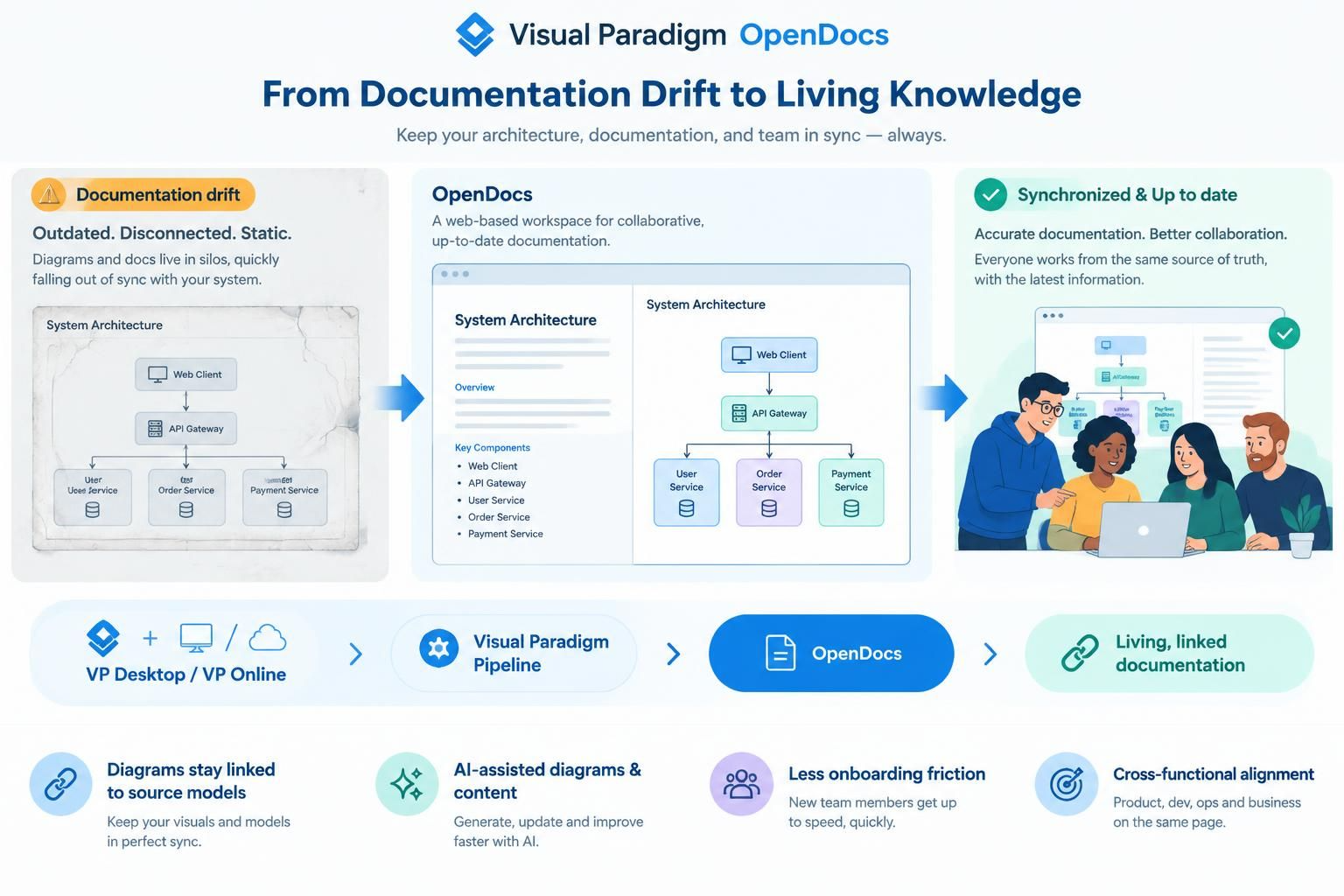
In the modern landscape of software development, the most expensive artifact in your repository is often not the code itself, but the documentation that describes it. Teams frequently fall into the trap of “documentation drift,” where static screenshots of architecture diagrams become obsolete the moment a commit is pushed to the main branch. This disconnect creates silos, increases onboarding friction, and leads to costly miscommunications.
Visual Paradigm OpenDocs offers a paradigm shift by unifying text authoring with visual diagramming in a single, web-based workspace. However, the true power of OpenDocs lies not merely in its editing capabilities, but in its integration with the broader Visual Paradigm ecosystem through the Pipeline. This tutorial explores how teams can leverage this architecture to transform documentation from a maintenance burden into a dynamic, synchronized knowledge base.
The Architecture of Synchronization: Understanding the Pipeline
Traditional documentation workflows are often linear: a model is created, a screenshot is taken, and that image is pasted into a wiki. The moment the model changes, the wiki becomes inaccurate. OpenDocs solves this by introducing a cloud-based asset and revision bridge known as the Visual Paradigm Pipeline.
Think of the Pipeline as a “living link” between your modeling tools and your documentation. It ensures that every diagram embedded in OpenDocs remains a live reference to its source model. When the source model updates, the documentation updates automatically.
Key Components of the Ecosystem
To maximize the benefits of this system, it is crucial to understand the roles of the different tools within the Unified Platform:
- Visual Paradigm Desktop: The powerhouse for creating complex enterprise architectures, BPMN processes, or SysML diagrams. This is where “Power Users” perform deep modeling.
- VP Online: A browser-based tool for lightweight diagramming and collaboration. It allows teams to create visuals without local installations.
- VPasCode: A developer-centric tool that supports text-based modeling standards like PlantUML and Mermaid. This enables “Diagram-as-Code” workflows.
- OpenDocs: The final destination for the knowledge base. It is a flexible, web-based workspace where structured notes and visual assets coexist.
Step-by-Step: The Sync and Revision Workflow
The core workflow for maintaining living documentation is straightforward. By following this process, teams can eliminate documentation drift effectively.
- Model Creation: Create your diagram using your preferred tool (Desktop, Online, or VPasCode).
- Send to Pipeline: Export or commit the diagram from your source tool directly to the OpenDocs Pipeline. This action establishes the link.
- Insert into OpenDocs: In the OpenDocs editor, use the
Insert > Pipelinefeature to embed the artifact. The diagram is now part of your documentation but linked to the source. - Update and Swap: When the source model is updated, the Pipeline panel in OpenDocs flags the availability of a new revision. Authors can review the changes and swap the old diagram for the new one with a single click.
This workflow ensures that the documentation always reflects the current state of the project, regardless of how many times the underlying system evolves.
Diagram-as-Code Integration
For development teams that prefer version control at the file level, the integration with VPasCode is seamless. You can write PlantUML or Mermaid syntax in VPasCode, push it to the Pipeline, and embed it alongside API specs and runbooks in OpenDocs.
graph TD
    User[User] --> WebClient[Web Client]
    WebClient --> API[API Gateway]
    API --> UserSvc[User Service]
    API --> OrderSvc[Order Service]
    API --> PaymentSvc[Payment Service]
    UserSvc --> DB[(DB)]
    OrderSvc --> DB
    PaymentSvc --> DB
The code above represents a standard C4 Context diagram. In a VPasCode workflow, this code is the source of truth. When rendered in OpenDocs via the Pipeline, it displays as a high-quality, interactive diagram that updates whenever the code changes.
High-Value Use Cases
The combination of OpenDocs and the Visual Paradigm ecosystem supports several critical business and technical workflows:
1. Living Software Architecture and C4 Specs
Software architects can maintain complex system component diagrams in VP Desktop. As the architecture evolves across sprints, updates are committed to the Pipeline and swapped into OpenDocs. This eliminates the need to manually rebuild documentation pages, ensuring architectural specs remain trustworthy.
2. Rapid AI-to-Knowledge-Base Ideation
Product managers can use the AI Visual Modeling Chatbot to generate initial use case diagrams from plain-English prompts. Once refined, these visuals are sent to the Pipeline. OpenDocs’ AI writing tools can then draft surrounding requirements, user stories, and acceptance criteria, significantly speeding up the initial documentation phase.
3. Cross-Functional Business Process Hubs
Business analysts can map operational workflows using BPMN in VP Online or Desktop, while operations teams write Standard Operating Procedures (SOPs) in OpenDocs. Stakeholders can view the latest process maps and step-by-step instructions in a single browser workspace, reducing friction between process design and execution.
Why This Combination Stands Out
The integration of OpenDocs with the Visual Paradigm ecosystem addresses several key pain points in modern knowledge management:
- Eliminates Documentation Drift: By keeping visuals linked to their source models with tracked revisions, teams avoid the common pitfall of outdated static images.
- Matches the Right Tool to Each Role: Power users get deep engineering features in VP Desktop, developers get text-based speed in VPasCode, and writers get a clean editor in OpenDocs. All roles contribute to a single source of truth.
- End-to-End AI Acceleration: AI assists across the entire lifecycle, from generating initial diagrams to drafting textual explanations, reducing the manual effort required to maintain comprehensive documentation.
- Reduces Context Switching: By centralizing creation and publication within the Visual Paradigm Unified Platform, teams reduce the overhead of managing disparate files and tools.
Conclusion
Visual Paradigm OpenDocs represents a significant shift in how teams approach documentation. By moving away from static, disconnected files and embracing a living, synchronized knowledge base, organizations can ensure that their documentation remains a valuable asset rather than a bureaucratic hurdle. The integration with the Visual Paradigm Pipeline ensures that diagrams are always up-to-date, while AI capabilities accelerate both visual and textual content creation. For teams looking to streamline their knowledge management, reduce documentation debt, and improve cross-functional collaboration, the OpenDocs ecosystem offers a powerful and cohesive solution.
 vpadmin
- November 25, 2026
