


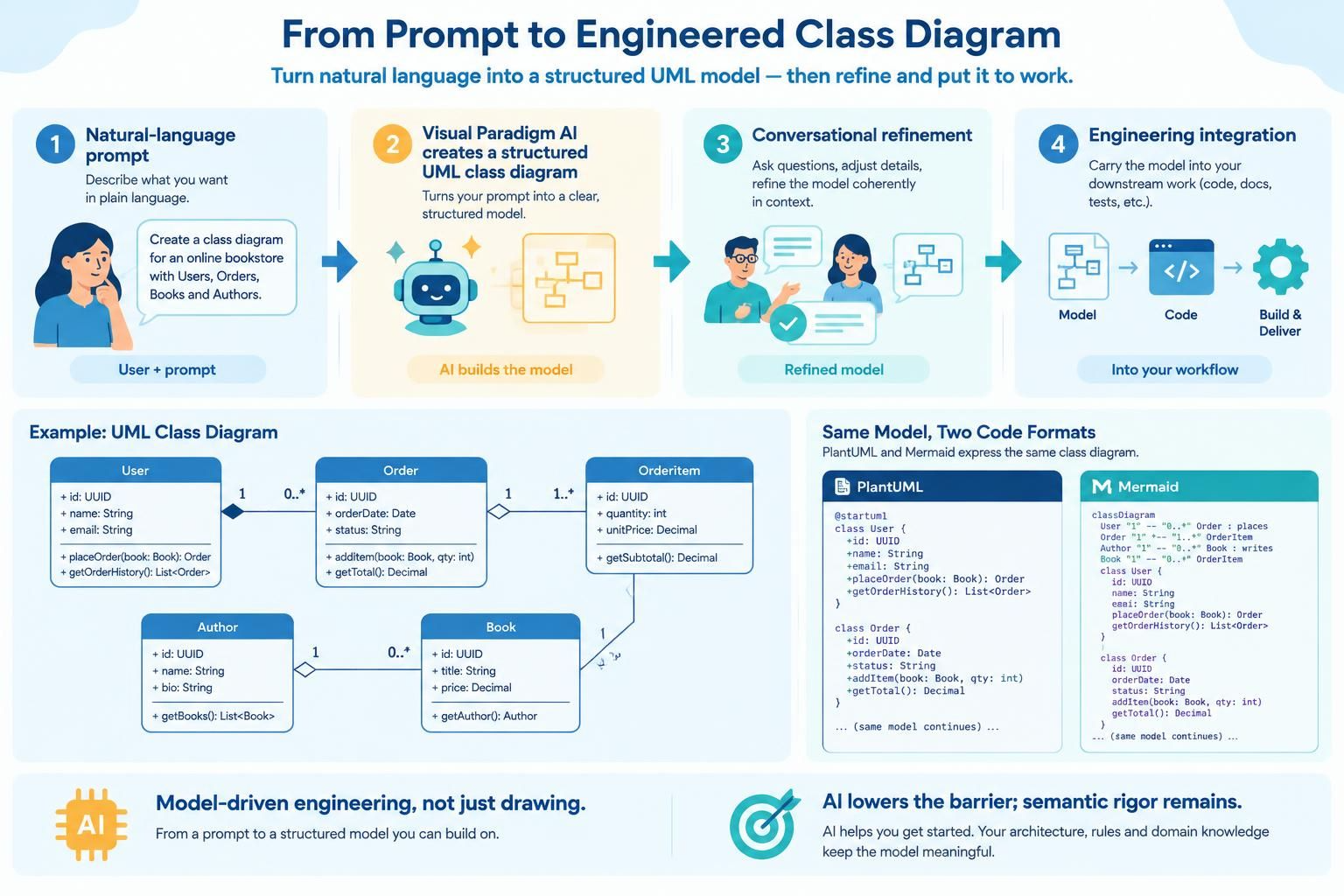
In the rapidly evolving landscape of software development, the Class Diagram remains one of the most widely used UML Diagrams. Historically, creating these diagrams was a manual, time-consuming process often relegated to a static phase of design before coding began. However, the recent integration of Artificial Intelligence has transformed this static artifact into a dynamic, conversational engineering tool. When used in conjunction with AI, the class diagram is no longer just a picture; it is a semantic contract between human intent and machine execution.
This tutorial explores the “Diagrams as Code” paradigm—a modern term increasingly used in Agile and AI-driven workflows. We will examine how tools like Visual Paradigm VPasCode and Visual Paradigm UML serve this purpose perfectly, allowing developers to bridge the gap between natural language prompts and production-ready architectures.
1. The Shift: From “Drawing” to “Engineering”
Traditional modeling tools often treated diagrams as graphical representations—essentially “pictures” of code. In this view, a shape is just a shape. If you rename a class in one diagram, other diagrams do not update because the tool does not “understand” the relationship between the shapes.
Modern Model-Driven Engineering (MDE), however, treats the class diagram as a metamodel. This distinction is fundamental to understanding the relevance of class diagrams in the AI era:
- The Model-Based Approach: Every class is an instantiable metaclass conforming to the UML 2.x specification. The tool understands that a Member class is semantically linked to a Book class via a specific relationship rule.
- Model-View Consistency: When you modify a model, changes cascade. Renaming a class in your architecture diagram automatically updates every other diagram, database schema, and generated code file referencing that class. This is impossible in pure drawing tools.
2. The AI Workflow: Conversational Modeling
AI assistants have transformed the creation of these models from a manual task into a conversational activity. Instead of dragging boxes and configuring properties, developers describe their domain in plain language. This workflow typically follows four distinct stages:
Step 1: The Natural Language Prompt
The process begins by describing the system. For an e-commerce scenario, a prompt might be: “Generate a class diagram for an online bookstore with Users, Orders, Books, and Authors. Include attributes, associations with multiplicities, and inheritance.”
Step 2: AI Generation & Semantic Validation
The AI does not just guess shapes; it generates a structured, semantically valid model. It understands UML rules, such as ensuring every class has at least one attribute or that relationships connect valid entities. It flags logical errors before they reach the codebase.
Step 3: Conversational Refinement
Once the initial draft is generated, the developer refines it conversationally. This is where the “Diagrams as Code” capability shines. You can issue commands like:
- Cascade Renaming: “Rename ‘Member’ to ‘Patron’.” The AI updates the name and all associated references instantly.
- Encapsulation: “Add a ‘status’ attribute to Order with getter and setter methods.” The AI regenerates the class compartment with the correct operations.
Step 4: Engineering Integration
The final step is carrying the model into downstream work. A well-formed class model is a first-class citizen in the engineering pipeline. From the diagram, you can generate source code (Java, C#, C++), produce database schemas (DDL), or generate ORM mappings (like Hibernate).
3. Practical Example: The Online Bookstore Model
To illustrate how this model translates across different formats and tools, consider a standard Online Bookstore domain. Below is how the same domain is modeled in two popular text-based diagramming formats, demonstrating the consistency of the underlying model supported by tools like VPasCode.
While Visual Paradigm UML provides a robust GUI for this, the underlying model can be exported or defined via text-based formats for version control and CI/CD pipelines.
PlantUML Representation
@startuml
skinparam classAttributeIconSize 0
skinparam shadowing false

class User {
  +id: UUID
  +name: String
  +email: String
  +placeOrder(book: Book): Order
  +getOrderHistory(): List
}

class Order {
  +id: UUID
  +orderDate: Date
  +status: String
  +addItem(book: Book, qty: int)
  +getTotal(): Decimal
}

class OrderItem {
  +id: UUID
  +quantity: int
  +unitPrice: Decimal
  +getSubtotal(): Decimal
}

class Author {
  +id: UUID
  +name: String
  +bio: String
  +getBooks(): List
}

class Book {
  +id: UUID
  +title: String
  +price: Decimal
  +getAuthor(): Author
}

User "1" *-- "0..*" Order : places
Order "1" *-- "1..*" OrderItem : contains
Book "1" *-- "0..*" OrderItem : is in
Author "1" *-- "0..*" Book : writes
@enduml
Mermaid Representation
classDiagram
    class User {
        +id: UUID
        +name: String
        +email: String
        +placeOrder(book: Book): Order
        +getOrderHistory(): List
    }

    class Order {
        +id: UUID
        +orderDate: Date
        +status: String
        +addItem(book: Book, qty: int)
        +getTotal(): Decimal
    }

    class OrderItem {
        +id: UUID
        +quantity: int
        +unitPrice: Decimal
        +getSubtotal(): Decimal
    }

    class Author {
        +id: UUID
        +name: String
        +bio: String
        +getBooks(): List
    }

    class Book {
        +id: UUID
        +title: String
        +price: Decimal
        +getAuthor(): Author
    }

    User "1" *-- "0..*" Order : places
    Order "1" *-- "1..*" OrderItem : contains
    Book "1" *-- "0..*" OrderItem : is in
    Author "1" *-- "0..*" Book : writes
4. Strategic Benefits for Teams
For modern development teams, the relevance of class diagrams is tied to the specific benefits they offer across different roles:
- Software Architects: They use AI to rapidly generate candidate structures, critique them, and refine the architecture without starting from a blank canvas.
- Agile Teams: They translate user stories directly into engineering models during sprint design sessions, allowing the AI chatbot to accept natural-language requirements and return structured diagrams.
- Developers Learning UML: Tools with wizards provide educational tips at each stage, explaining why certain modeling choices are made, such as identifying nouns for classes.
- Database Designers: Class models flow directly into ERD generation and DDL scripts, ensuring the database schema stays synchronized with the live application logic.
5. Conclusion: Engineering Artifacts, Not Presentation Slides
The future of software development is not about abandoning diagrams for code; it is about treating diagrams as engineering artifacts. By leveraging AI to handle the syntax and initial generation, teams can focus on the semantics and logic of their system.
When you start with a prompt, refine conversationally, and import the model into a desktop workspace, you create a robust foundation for code generation, testing, and documentation. The AI lowers the barrier to entry, but the semantic rigor of the class diagram keeps the architecture meaningful.
 vpadmin
- November 25, 2026
