


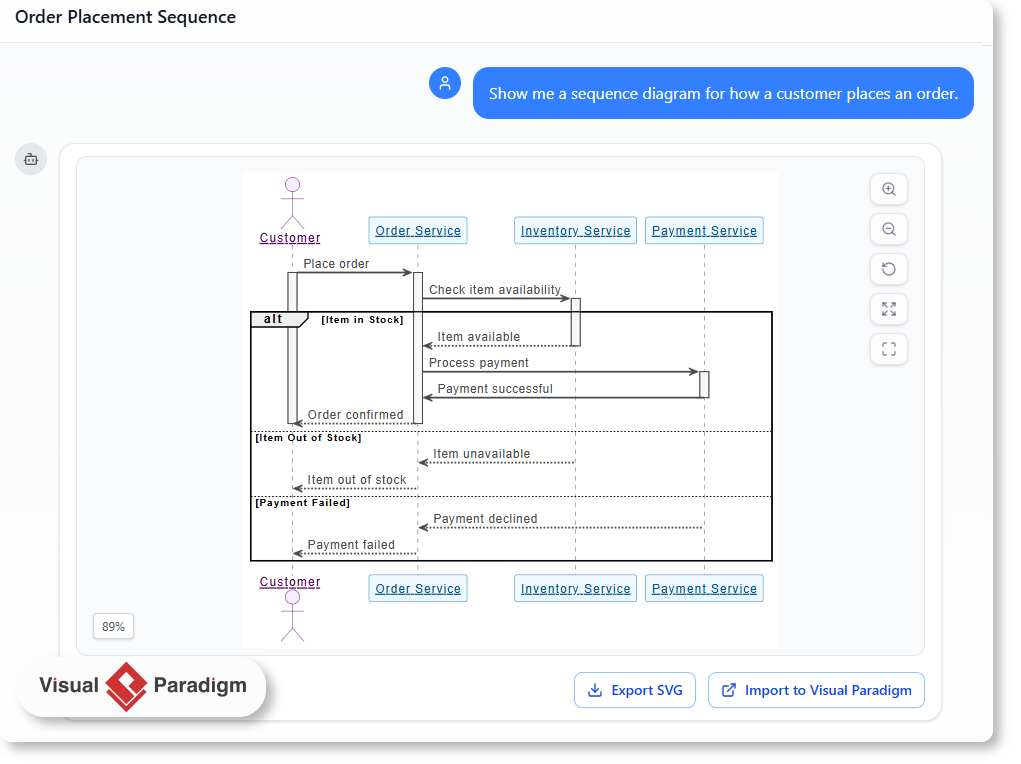
In modern software engineering, understanding the flow of interactions between system components is critical. While traditionally this required manual drawing in UML tools, Artificial Intelligence has revolutionized this process. This tutorial explores how to leverage AI to generate complex Sequence Diagrams, specifically focusing on the architecture of an “Order Placement” system using Visual Paradigm’s AI capabilities.
Understanding the Anatomy of a Sequence Diagram
Before generating diagrams, it is vital to understand the semantic elements that the AI constructs. A sequence diagram is a time-ordered interaction diagram. In the context of the “Order Placement” scenario, the AI constructs the following core components:
- Lifelines: These are the vertical dashed lines representing the actors or system objects. In our example, we see the Customer (the initiator), the Order Service (the orchestrator), the Inventory Service (a dependency), and the Payment Service (a critical external system).
- Messages: The horizontal arrows represent communication. Solid arrows indicate synchronous method calls (e.g., “Place order”), while dashed arrows indicate return messages (e.g., “Item available”).
- Activation Bars: The narrow rectangles on the lifelines indicate the period during which an object is performing an action or waiting for a response. For instance, the Order Service is active from the moment it receives “Place order” until it sends “Order confirmed”.
The Power of Combined Fragments
Real-world logic is rarely linear. It involves choices, loops, and alternatives. Sequence diagrams use Combined Fragments to encapsulate these logic paths. The AI in Visual Paradigm is capable of parsing natural language requirements and translating them into these complex UML structures.
In the “Order Placement” diagram, the AI has identified a branching logic path using an alt (Alternative) fragment. This container groups mutually exclusive execution paths, ensuring the model reflects reality where an order might succeed or fail based on inventory availability.
Step-by-Step: Generating the Order Placement Architecture
Visual Paradigm’s AI Chatbot transforms the modeling process from a manual drawing exercise into a conversational design session. Here is how to replicate this architecture generation.
- Access the AI Interface: Navigate to the Visual Paradigm AI Chatbot interface. This tool is designed to interpret natural language prompts and render UML diagrams instantly.
- Define the Scenario: Instead of drawing lines, you describe the system. A robust prompt for this architecture would be: “Show me a sequence diagram for how a customer places an order.”
- Analyze the AI Output: The AI interprets this prompt and creates a default architecture. It automatically identifies the necessary actors (Customer, Services) and the primary flow (Ordering).
- Refine the Logic (Iterative Approach): The AI is not just a renderer; it is a collaborator. You can refine the generated model by adding constraints. For example, you might ask: “Add an alternative path if the item is out of stock.”
- Export the Model: Once the diagram accurately reflects the system architecture, you can export the SVG for documentation or import it directly into Visual Paradigm for further editing and code generation.
Deep Dive: The “Alt” Fragment Logic
The diagram provided demonstrates a sophisticated handling of business logic. The alt frame is a standard UML construct used to represent alternative executions. The AI segments the lifelines into two distinct scenarios within this frame:
Scenario A: [Item in Stock]
This is the happy path. When the Order Service checks the Inventory Service and receives a confirmation that the item is available, the system proceeds to the Payment Service. This sequence represents a successful transaction flow.
Scenario B: [Item Out of Stock]
This is the error handling path. If the Inventory Service returns a negative status, the flow diverts here. The system does not attempt payment. Instead, it immediately returns an “Item out of stock” message to the Customer, terminating the interaction efficiently.
Scenario C: [Payment Failed]
The diagram also illustrates a nested failure scenario. Even if the item is in stock, the Payment Service might decline the transaction. The diagram captures this by showing the “Payment declined” return message, ensuring the model covers both inventory and financial failure points.
Tooling: Visual Paradigm
Visual Paradigm stands out as a comprehensive modeling solution that integrates AI directly into the workflow. Unlike generic tools, Visual Paradigm allows you to not only generate diagrams via chat but also edit them, validate them against syntax rules, and export them into various industry-standard formats.
By utilizing the Export SVG or Import to Visual Paradigm features, you ensure that the AI-generated model is not just a static image, but a living part of your software documentation. This seamless integration between natural language input and UML output empowers developers to focus on system architecture rather than the mechanics of drawing.
 vpadmin
- October 9, 2026
