


In the rapidly evolving landscape of software architecture and business process modeling, the barrier between abstract thought and visual representation is constantly being lowered by Artificial Intelligence. However, as AI capabilities expand, the interface design of the tools we use becomes just as critical as the underlying algorithms. Visual Paradigm has recognized a common pitfall in modern software development: the fragmentation of tools.
This tutorial explores the architectural shift towards a centralized AI Tools Menu. We will analyze why consolidating features like generation, modification, and translation into a single interface is essential for maintaining developer focus, reducing cognitive load, and streamlining the modeling workflow.
The Problem: Scattered Contexts and Cognitive Load
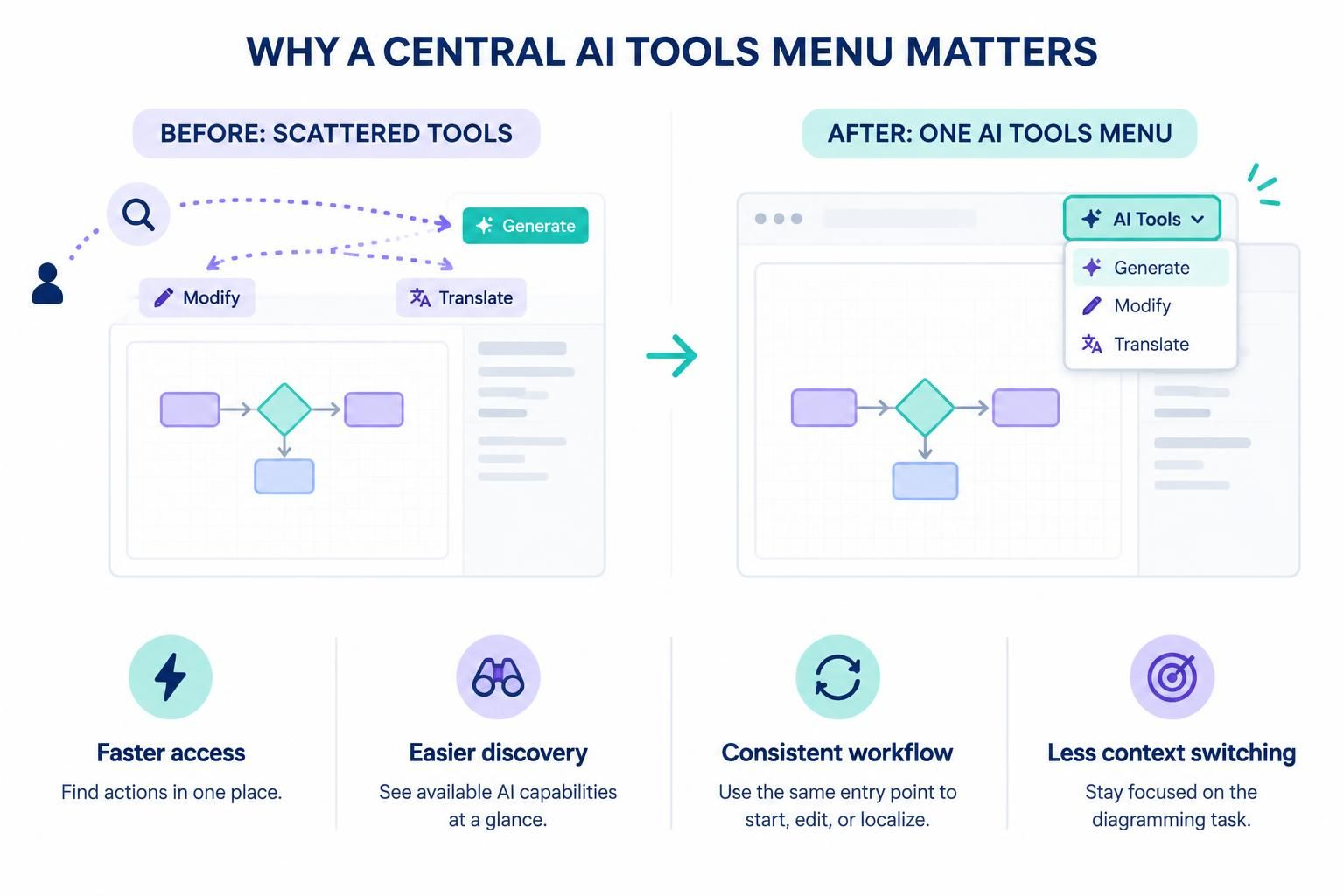
Before the introduction of a unified menu, AI functionalities were often siloed across the user interface. This architectural decision created a disjointed experience for the modeler. Consider the typical workflow before this update:
- Generation was often tucked away in a primary application bar, requiring the user to leave the canvas context.
- Modification and Refinement were located above the code editor or within specific context menus.
- Translation (for localization) was a separate action, often requiring navigation to different settings.
This fragmentation forced users to engage in a constant “hunt” for tools. Every time a user switched from generating a diagram to modifying a specific node, they had to mentally map where that tool lived. This interruption of flow is known as context switching, and it significantly impacts productivity and user satisfaction.
The Solution: The Centralized AI Tools Menu
Visual Paradigm has addressed this by consolidating all AI capabilities into a single, accessible entry point. This change is not merely cosmetic; it is a strategic move to align the user interface with the natural cognitive flow of a diagrammer.
Key Benefits of the Unified Interface
The new architecture offers four distinct advantages that transform the modeling experience:
- Faster Access: By unifying the interface, all AI actions are now a single click away. Users no longer need to memorize the location of specific icons or navigate complex hierarchies.
- Easier Discovery: New users are often intimidated by the sheer number of features in modeling tools. A central menu acts as a dashboard, immediately revealing the full range of AI capabilities available, such as auto-generation and auto-translation.
- Consistent Workflow: Whether you are starting a new diagram from scratch, editing an existing node, or localizing a diagram for a different audience, the entry point remains the same. This consistency builds muscle memory and reduces the learning curve.
- Reduced Context Switching: By keeping related actions together, the interface allows the user to stay focused on the diagramming task at hand. The tool disappears into the background until explicitly needed.
Core AI Capabilities: VPasCode and Embedded AI
The engine behind this streamlined experience is the integration of VPasCode and Embedded AI. These technologies work in tandem to support high-level modeling without requiring the user to be a coding expert.
1. AI-Assisted Diagram Generation
Traditionally, creating a diagram required manual placement of shapes and connectors. With the new AI Tools menu, users can initiate the generation process directly. The AI interprets natural language prompts or high-level requirements and renders the corresponding visual structure. This is particularly useful for:
- Class Diagrams: Generating structure from text descriptions.
- Sequence Diagrams: Creating flow logic based on user stories.
- Activity Diagrams: Visualizing workflows automatically.
2. Intelligent Refinement and Modification
Once a diagram is generated, it rarely meets 100% of the requirements immediately. The “Modify” capability allows users to refine the model. Instead of manually dragging shapes to fix a layout or change a connector type, the AI can intelligently adjust the diagram based on feedback. This includes:
- Optimizing layout for better readability.
- Correcting logical inconsistencies in the flow.
- Enhancing the visual hierarchy of the model.
3. Auto-Translation for Global Models
In international projects, diagrams often need to be localized. The “Translate” feature, now accessible via the same menu, allows for seamless localization. This ensures that the semantic meaning of the diagram is preserved across different languages, a critical feature for global teams.
Conclusion
The shift to a centralized AI Tools Menu represents a maturation of the Visual Paradigm platform. It acknowledges that the future of modeling is not just about powerful algorithms, but about how seamlessly those algorithms integrate into the user’s daily workflow. By reducing friction and keeping the focus on the diagram, Visual Paradigm empowers architects and developers to create better models, faster.
 vpadmin
- November 17, 2026
