


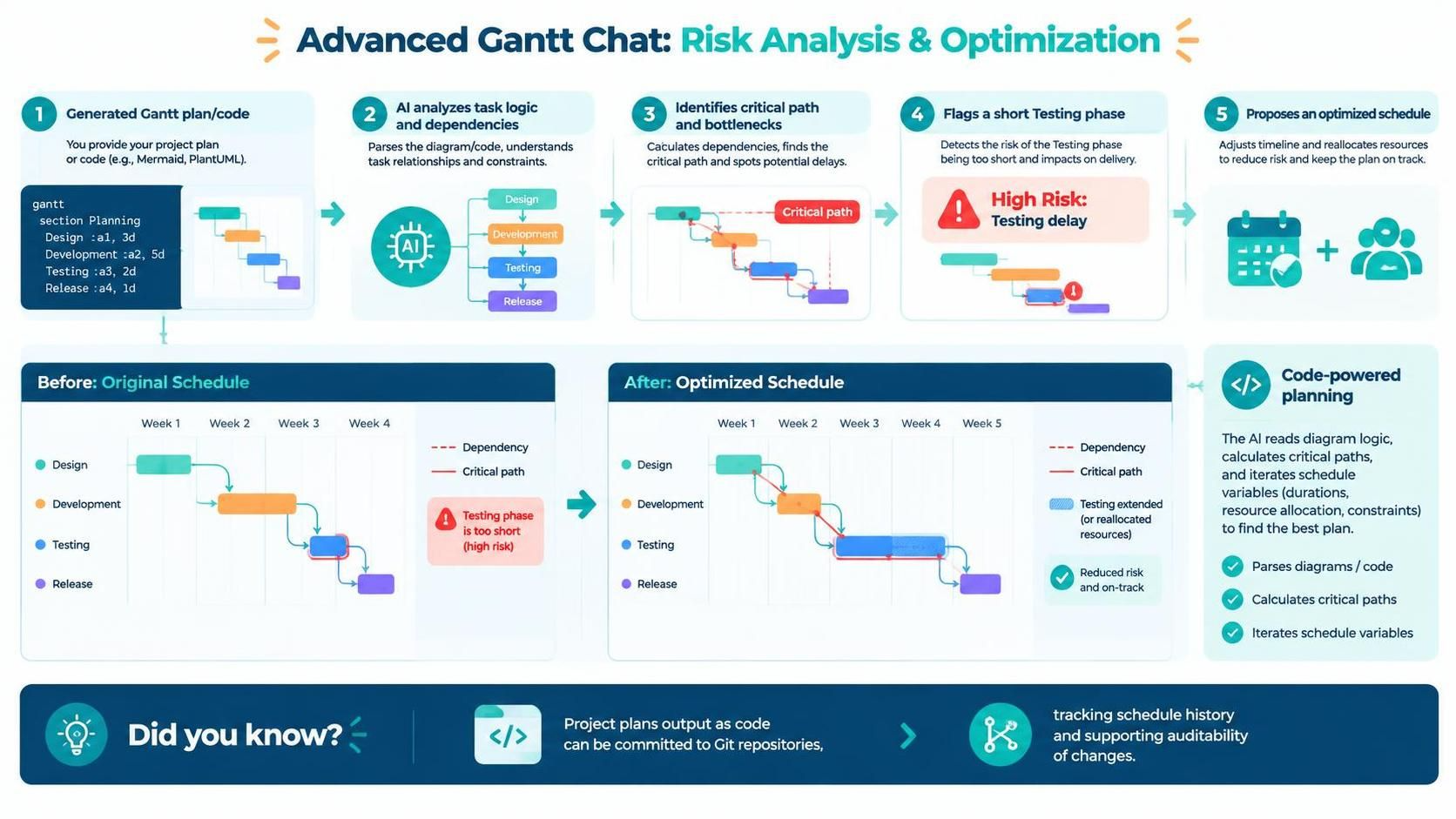
In the realm of modern project management, static diagrams are no longer sufficient. The evolution of tools like Visual Paradigm’s VPasCode represents a paradigm shift from “drawing” charts to “programming” project logic. This tutorial explores the advanced capabilities of Gantt Chat, an AI-powered feature that transforms simple project code into intelligent, optimized schedules.
1. The Core Philosophy: Diagrams as Code
Traditional Gantt charts are often created by dragging and dropping shapes, making them rigid and difficult to audit. VPasCode changes this by treating your project plan as executable code. Whether using Mermaid or PlantUML syntax, the project plan becomes a version-controlled asset. This approach allows the AI to read, understand, and manipulate the schedule logic just as it would software source code.
2. The Workflow: From Static Plan to Optimized Schedule
The Gantt Chat system operates through a sophisticated, five-step iterative process. Unlike a simple chatbot that merely summarizes text, the AI acts as an intelligent analyst that simulates the project lifecycle.
Step 1: Input and Generation
The process begins when a user provides a project plan in code format. This text is parsed by the system to generate a visual Gantt chart. The code defines the structure of the project, including task names, durations, and sections.
gantt
  section Planning
    Design      :a1, 3d
    Development :a2, 5d
    Testing     :a3, 2d
    Release     :a4, 1d
Step 2: Logic Analysis
Once the diagram is generated, the AI parses the diagrammatic code to understand the underlying task relationships and constraints. It maps out the hierarchy and dependencies, creating a mental model of the project flow.
Step 3: Critical Path Calculation
The system calculates the Critical Path—the sequence of stages that determines the minimum time needed for the project to complete. By identifying these bottlenecks, the AI can determine which delays will directly impact the final delivery date.
Step 4: Risk Flagging
Here is where the AI acts as an analyst. It simulates the schedule to identify potential risks. For instance, if a “Testing” phase is logically too short relative to the preceding “Development” phase, the AI flags this as a High Risk area, predicting potential delays.
Step 5: Optimization Proposal
Finally, the AI proposes an Optimized Schedule. It iterates on variables such as duration and resource allocation to find a solution that mitigates the identified risks while maintaining project integrity. It might suggest extending the testing phase or reallocating resources to ensure the project stays on track.
3. Code-Powered Planning Benefits
The power of this system lies in its ability to iterate. By treating the schedule as code, the tool can:
- Parse Diagrams/Code: Understand complex dependencies instantly.
- Calculate Critical Paths: Use algorithmic logic to find bottlenecks.
- Iterate Schedule Variables: Automatically adjust durations and constraints to find the best plan.
4. Integration and Auditability
One of the most significant advantages of this “Diagram as Code” approach is its integration with standard software development workflows. Because the output is text-based code, project plans can be committed to Git repositories.
This enables teams to track changes to the schedule history just as they would track changes to source code. It ensures full auditability of project evolution, allowing stakeholders to see exactly when a timeline was altered and why.
Conclusion
By leveraging the VPasCode Tool and AI capabilities, Visual Paradigm moves beyond simple creation. It offers a robust environment where project plans are not just visual representations, but intelligent, analyzable, and optimized systems. This approach bridges the gap between project management and software engineering, providing a high level of precision and control.
 vpadmin
- November 23, 2026
