


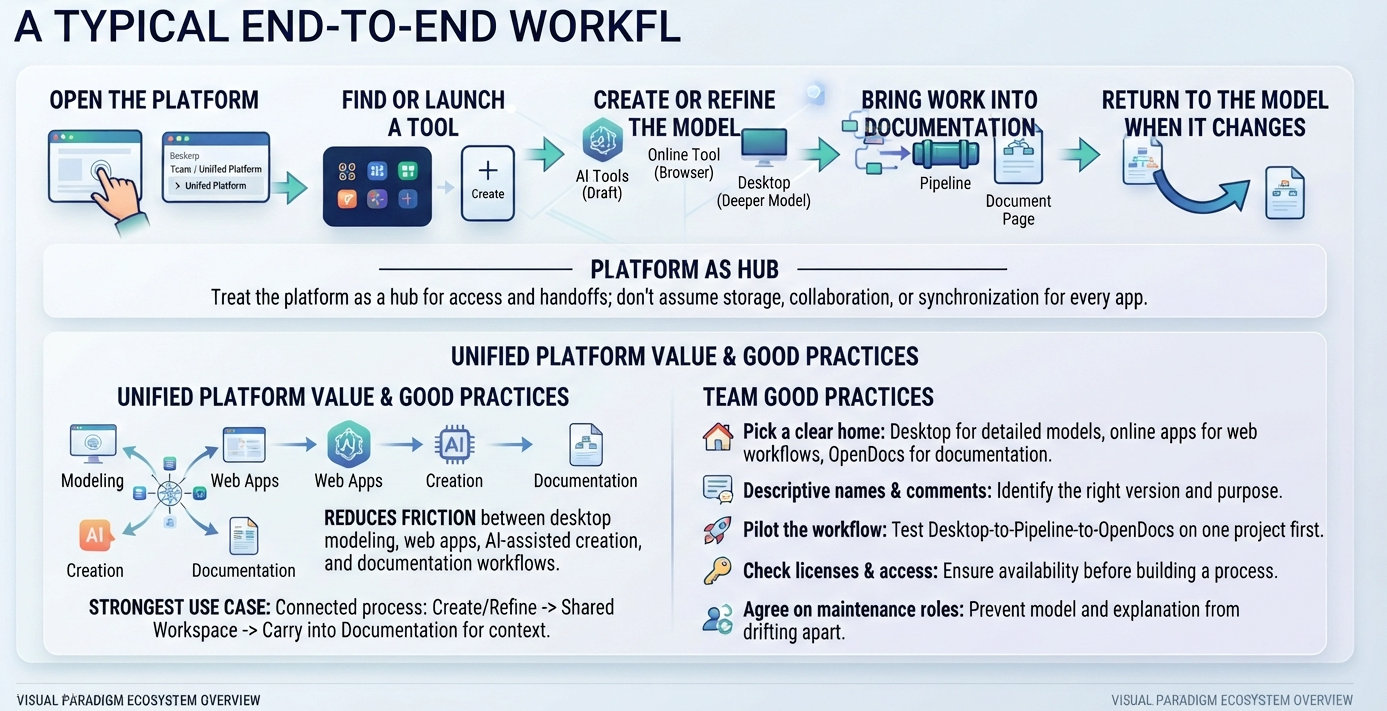
In the modern landscape of software engineering and system architecture, the gap between high-level design and executable reality often leads to confusion. Visual Paradigm has addressed this through its Unified Platform and its integrated AI Ecosystem. This tutorial walks you through the system architecture of the “Typical End-to-End Workflow,” explaining how to leverage the platform as a central hub to reduce friction between modeling, creation, and documentation.
1. The Architecture of a Connected Process
The core philosophy of the Visual Paradigm Unified Platform is to treat the software not just as a drawing tool, but as an orchestrator of a connected lifecycle. As illustrated in the workflow diagram, the architecture follows a linear yet cyclical path designed to keep data consistent across different environments.
The process begins with Access and ends with Synchronization. The platform acts as the “Hub” that connects three distinct layers of work:
- Desktop Modeling: For detailed, deep-dive engineering work.
- Web Apps: For collaborative workflows and high-level design.
- AI Creation: For rapid prototyping and assisted generation.
By unifying these layers, the platform ensures that a model created in the browser can be refined in the desktop environment and then instantly carried into a documentation pipeline, without requiring manual re-entry of data.
2. Step-by-Step Workflow Implementation
To effectively utilize this ecosystem, follow these operational steps:
Step 1: Open the Platform & Launch the Tool
The journey starts at the Beskerp Team / Unified Platform interface. Instead of opening a standalone executable, you initiate the process from the cloud. From here, you can find or launch specific tools. You might choose an AI Tool for an initial draft or open a Web App for collaborative brainstorming.
Step 2: Create or Refine the Model
This is the “creation” phase. The workflow supports a hybrid approach:
- Drafting: Use AI Tools or Online Tools (Browser) to generate initial concepts or wireframes quickly.
- Refining: Move the draft to the Desktop application. The Desktop environment is designed for “Deeper Modeling,” allowing for granular control over system architecture, database schemas, and complex logic.
Step 3: Bring Work into Documentation
Once the model is refined, the next challenge is communication. The platform utilizes a Pipeline mechanism to push model data into a Document Page (OpenDocs). This step is crucial for “Explanatory Documentation.” It ensures that the visual diagram is accompanied by the necessary context, requirements, or analysis needed for stakeholders.
Step 4: Return to the Model When It Changes
The workflow is circular, not linear. When a model changes—perhaps a new requirement is added or a bug is fixed in the design—the change should flow back into the documentation. The platform’s value lies in this synchronization. You do not manually update the document; the system carries the updated model into the documentation automatically, ensuring that “the model and its explanation don’t drift apart.”
3. Team Good Practices for Adoption
To maximize the efficiency of this architecture, teams should adopt specific “Good Practices” that govern how artifacts are managed.
Artifact Management & Naming
Clarity is key. The platform recommends picking a clear “home” for every artifact:
- Desktop: Use for detailed models where precision is required.
- Online Apps: Use for web-based workflows and collaboration.
- OpenDocs: Use specifically for explanatory documentation.
Furthermore, always use descriptive artifact names and comments. In a shared workspace, a file named “Projectv2Final” is a risk. A file named “PaymentGatewayAPIDraft_v2″ ensures teammates can identify the right version and purpose immediately.
Process Validation
Before rolling out the Desktop-to-Pipeline-to-OpenDocs workflow to the entire organization, it is best practice to pilot the workflow on a single project. This allows the team to identify bottlenecks in the pipeline or issues with license management before they become systemic problems.
Role Definition
A common failure point in model-driven development is the “drift” between the diagram and the text. To prevent this, teams must agree on who maintains diagrams and who updates linked documentation. By assigning clear ownership, you ensure that the model and its explanation remain in sync.
Conclusion
The strongest use case for the Visual Paradigm Unified Platform is a connected process. It is not merely about drawing diagrams; it is about creating a pipeline where you can create or refine a model, make it available in a shared workspace, and carry it seamlessly into documentation. By reducing the friction between visual modeling, web apps, AI-assisted creation, and documentation, teams can focus on solving problems rather than managing file versions.
 vpadmin
- November 18, 2026
