


Modern business analysis demands speed and precision. The traditional method of drawing complex BPMN (Business Process Model and Notation) diagrams manually—dragging and dropping shapes, connecting flow lines, and ensuring strict adherence to syntax rules—can be a bottleneck for analysts and architects. Visual Paradigm’s AI Ecosystem revolutionizes this workflow by leveraging Natural Language Processing (NLP) to transform text-based narratives directly into structured, executable process models.
This tutorial explores the system architecture behind the AI Diagram Generation tool within Visual Paradigm. We will deconstruct how the system interprets user intent, maps linguistic structures to BPMN primitives, and integrates these generated assets into a broader enterprise modeling ecosystem.
1. The System Architecture: From Text to Graph
The core of the AI BPMN Generator functions as a semantic translation engine. When a user inputs a topic or narrative, the system does not merely “guess” the layout. Instead, it performs a multi-step analysis:
- Intent Recognition: The system identifies the domain (e.g., “Online Retail,” “HR Onboarding”) to load appropriate domain-specific patterns.
- Syntactic Parsing: It breaks down the input sentence structure. It looks for subjects (Actors/Participants), verbs (Tasks), and conjunctions (Gateways/Sequence Flows).
- Entity Extraction: Key terms are mapped to BPMN artifacts. For instance, “Sales Department” triggers a Pool or Lane creation, while “Review Inventory” triggers a Task node.
- Graph Construction: Finally, the nodes and edges are instantiated in the Visual Paradigm diagram editor, adhering to the underlying BPMN 2.0 specification standards.
2. Configuration and Settings Analysis
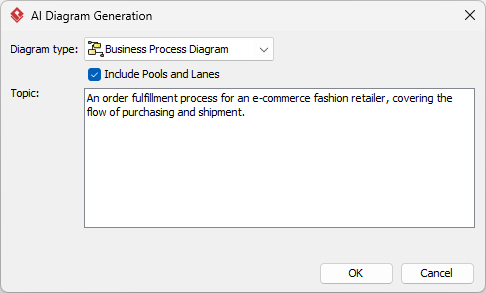
Before the generation engine is triggered, the user must configure the AI Diagram Generation dialog. These settings define the “schema” of the resulting diagram.
Diagram Type Selection
In the screenshot provided, the Business Process Diagram is selected. This is the standard BPMN 2.0 container. While other diagram types exist (like Sequence Diagrams or Class Diagrams), the BPMN type is specifically optimized for flow control, event triggers, and state transitions.
The Role of “Pools and Lanes”
The checkbox labeled Include Pools and Lanes is critical for context.
- Unchecked: The AI generates a “Swimlane-less” flow. All tasks appear in a single vertical stack. This is useful for high-level functional flows where departmental ownership is irrelevant.
- Checked: The AI attempts to detect organizational boundaries in the text. If the text mentions “Sales Department” and “Warehouse,” the AI will automatically create distinct Lanes within a Pool. This creates an Organizational View, clarifying which actor is responsible for which step.
3. Inputting the Narrative: Prompt Engineering for Modeling
The effectiveness of the AI depends heavily on the quality of the input prompt. The system expects a chronological narrative rather than a bulleted list of requirements. The logic follows a “Subject-Verb-Object” pattern.
Example Scenario: Order Fulfillment
Consider the following input provided in the tool’s interface:
“An order fulfillment process for an e-commerce fashion retailer, covering the flow of purchasing and shipment.”
This prompt is concise but abstract. To generate a detailed graph, the system often requires more granular steps, such as:
- The Customer places an online order.
- The Sales Department reviews inventory.
- Decision Point: Is the item in stock?
- If Yes: Warehouse packs, Shipping delivers.
- If No: Order is cancelled.
The AI uses these logical connectors (If/Else, And, Or) to automatically generate Exclusive Gateways (diamonds with an X) and Sequence Flows.
4. Refinement and Post-Processing
Generation is just the beginning. The resulting diagram is a “living model” within the Visual Paradigm ecosystem. The interface allows for two primary modes of refinement:
Manual Editing
Users can drag and drop elements to correct the layout or change the visual hierarchy. The AI provides the skeleton; the human provides the polish.
Conversational Refinement (AI Chatbot)
One of the most powerful features is the ability to edit the diagram via natural language commands. Instead of manually adding a diamond shape, a user can type into the AI Chatbot: “Add a parallel gateway here to allow packing and labeling to happen simultaneously.” The system parses this instruction, locates the relevant node in the graph, and inserts the correct BPMN constructs.
5. Advanced Capabilities: Beyond Static Diagrams
Visual Paradigm distinguishes itself by treating diagrams as data, not just graphics. Once the AI generates the model, the ecosystem unlocks several enterprise-grade capabilities:
- As-Is vs. To-Be Analysis: Users can duplicate the generated model to create a “To-Be” scenario. The system can maintain traceability links between the baseline process and the optimized future state, allowing for impact analysis.
- Process Simulation: The diagram can be run as a simulation. The AI-generated model contains the logic necessary to simulate data flow, allowing architects to identify bottlenecks (e.g., “The Warehouse lane is overloaded”) before implementing changes in the real world.
- Code & Data Generation: The model can be converted into executable artifacts. For example, the process flow can be used to generate database schemas or code skeletons for workflow engines.
Conclusion
The integration of AI into Visual Paradigm represents a shift from drawing diagrams to specifying processes. By abstracting the visual complexity away from the initial drafting phase, analysts can focus on the logic and strategy of the business process. The “AI Diagram Generation” tool serves as a bridge, translating human language into the rigorous, standardized language of BPMN, ensuring that models are not only accurate but also ready for simulation and governance.
 vpadmin
- November 18, 2026
