


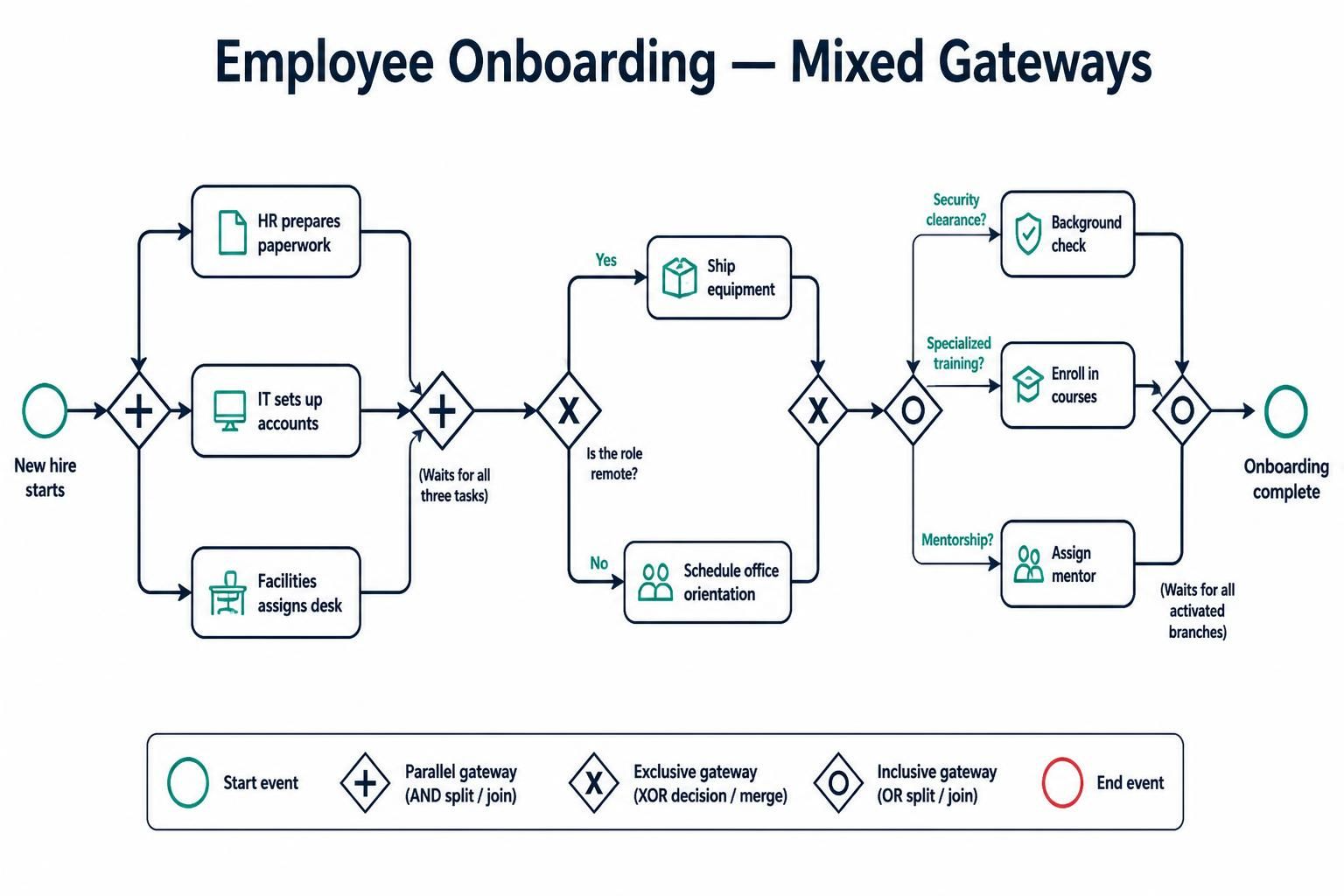
In Business Process Model and Notation (BPMN), the power of a diagram lies not just in drawing boxes and arrows, but in correctly defining the logic of control flow. One of the most common sources of confusion for process modelers is the choice between Parallel, Exclusive, and Inclusive gateways. When these are combined within a single process, as seen in the Employee Onboarding scenario, the resulting architecture becomes a robust representation of real-world complexity.
This tutorial dissects the “Mixed Gateways” model, guiding you through the decision-making logic required to construct such a diagram using tools like Visual Paradigm.
The Decision Framework: Choosing the Right Gateway
Before modeling begins, you must determine the behavior of the gateway. Use the following decision tree to select the correct symbol:
- Step 1: Are conditions involved?
If the process simply continues without a decision or condition check, the path is a Parallel Gateway (AND split). If all paths must execute simultaneously, use the diamond with a plus sign (+).
- Step 2: Can multiple conditions be true simultaneously?
If the options are mutually exclusive (e.g., a choice between A or B, but never both), use an Exclusive Gateway (XOR). If multiple paths can be triggered at the same time (e.g., a user has both privilege A and privilege B), use an Inclusive Gateway (OR).
- Step 3: Synchronization for Converging Gateways
When paths merge back together, the behavior changes:
- Exclusive Converging: No synchronization is needed. The process continues as soon as any path arrives.
- Parallel Converging: The process must wait for all incoming paths to arrive before proceeding.
- Inclusive Converging: The process must wait for all activated paths to arrive.
Architectural Walkthrough: The Employee Onboarding Process
The diagram provided illustrates a sophisticated workflow where three different types of gateways interact. Let’s trace the flow from start to finish.
Phase 1: The Parallel Split (The “AND” Logic)
At the start of the process, the event “New hire starts” triggers a split into three distinct departments: HR, IT, and Facilities. This is modeled using a Parallel Gateway (represented by the diamond with a +).
- HR prepares paperwork.
- IT sets up accounts.
- Facilities assigns a desk.
Crucially, note the convergence point immediately following these tasks. The diagram shows a parallel gateway merging these three flows. This signifies that the process waits for all three tasks to complete before moving to the next phase. If IT is delayed, the process cannot proceed, even if HR and Facilities are finished.
Phase 2: The Exclusive Split (The “XOR” Logic)
Once the initial setup is synchronized, the process encounters an Exclusive Gateway (diamond with an X). The decision point is: “Is the role remote?”
Because a role cannot be both remote and non-remote simultaneously, this is a mutually exclusive decision:
- Yes: The process follows the path to “Ship equipment.”
- No: The process follows the path to “Schedule office orientation.”
These two paths converge again at an Exclusive Gateway. Because this is an XOR merge, the system does not wait for both paths. It simply continues once the active path (either shipping or orientation) is complete.
Phase 3: The Inclusive Split (The “OR” Logic)
The final section introduces the most complex logic: the Inclusive Gateway (diamond with an O). This gateway asks three distinct questions regarding the employee’s specific needs:
- Does the employee need Security clearance?
- Does the employee need Specialized training?
- Does the employee need Mentorship?
Unlike the Exclusive gateway, it is entirely possible for a new hire to require all three of these, or perhaps just one. This is an Inclusive Split, allowing multiple parallel branches to activate based on the conditions.
Phase 4: The Inclusive Converge
The diagram concludes with an Inclusive Converging Gateway. This is a critical architectural detail. The process will wait until all activated branches are complete.
- If only “Security clearance” was activated, the process waits only for that task.
- If all three were activated, the process waits for the Background Check, the Course Enrollment, and the Mentor Assignment to finish before marking the process as “Onboarding complete.”
Implementation Best Practices in Visual Paradigm
When implementing this model in Visual Paradigm, ensuring clarity is as important as accuracy. Follow these tips to maintain a high-quality diagram:
- Use Swimlanes: As suggested in the context, use swimlanes to visually separate the responsibilities of HR, IT, and Facilities. This helps stakeholders immediately understand who owns which part of the flow.
- Label Gateways: Don’t rely solely on the symbol. Add a text label like “Remote Work Decision” near the Exclusive Gateway to clarify the context.
- Annotation: For the Inclusive Gateway, add an annotation explaining the condition logic (e.g., “Any combination of the following may be true”) to prevent ambiguity.
 vpadmin
- November 4, 2026
