


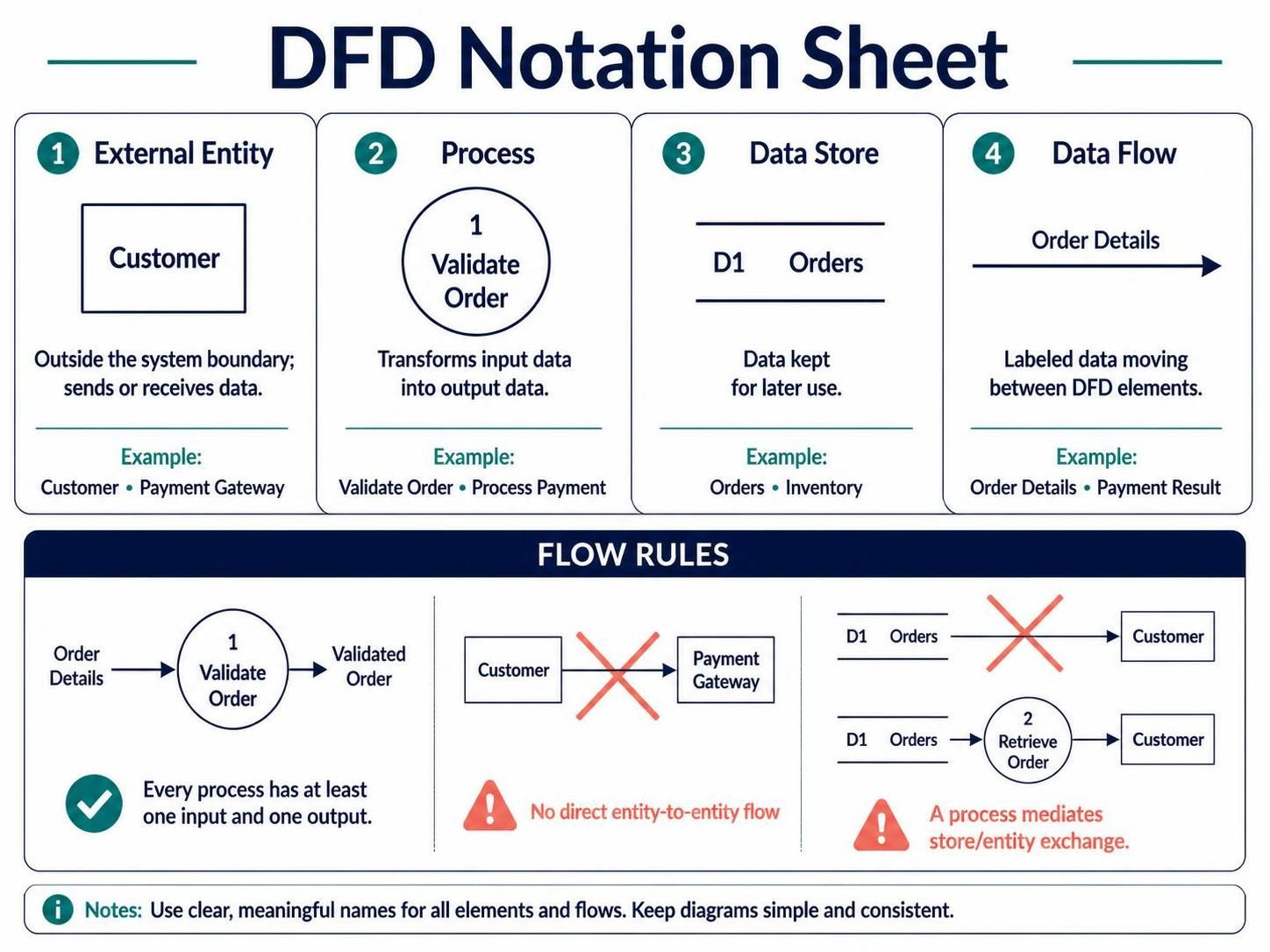
Understanding how data moves through a complex system is the first step toward building robust software architecture. Data Flow Diagrams (DFDs) are one of the most powerful tools in a systems analyst’s arsenal, offering a visual representation of the flow of information, processes, and storage requirements without getting bogged down in implementation details.
Using modeling tools like Visual Paradigm with AI assistance, you can rapidly construct these diagrams to validate business logic before writing a single line of code. Let’s break down the four fundamental pillars of DFD notation and the critical rules that govern how data interacts within your system.
The Four Core Elements of DFD Notation
A standard DFD relies on four distinct shapes, each representing a specific function within the system’s ecosystem. Mastering these elements allows you to create a clear map of your application’s data journey.
1. External Entity (The Source and Destination)
An External Entity represents a person, organization, or system that exists outside the boundary of the system you are modeling. These are the actors that initiate data entry or receive final results.
- Visual Representation: Typically depicted as a rectangle.
- Role: They send data into the system (Input) or receive data from the system (Output).
- Examples: Customer, Payment Gateway, Warehouse Manager.
2. Process (The Transformer)
A Process is a function that transforms input data into output data. It represents the “work” being done by the system. Crucially, a process changes the data in some way; it does not just pass it through unchanged.
- Visual Representation: A circle or rounded rectangle, often numbered (e.g., 1.0) to indicate hierarchy.
- Role: It consumes input data and produces meaningful output data.
- Examples: Validate Order, Calculate Tax, Process Payment.
3. Data Store (The Memory)
A Data Store represents a repository where data is held for later use. This could be a database table, a flat file, or a queue. It is distinct from a process because it is passive; it does not change data, it simply holds it.
- Visual Representation: Two parallel horizontal lines with an open rectangle on the side (or a similar open-ended box).
- Role: Data flows into a store to be saved, and flows out when retrieved.
- Examples: Orders, Inventory List, User Accounts.
4. Data Flow (The Arteries)
Data Flow represents the movement of data between entities, processes, and stores. These are the lines that connect your diagram’s elements.
- Visual Representation: An arrow labeled with the name of the data being moved.
- Role: It indicates direction and content.
- Examples: Order Details, Payment Result, Stock Update.
Strict Flow Rules for Valid Diagrams
While diagrams can be creative, DFDs must adhere to strict logical rules to remain valid. Breaking these rules results in “leaky” models that confuse developers and stakeholders.
Rule 1: Every Process Must Transform Data
A process cannot simply pass data through without changing it. Every valid process must have at least one input and one output. If data enters a process and exits unchanged, it is not a process—it is a data flow.
Rule 2: No Direct Entity-to-Entity Communication
Data cannot flow directly from one External Entity to another. The system (your processes) must mediate the interaction.
Incorrect: Customer → Payment Gateway
Correct: Customer → Process Payment → Payment Gateway
Rule 3: No Direct Data Store/Entity Exchange
External entities cannot read from or write directly to a Data Store. All data persistence must be handled by a specific process within the system.
Incorrect: Customer → Orders (Store)
Correct: Customer → Validate Order → Orders (Store)
Best Practices for System Modeling
When building your DFD, keep the following principles in mind to ensure your diagram remains a clear communication tool:
- Meaningful Naming: Avoid generic names like “Data 1” or “Process A”. Use clear nouns for data flows (e.g., Customer Invoice) and verbs for processes (e.g., Generate Invoice).
- Consistency: Ensure that the data leaving a process is logically consistent with the data entering it.
- Focus on Logic: DFDs are about what the system does, not how it is coded. Avoid UI elements or technical database constraints unless they impact data logic.
 vpadmin
- November 5, 2026
