


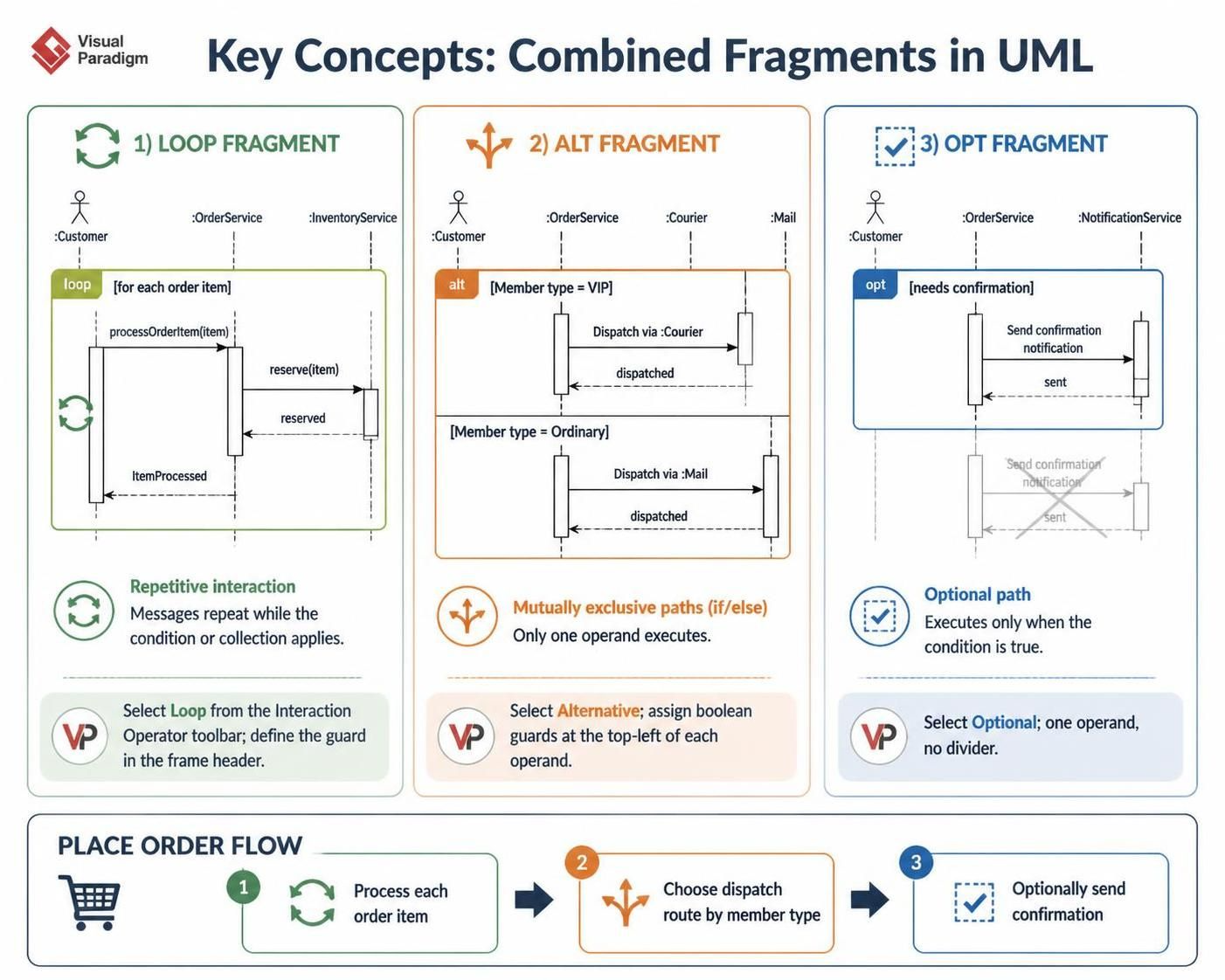
In the realm of software engineering, static diagrams often fail to capture the dynamic reality of business logic. Real-world systems rarely follow a single, linear path; they branch based on user roles, loop through data sets, and trigger optional events based on specific conditions. The “Place Order Scenario” diagram provided serves as a perfect case study for modeling this complexity.
This guide explores how to translate complex business rules—such as VIP versus Ordinary member handling—into clear, standardized UML Sequence Diagrams. We will focus specifically on leveraging Visual Paradigm, a leading modeling tool, to construct these interactions using Combined Fragments. By mastering loop, alt, and opt fragments, developers and analysts can create documentation that bridges the gap between abstract requirements and concrete implementation logic.
Key Concepts: Combined Fragments in UML
To accurately model the “Place Order” scenario, one must understand the three specific interaction operators used in the diagram. In Visual Paradigm, these are referred to as Combined Fragments.
1. The Loop Fragment (loop)
Definition: Represents a repetitive interaction. The messages inside this frame occur multiple times based on a specific condition or collection.
In Context: The order contains multiple line items. The system must process each item individually before moving to the next stage.
Visual Paradigm Tooling: When drawing a message, you can wrap it in a loop fragment by selecting the “Loop” operator from the Interaction Operator toolbar. You must define the guard condition (e.g., [for each order item]) in the header of the fragment.
sequenceDiagram
    participant Customer
    participant OrderService
    participant InventoryService

    loop for each order item
        Customer->>OrderService: processOrderItem(item)
        OrderService->>InventoryService: reserve(item)
        InventoryService-->>OrderService: reserved
    end
    OrderService-->>Customer: ItemProcessed
2. The Alternative Fragment (alt)
Definition: Represents mutually exclusive paths (If/Else logic). Only one operand within the alt frame will execute based on the evaluation of guard conditions.
In Context: The system checks the Member Type.
- If VIP: Dispatch via
:Courier. - If Ordinary: Dispatch via
:Mail.
Visual Paradigm Tooling: Use the “Alternative” operator. Visual Paradigm automatically creates the dividing line between operands. You assign the boolean condition (e.g., [Member type = VIP]) to the top-left corner of each operand section.
sequenceDiagram
    participant Customer
    participant OrderService
    participant Courier
    participant Mail

    alt Member type = VIP
        OrderService->>Courier: Dispatch via :Courier
        Courier-->>OrderService: dispatched
    else Member type = Ordinary
        OrderService->>Mail: Dispatch via :Mail
        Mail-->>OrderService: dispatched
    end
3. The Optional Fragment (opt)
Definition: Represents a path that only executes if a specific condition is true. If the condition is false, the interaction simply skips this section.
In Context: Not every order requires a confirmation notification. This step only happens if [needs confirmation] evaluates to true.
Visual Paradigm Tooling: Select the “Optional” operator. Unlike alt, there is no dividing line; there is only one operand area containing the conditional logic.
sequenceDiagram
    participant Customer
    participant OrderService
    participant NotificationService

    opt needs confirmation
        OrderService->>NotificationService: Send confirmation notification
        NotificationService-->>OrderService: sent
    end
The Place Order Flow
By combining these fragments, we create a robust workflow. The flow begins with the customer initiating an order, which triggers a Loop to process every item in the cart. Once items are processed, the system enters an Alternative fragment to decide the delivery method based on membership status. Finally, an Optional fragment determines if a confirmation message should be sent.
 vpadmin
- October 9, 2026
