


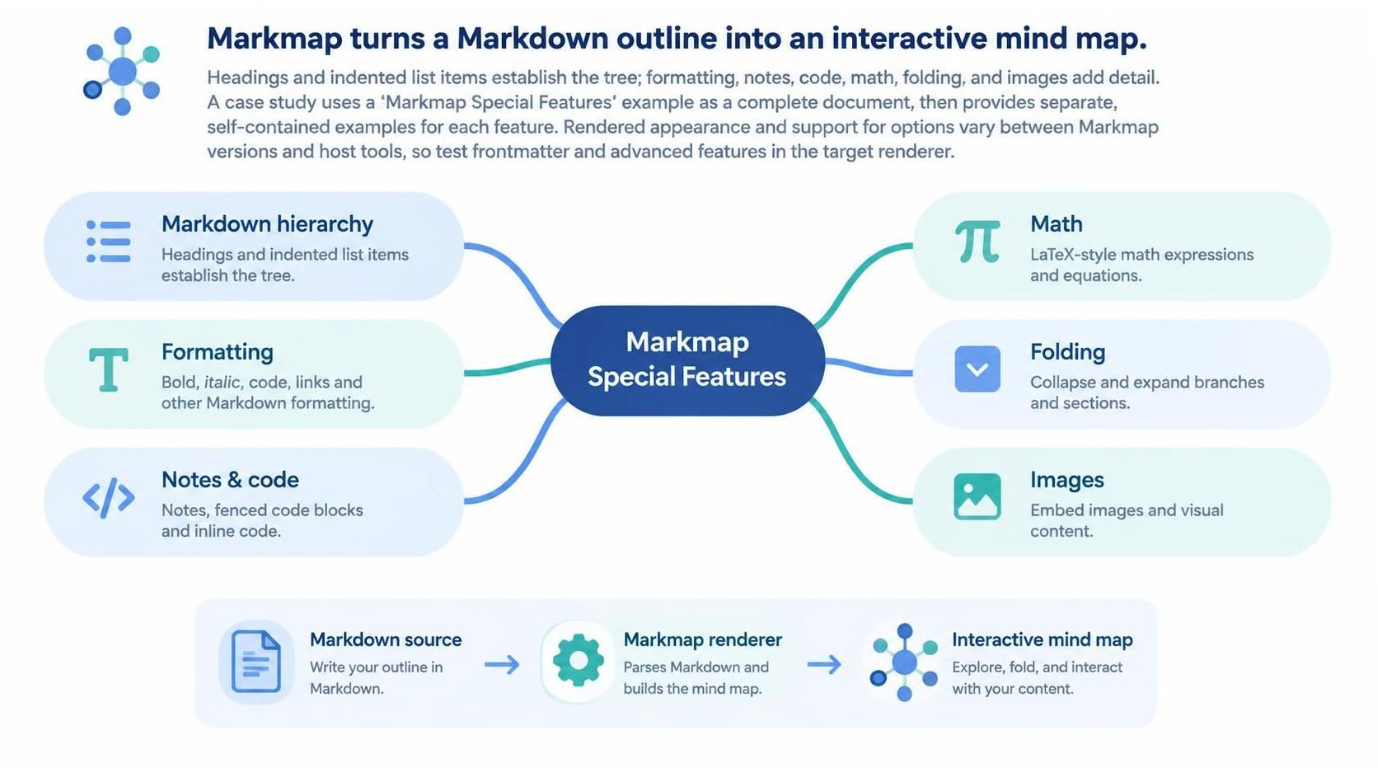
Markmap is a transformative tool that bridges the gap between static text documentation and dynamic visual thinking. By converting a Markdown outline into an interactive mind map, it allows users to visualize complex hierarchies and relationships instantly. The system operates on a robust architecture where a text-based source is parsed by a renderer engine to generate a vector-based, interactive node graph.
Core Architecture: From Text to Visualization
The fundamental workflow of Markmap follows a linear transformation process. It begins with a Markdown source, where the user writes their outline. This source is fed into the Markmap renderer, a parsing engine that interprets the syntax rules to build the tree structure. Finally, the engine outputs an Interactive mind map, which the user can explore, fold, and interact with.
The structural integrity of this map relies on two primary Markdown elements:
- Headings: These define the topology of the map. The root topic is established by the
#heading. Child branches are created using##and###headings. - Indentation: Indented bullet points create nested nodes, allowing for deep hierarchies without relying solely on heading levels.
Furthermore, the system supports “attached” content. Paragraphs, tables, and code blocks placed under a specific branch serve as rich supporting content for that node rather than becoming tree nodes themselves. This separation of structure (the tree) and content (the notes) is a critical design pattern for maintaining clean maps.
Advanced Features and Syntax
Markmap extends beyond simple hierarchy, offering a suite of “Special Features” that enhance the utility of the diagrams. These features leverage the flexibility of Markdown syntax to inject rich media and logic.
Formatting and Text Styling
Just like in standard Markdown documents, you can apply bold, italic, and code formatting within your nodes. This allows for emphasis and inline technical references without breaking the visual flow of the map.
Mathematical Expressions
For technical users, Markmap supports LaTeX-style math expressions. This enables the rendering of complex equations directly within the nodes, making the tool suitable for mathematical documentation or scientific modeling.
Code and Notes Integration
The system recognizes fenced code blocks and inline code. This feature allows developers to embed snippets of code as part of the visual hierarchy, serving as excellent documentation for project structures or algorithmic logic.
Visual Elements
Images can be embedded directly into the map. This is particularly useful for adding visual context, logos, or diagrams to specific nodes, turning the mind map into a comprehensive visual summary.
Collapsible Folders
To manage complexity, the “Folding” feature allows users to collapse and expand branches. This interactivity is essential for large documents, enabling users to focus on specific sections of the tree while hiding the rest.
Configuration via Frontmatter
Advanced configuration is possible using YAML frontmatter. This metadata can be used to configure the rendering engine, control layout options, or influence how the final map is displayed. However, because rendering support can vary between different host tools and versions of Markmap, it is best practice to test these advanced features in a preview environment before finalizing the document.
Conclusion
By mastering the “Markmap Special Features,” users can leverage a powerful, lightweight tool for creating interactive documentation. Whether drafting outlines, visualizing data, or creating technical diagrams, the combination of Markdown syntax and the Markmap renderer offers a flexible and efficient workflow.
 vpadmin
- November 12, 2026
